Onboard motherboard audio has a ceiling, and most gamers hit it the first time they try to stream, record, or simply sound clear in Discord. The best budget audio interface fixes the thin mic signal, the laggy monitoring, and the messy routing in one box, without dragging your setup into studio-gear prices.
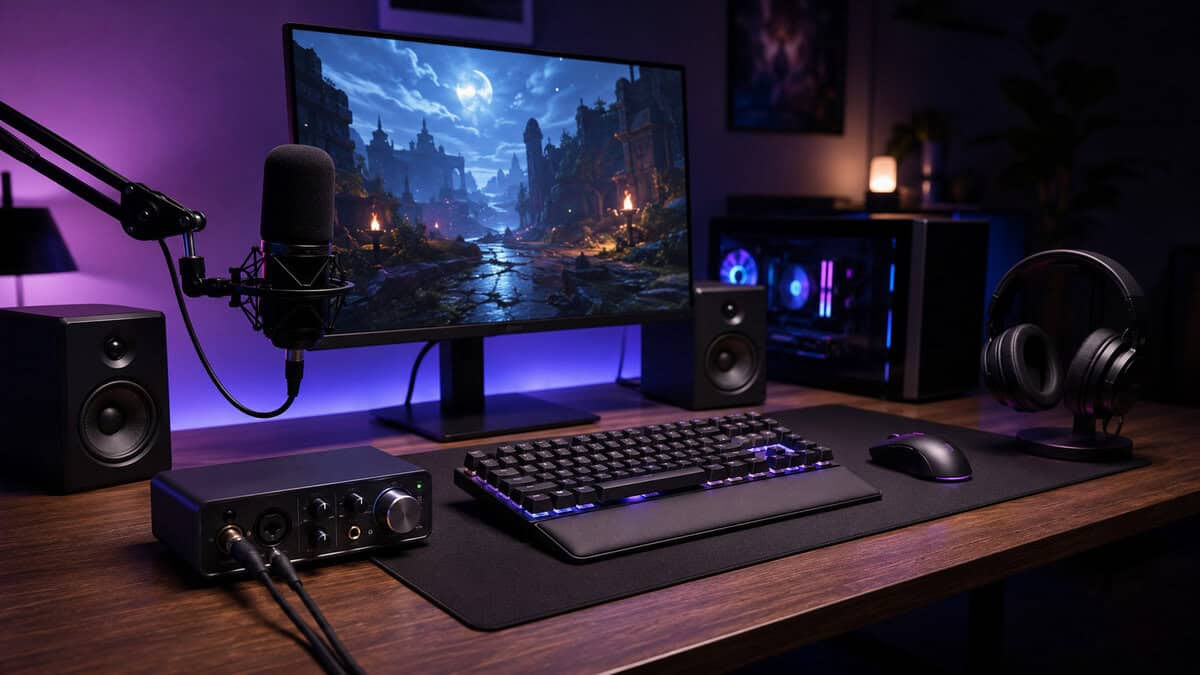
The catch is simple: budget in this category is relative. A real entry-level interface can sit anywhere from the bare minimum to the genuine home-studio sweet spot, and the right choice depends on whether you’re mainly gaming, streaming, or recording voice and content. If you want a clean recommendation instead of spec-sheet noise, you’re in the right place.
The cheapest reliable way to get an XLR mic into your PC, with a huge review base and a first-party Amazon listing. It does the one job a starter interface must do and skips everything else.
- Simplest possible setup on Windows and Mac
- 48V phantom power runs condenser mics
- Direct monitor switch kills echo while you chat
- 24-bit/48kHz ceiling is fine for voice, low for music work
- Plastic shell feels lighter than the metal boxes above it
- No loopback for stream audio routing
The value anchor of the lineup. One genuinely clean preamp, switchable Air mode that flatters voice, and one of the largest review track records in the category make it the safe single-mic call.
- Clean, quiet preamp with generous gain for dynamic mics
- Air mode adds presence to voice on stream
- Proven by one of the biggest review bases in the category
- Single mic path limits duo streams
- No loopback, so routing leans on OBS or software mixers
- A newer 4th Gen exists, though it currently sells through resellers
The step-up that buys workflow, not just sound. Loopback and dual preamps cover streaming and music in one box, replacing a separate mixer for most setups.
- Loopback routes game, chat, and music into the stream cleanly
- Auto Gain and Clip Safe stop ruined recordings
- Two preamps cover a second mic or an instrument
- Costs more than a solo-mic setup strictly needs
- Software-driven workflow takes a session to learn
- Larger desk footprint than the compact entry boxes
- A dedicated interface fixes the three onboard-audio pains at once: thin mic signal, laggy monitoring, and messy routing.
- The M-Audio M-Track Solo is the entry pick. It gets an XLR mic into the PC reliably and skips everything else.
- The Focusrite Scarlett Solo 3rd Gen is the mid-tier value anchor, with a clean preamp and Air mode that flatters voice.
- The Focusrite Scarlett 2i2 4th Gen is the step-up: loopback and dual preamps replace a separate mixer for most streams.
- This category is packed with third-party-fronted listings. Strong models like the MOTU M2 earn a buy only when a first-party listing returns.
Table of Contents
Why a Budget Audio Interface Changes Your Gaming and Streaming Setup
Your motherboard audio can limp along for a while, and a headset jack will always seem “good enough” until you hear what’s missing. The mic sounds thin, your monitoring feels delayed, and when you try to route game audio, chat, and voice separately, the whole setup turns into a compromise. That’s where an interface earns its keep, it converts your mic signal to USB, gives you proper headphone monitoring, and gives you a cleaner place to build the rest of the rig.
What it fixes in real gaming use
If you play FPS games, you need fast, stable monitoring so your own voice doesn’t feel detached from the action. If you spend more time in MMOs or hanging in Discord, the bigger win is routing, because you want chat, game audio, and mic flow to stay separate instead of feeding one messy signal into everything. If you stream, the interface becomes your control point for voice, headphones, and capture, which is why a guide on budget-friendly mics and interfaces is useful when you’re building a voice-first setup from scratch.
The main thing to ignore is marketing fluff around “studio sound” without any talk about monitoring, drivers, or gain. A good interface should feel like a practical desk tool, not a gimmick box. If you’re already using a PC audio mixer for routing, a dedicated interface still matters, but it changes the job from cleanup to actual signal quality, which is exactly what the PC audio mixer guide gets people thinking about.
Practical rule: if your setup has become a tangle of headset cables, random USB dongles, and audio workarounds, the interface is the reset button.
The right frame is simple. You’re not buying a tiny studio because you suddenly want to become a producer. You’re buying a cleaner mic path, better monitoring, and a more reliable way to hear yourself while you game and stream.
The Five Specs That Actually Matter on a Budget Interface
Start with inputs and outputs, not marketing labels
The first question is basic: how many things do you need to plug in at once? If you only use one mic and headphones, a 2-in, 2-out interface is enough. If you want to add another mic later, or you plan to connect extra gear, you need to care about the input count before you care about anything else. That’s why a simple buying guide for budget DACs is not the same thing as an interface guide, digital audio conversion alone doesn’t solve your mic workflow.
Then look at the preamp, because weak gain is a real problem
This is the spec people skip and then regret later. A 2026 guide says professional-grade Equivalent Input Noise (EIN) sits around -128 dBu, while most budget interfaces land between -120 and -129 dBu, and another source notes that many affordable units provide 50 to 60 dB of gain with EIN between -125 dBV and -132 dBV. That range matters because it explains why some budget boxes can handle a dynamic mic cleanly and others push you toward an inline booster. If you’re using a quieter voice or a low-output mic, cleaner gain is the difference between “usable” and “constantly cranked.”
Sample rate, latency, and drivers are the daily-use trio
Modern budget interfaces now commonly deliver 24-bit/192kHz conversion, sub-10ms latency, and stable ASIO drivers, and one 2026 review says those features would have cost several times more five years earlier. That doesn’t mean you need to chase the biggest number on the box. It means the baseline has improved enough that you can buy on workflow instead of panic-buying on hype. On Windows, ASIO is what keeps monitoring from feeling sloppy. On Mac, native driver behavior is usually simpler, but the same rule applies: stable low-latency monitoring beats flashy spec sheets.
Short version: if the interface sounds clean, monitors without lag, and doesn’t fight your OS, the rest is mostly feature preference.
How to Pick the Best Budget Audio Interface by Tier
The entry tier is survival mode, not a sweet spot
If your setup is barebones and the only job is getting a mic into the PC, the M-Audio M-Track Solo fits that emergency lane. It gets the signal in, and that is the main win at this price. For a temporary battle station, that can be enough.
That tier usually gives you basic preamps, limited monitoring control, and almost no help with streaming workflow. Cheap knobs, flimsy ports, and loose hardware show up fast. If you only need casual voice chat, it can do the job. If you want gear that survives constant plugging, unplugging, and desk abuse, this is the tier where corners start cutting back at you.
The mid tier is where most gamers should actually shop
This is the range where budget gear stops feeling like a compromise and starts working for daily use. The Focusrite Scarlett Solo 3rd Gen is the anchor of this tier: one genuinely clean preamp, switchable Air mode for voice, and a track record built on tens of thousands of Amazon ratings. The newer Solo 4th Gen exists, but it currently sells through third-party resellers at a higher price, which keeps the 3rd Gen as the honest value buy. For gaming and streaming, that extra spend usually buys cleaner gain, easier monitoring, and fewer “why does this sound broken today?” moments.
The Focusrite Scarlett 2i2 4th Gen sits at the top of the budget pile here, while the M-Audio M-Track Solo holds down the entry lane. You can compare the full spec sheet on Focusrite’s official Scarlett 2i2 page. That is the right way to read this tier, not as a hard cutoff, but as the jump where build quality, input quality, and monitoring control stop being lottery tickets.
If you are pairing a budget interface with a mic, our guide to the best budget USB microphones can help you find a compatible match.
The step-up tier buys workflow, not just sound
Interfaces start feeling finished at this price point because the annoying stuff gets handled better. Most neutral guides place the practical sweet spot for home studios in this step-up tier, with cheaper units described as basic and pricier gear moving into pro-sumer territory with better converters and build quality. In practice, that extra money usually goes into stronger metering, better monitoring control, and tougher physical construction.
For streaming and content work, that tier is where an interface starts cleaning up routing and control instead of just recording audio. If you want the least stressful buy and care about loopback, chat routing, and low-latency monitoring, this is the lane worth watching.
Matching an Interface to Your Game and Stream
Drop a cheap interface into a gaming rig and the weak points show up fast. FPS players feel it first, because every bit of delay in your own headphones makes callouts, reload timing, and comms feel clumsy. You want your voice in the mix right away, and you want the mic path to stay clean while the match gets loud.
That makes a clean two-input interface with stable drivers and a solid gain stage the smart buy. Skip the giant desk box if you do not need it. Get a unit that holds up under constant use, keeps your voice clear, and does not turn monitoring into a fight.
FPS gaming rewards low-latency monitoring and a clean voice path
Competitive shooters punish lag in the monitoring chain. If your voice comes back late, you start overtalking yourself and lose track of what is happening on screen. Clear sidetone or direct monitoring matters more than flashy extras, because bad monitoring gets old fast.
Keep the setup simple. A compact interface with reliable drivers and clean gain is enough for a gaming desk, especially if you want to hear yourself without delay and avoid the cheap-box hiss that ruins tense comms.
MMO and Discord-heavy setups need routing first
Long MMO sessions, co-op voice, and Discord-heavy nights need routing before anything else. Separate game audio, Discord, and your mic so streaming and recording do not collapse into one muddy mix. A good interface sits at the center of that setup and handles the traffic instead of adding more mess.
Budget guides often focus on inputs and preamps, then skip the part that matters for stream use. Loopback, desktop capture, and chat routing deserve attention, because that is what keeps gameplay, voice, and stream audio under control MusicRadar. For MMO and Discord-heavy setups, a clean mic path is essential, and our guide on how to reduce background noise on a mic can help you get the most from your interface.
Live streaming and content creation benefit from visual control
Streamers should care about controls they can use without thinking. A visible meter, a straightforward monitor mix, and a direct monitor control do more for day-to-day use than a feature you will barely touch. The MOTU M2 gets attention for its built-in metering screen, the SSL 2 is known for its Legacy 4K button, and the Audient iD4 MkII is valued for pro-grade sound in a compact body.
Those differences matter on a crowded desk. A meter shows you input level at a glance. A mix or direct-monitor control keeps zero-latency listening manageable. A compact body fits better when a keyboard, mouse, and capture gear already eat most of the space.
For console gamers and work-from-home dual-use rigs, the same logic holds. Buy the interface that handles mic monitoring and desk routing cleanly, then make sure the chassis feels solid enough to survive being unplugged and moved around.
Why Buying One Tier Above the Cheapest Is Usually Worth It
The cheapest interface is tempting because the price is right in front of you. The problem is that cheap audio gear tends to reveal itself in small annoyances first, then in reliability problems later. A gain knob that feels loose, a USB port that wiggles, or a chassis that flexes too much when you grab the cable doesn’t sound dramatic on day one. It sounds annoying on month six.
That’s why I’d rather spend once on a tougher unit than replace a flimsy one later. Build quality and durability matter here because an interface is desk gear, and desk gear gets bumped, tugged, unplugged, and left on for long stretches. If you’re building around gaming, streaming, and voice chat, the device is part of your daily routine, not a weekend toy.
A better preamp also saves you from overbuying accessories you may not need. When the gain is cleaner and the interface is easier to monitor, you spend less time fighting the hardware and more time using it. That’s the core argument for stepping up one tier, not bragging rights.
If you think you’ll upgrade later, ask the better question, which unit can stay in the setup longest without feeling like a compromise. A mid-tier interface that lasts years is a better buy than a bargain box you resent every time you boot the PC. For value-conscious gamers, that’s the whole point, pay for the thing you’ll still be happy with after the novelty wears off.
Side by Side Comparison of Real Budget Picks
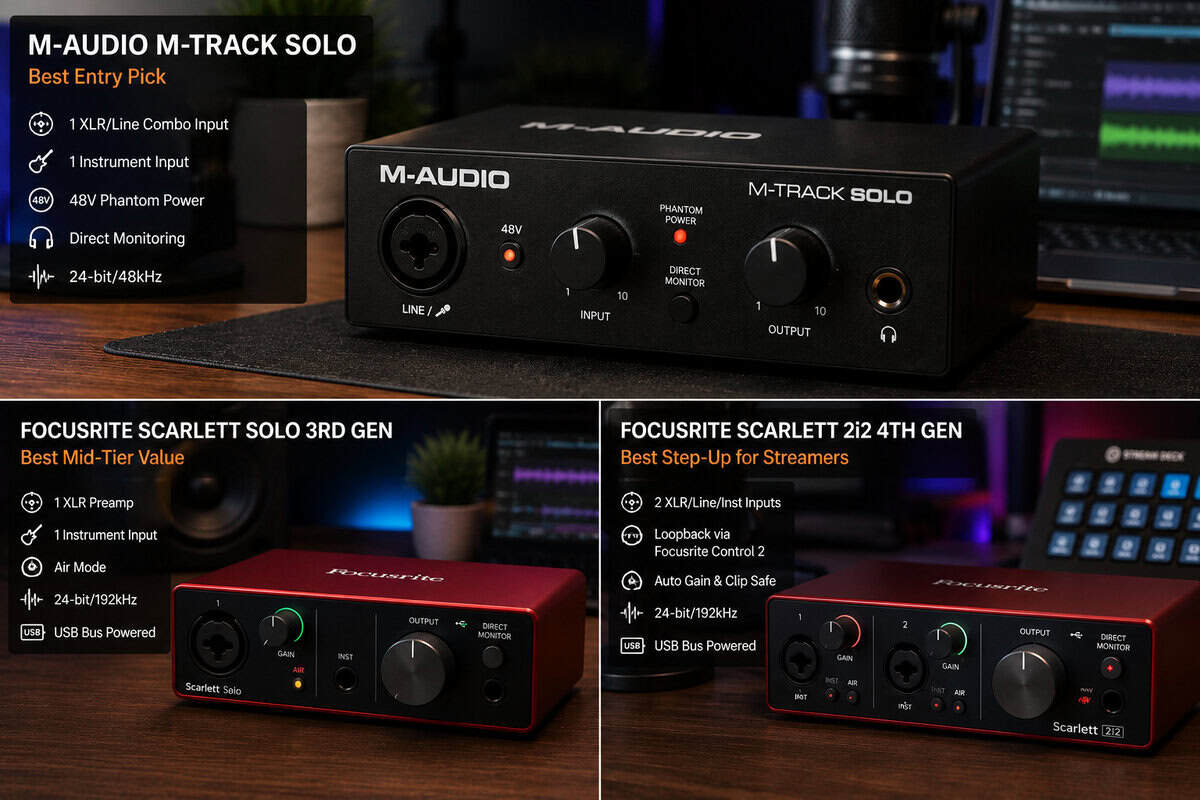
The table sticks to the three interfaces that passed our availability check with clean first-party listings. Specs come from the current product pages, and each model links to the same destination everywhere it appears in this guide.
| Model | Inputs | Max Resolution | Loopback | Best For |
|---|---|---|---|---|
| M-Audio M-Track Solo | 1 XLR/line combo + 1 line/instrument | 24-bit/48kHz | No | Bare-minimum mic-to-PC starter |
| Focusrite Scarlett Solo 3rd Gen | 1 XLR + 1 instrument | 24-bit/192kHz | No | Single-mic streamers who want a clean preamp |
| Focusrite Scarlett 2i2 4th Gen | 2 XLR/line/instrument combos | 24-bit/192kHz | Yes, via Focusrite Control 2 | Streaming plus music with room to grow |
The M-Audio M-Track Solo is the bare-minimum door into real mic audio. It gets an XLR signal into the PC with direct monitoring and nothing exotic, which is exactly what a first interface needs to do. The trade-off is a 48kHz ceiling and a build that feels lighter than the metal boxes above it, both fair compromises at this end of the market.
The Focusrite Scarlett Solo 3rd Gen is the value anchor of the lineup. One clean preamp, switchable Air mode that flatters voice, and one of the largest review track records in the category make it the safe call for a single-mic stream setup. The trade-off is a single mic path and no loopback, so routing-heavy workflows will want the step-up pick.
The Focusrite Scarlett 2i2 4th Gen is the step-up that buys workflow, not just sound. Two preamps, Auto Gain, Clip Safe, and software loopback through Focusrite Control 2 cover streaming and music in one box. The trade-off is simple: it costs more than a solo-mic setup strictly needs, which is why it is the step-up rather than the default.
Strong alternatives such as the MOTU M2, the Audient iD4 MkII, and the newer Scarlett Solo 4th Gen deserve a mention, but at publish time every listing we checked for them was fronted by third-party resellers rather than Amazon or the brand itself. They stay on the watch list instead of the picks.
Setup, Drivers, and Compatibility Without the Headache
Windows users should install the manufacturer’s ASIO driver first, then set the interface as the default playback and recording device in Sound settings. That one step gets skipped all the time, and it’s the fastest way to end up with weird playback issues. If you’re routing game audio and Discord separately, keep the interface as the main device and handle the split inside your streaming software.
Most common mistake: people install the driver, then leave Windows pointed at the old motherboard audio device.
For OBS routing, treat loopback as a workflow feature, not a magic button. If the interface supports it, feed desktop audio back into the capture software as a separate source and keep your mic channel clean. A short setup pass with your streaming app usually solves what would otherwise feel like a messy desk problem, and a guide on OBS settings for streaming is a solid companion when you’re tightening the rest of the chain.
Mac users have it easier, because Core Audio handles most of the basics without the same driver friction. That doesn’t mean every unit is plug-and-play in every situation, but it does mean less setup drama out of the box. If you’re also making clips or ad reads, a tool like ShortGenius AI ad generator can help handle the promo side while you keep the audio chain clean.
For console use, check USB audio compatibility before you buy. Most budget interfaces will work fine in a simple USB audio role, but not every feature travels cleanly across every system. If your goal is to go from unboxing to working monitoring in under half an hour, keep the cabling simple, confirm the interface is the active system device, and test headphones before you start changing levels in panic mode.
Final Recommendations and Pre-Purchase Checklist
If your budget is tight and you just need the cheapest workable box, the M-Audio M-Track Solo is the entry pick. It makes sense when that ceiling is fixed and you are not expecting much headroom. For a cleaner all-round choice in the mid tier, the Focusrite Scarlett Solo 3rd Gen is the safe buy because it balances input quality, easy setup, and long-term confidence without wasting money on features you will not use.
If your setup is built around streaming and live chat routing, the Focusrite Scarlett 2i2 4th Gen should be near the top of your list because its loopback and dual inputs handle game, chat, and mic without a separate mixer. Polished desktop options like the SSL 2 and MOTU M2 sit above this trio, but their listings currently run through third-party resellers, so treat them as watch-list gear rather than buys.
A real streaming rig lives or dies on a few checks before checkout. Mic gain headroom matters if you run a dynamic mic and your voice sits low, because a weak preamp will leave you cranking gain and fighting hiss. Loopback support matters if you route game audio, chat, and alerts into OBS or another streaming app. Driver support matters on Windows, because cheap interfaces often fail at the exact moment you want a clean session. USB cable inclusion matters too, since some boxes arrive with less in the package than you expect, and buying an interface plus a missing cable is a waste of money.
If you only need a headset for chat and you are not trying to improve your mic chain, leave the interface alone for now. If you want better voice quality, cleaner monitoring, and a setup that does not fight you every night, buy once and choose the tier that matches how you actually play. If you are making clips or full stream videos, you will also want to add background music to a video without masking your voice, so plan the audio chain before you start stacking content on top of it.
Frequently Asked Questions
Quick answers to the questions that come up most when picking a first interface.
Do I need an audio interface just for gaming and Discord?
Not for casual voice chat, where a decent USB headset or USB mic is enough. An interface earns its place the moment you move to an XLR microphone, start streaming, or want independent control over game, chat, and mic levels. It replaces a stack of workarounds with one clean signal path.
What is loopback, and do streamers actually need it?
Loopback routes your PC audio, such as game sound or music, back through the interface so it can be mixed into your stream as its own source. It is the cleanest way to balance game audio against your voice. Among our picks only the Scarlett 2i2 4th Gen offers it, which is why it is the step-up choice for routing-heavy streams.
Is 24-bit/48kHz enough, or should I pay for 192kHz?
For voice, streaming, and Discord, 24-bit/48kHz is genuinely enough, and most platforms deliver audio at 48kHz anyway. Higher sample rates mainly matter for music production headroom. Do not reject an entry interface over the number on the box if voice is the whole job.
Can I keep using my USB microphone with an audio interface?
You can run both at once, but juggling two audio devices in Windows and OBS gets messy fast. The cleaner path is treating the interface plus an XLR mic as the replacement for the USB mic. Our guide to the best budget USB microphones covers the other side of that decision.
Why are so many audio interfaces sold by third-party resellers?
Stock in this category cycles constantly, and reseller listings often stay up at higher prices after first-party stock runs out. Buying a first-party listing keeps warranty and returns clean, which is exactly why the three picks in this guide were selected in part on the state of their listings.
Clean audio is one of the cheapest upgrades in a gaming setup once you know which boxes are worth buying. For more budget gaming gear that earns its slot, check out BudgetLoadout.com for the latest reviews and recommendations.
Related Articles