The most common advice about PS5 storage is also the weakest: chase the highest sequential read number and call it a day. That’s how people end up paying for a drive that looks good on a spec sheet, then discovers the problem is fit, cooling, or value. The best SSD for PS5 is the one that clears Sony’s floor, fits the bay, stays cool, and doesn’t waste money on speed you’ll barely notice in actual games.
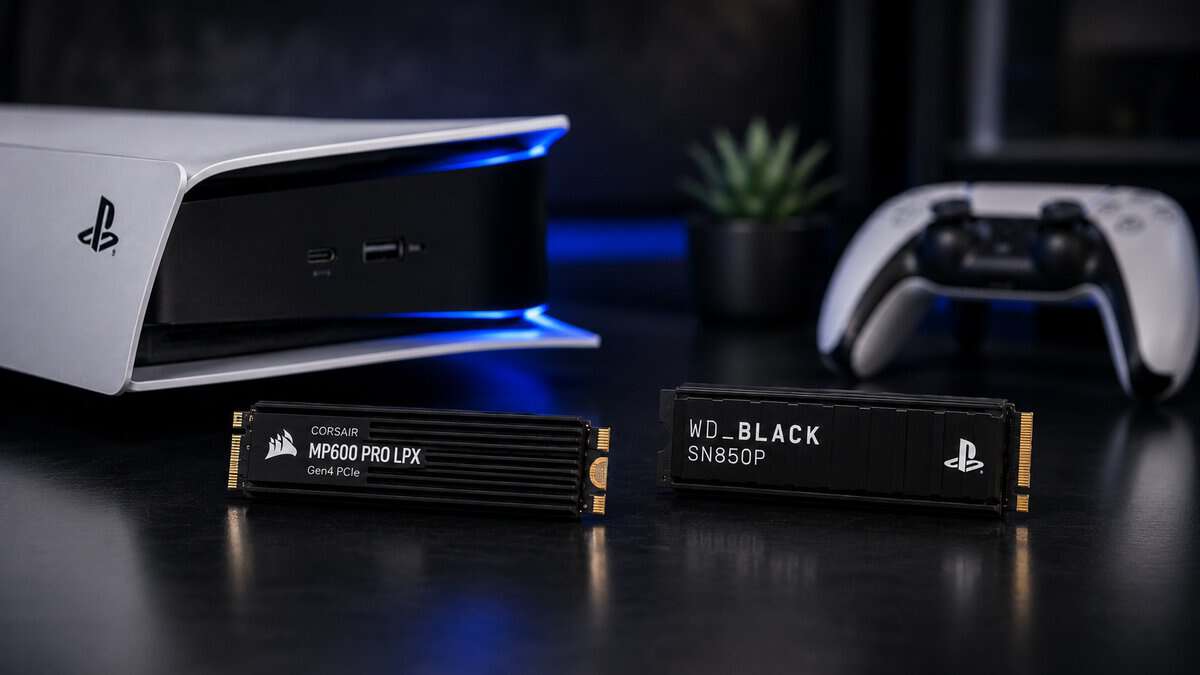
Purpose-built for the PS5 bay, with a low-profile heatsink shaped around the expansion slot. It fits cleanly, runs cool in the closed chassis, and clears Sony’s speed floor with headroom.
- Heatsink profile designed around the PS5 expansion bay
- 7,100 MB/s reads clear Sony’s floor easily
- Huge review base across years of PS5 installs
- Shortage-era pricing sits above the category’s norm
- No 4TB option in the LPX line
- Gen4 only, though the PS5 cannot use faster anyway
The licensed-for-PS5 option with the biggest review base in the category, pairing an integrated heatsink shaped for the bay with 7,300 MB/s rated reads.
- Official PlayStation licensing and guaranteed bay fit
- Slightly faster rated reads than the Corsair
- Massive review base for extra confidence
- Extra rated speed adds little past Sony’s floor
- Shortage pricing above its historical norm
- Larger capacities are not sanely priced right now
The value route into the PS5 slot: a Gen4 drive with its heatsink already included and rated reads well past Sony’s floor. It is not PlayStation-licensed, so Sony does not back the fit.
- Heatsink included, nothing extra to fit
- Fastest rated reads of the three picks
- Rated for 1,000 TBW on the 1TB
- No official PlayStation license
- DRAM-less design leans on Host Memory Buffer
- Listing gives no heatsink height
Picks and availability last verified: October 26, 2026
- Fit, cooling, and Sony’s speed floor decide PS5 SSD value; benchmark bragging rights do not
- The Corsair MP600 Pro LPX is the safest all-around buy, with a low-profile heatsink shaped for the PS5 bay
- The WD_BLACK SN850P adds an official PlayStation license and the biggest review base in the category
- The Lexar NM790 with heatsink is the value pick: the fastest rated reads of the three and a heatsink in the box, but no PlayStation license
- The flash shortage has pushed most PS5 drives well above where they sat a year ago, so buy for fit and value
- Other popular flagship Gen4 drives become buys again once their prices settle back down
Table of Contents
Why Raw Speed Numbers Mislead PS5 SSD Buyers
A bigger number on the box does not automatically translate into a better PS5 experience. Once a drive clears Sony’s 5,500 MB/s sequential read floor, load times for real games tend to bunch up close together, so the gap between compatible drives often looks wider on paper than it feels in the console. In the PS5’s own storage speed test, fast Gen4 drives that meet the spec land within a narrow band of each other, a spread small enough to make raw speed a weak way to separate drives that already qualify.
What changes the experience
The expensive mistake is paying for speed you will not feel. In actual use, the difference between a solid Gen4 drive and a flagship model is usually better thermals, steadier behavior under load, more capacity, and better build quality. That matters most if you keep games installed for months, bounce between multiplayer titles, or leave the console in a warm entertainment center.
Practical rule: if two PS5-compatible drives both clear Sony’s floor, pick the one with the better heatsink, better fit, and better value per terabyte.
Budget-minded buyers should stop chasing the biggest benchmark claim and start asking a better question, which drive is the least annoying to live with? For a broader PC gaming perspective, this best SSD buying guide for gaming is useful, but PS5 storage is stricter because the console cares about slot fit and heat, not just headline speed.
The value case is stronger than the benchmark case
The best PS5 SSD roundups usually gloss over the part that matters. The smartest buy is rarely the absolute fastest drive, it is the one that clears Sony’s requirement, has a heatsink that fits, and does not push you into premium pricing for nearly identical load times. I would rather point a PS5 owner to a well-built 2TB drive with sane thermals than a flashy flagship that spends its advantage on a benchmark chart and nowhere else.
For anyone still sorting out drive types, the hard drive connection formats guide is a clean way to separate SATA, NVMe, and other storage categories without getting buried in marketing language.
PS5 SSD Requirements and Hidden Compatibility Constraints
Sony’s expansion slot is stricter than a lot of buyers expect. The PS5 needs an internal M.2 NVMe SSD on PCIe 4.0 x4, and Sony’s published floor is 5,500 MB/s sequential read. Compatible drives also span 250 GB to 8 TB, so capacity can be part of the decision instead of an afterthought. Older SATA SSDs and PCIe 3.0 drives are the wrong class of hardware for this job, even if the branding sounds close enough to fool a casual buyer.
The part most buyers miss is physical fit
Speed is only half the job. The drive has to fit the slot and stay cool inside the console. Eurogamer’s Digital Foundry notes that the M.2 slot needs PCIe 4.0 x4 NVMe, a heatsink, and a combined drive-plus-heatsink height of 11.25 mm or less. That single dimension kills a lot of cheap “PS5 compatible” claims, because a taller cooler can block the install or make the fit awkward enough that I would not trust it in a closed console.
For a practical refresher on connection types, the hard drive connection formats guide is a clean way to separate SATA, NVMe, and other storage categories without getting lost in marketing language. If you want a broader look at how console storage options are laid out, Sony’s own PlayStation storage solutions page is the right baseline.
Internal expansion is not the same as USB storage
Sony is very clear about this split. PS5 games can be stored on USB drives, but they cannot be played directly from USB and have to be moved back to internal storage or M.2 expansion to launch. That makes internal NVMe the practical choice for anyone who plays PS5 games often, because external storage is only a holding area for PS5 titles.
Simple checklist: PCIe 4.0 x4, NVMe, at least Sony’s read-speed floor, a real heatsink, and a combined height under 11.25 mm. Miss any one of those and the “deal” stops being a deal.
If you are sizing the upgrade around your own library, the PS5 storage expansion guide helps you judge how much capacity makes sense before you pay for space you will not use.
Best SSD for PS5 Picks That Are Actually Buyable
Skip the hype and buy for fit, thermals, and capacity first. Once a drive clears Sony’s compatibility floor, the gap in day-to-day load behavior gets small fast, so the smartest choice is usually the one that fits the console cleanly and stays cool in a closed chassis.
There is a second filter in 2026 that most guides ignore: the flash memory shortage has pushed almost every popular PS5 drive far above where this category sat a year ago. Several big names now cost more than a console storage upgrade should, and once you filter for drives that are still worth the money, the honest field comes down to three.
| Drive | Read Speed | Heatsink | Best For |
|---|---|---|---|
| Corsair MP600 Pro LPX | 7,100 MB/s | Low-profile, PS5-shaped | The safest all-around fit |
| WD_BLACK SN850P | 7,300 MB/s | Integrated, officially licensed | License-backed fit with the biggest review base |
| Lexar NM790 1TB with Heatsink | 7,400 MB/s | Included, not PlayStation-licensed | Value buyers who want the heatsink in the box |
Low-Profile Pick: Corsair MP600 Pro LPX
The Corsair MP600 Pro LPX is the drive this market leaves standing, and it happens to be purpose-built for the job: a low-profile heatsink designed around the PS5 expansion bay, 7,100 MB/s reads that clear Sony’s recommended floor with room to spare, and a long track record across one of the largest review bases in PS5 storage. The 1TB model is the value sweet spot; a 2TB version exists for heavy libraries if the budget stretches.
Licensed Pick: WD_BLACK SN850P
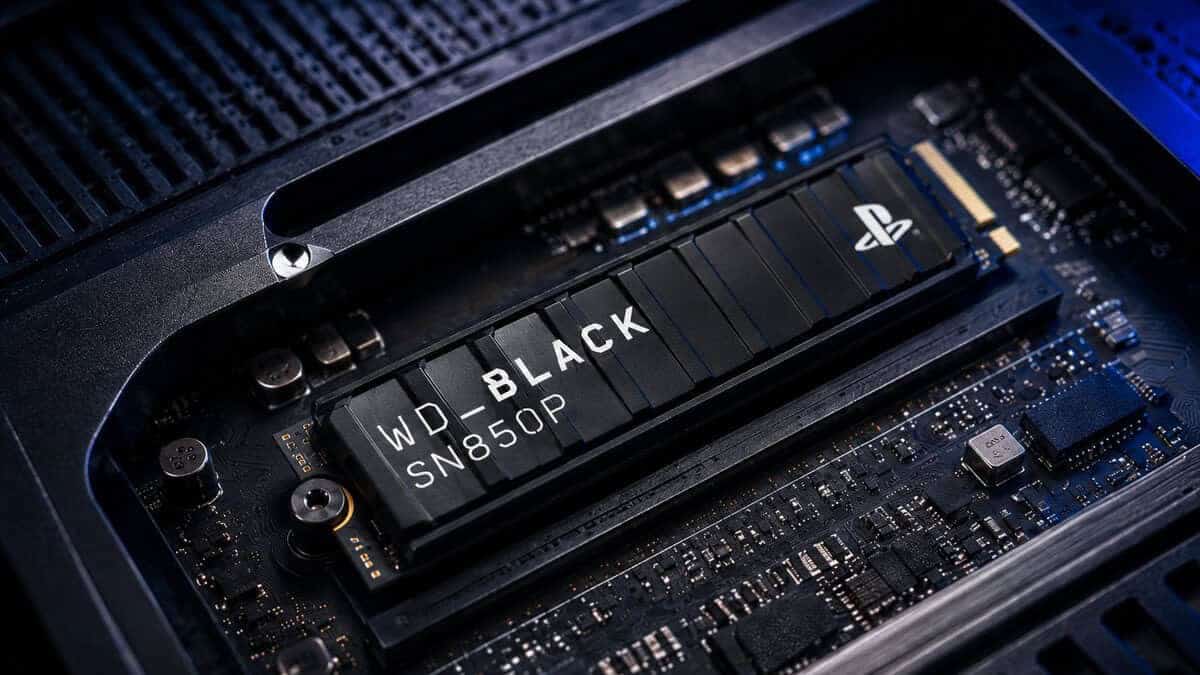
The WD_BLACK SN850P is the only drive on this list carrying an official PlayStation license, with a heatsink shaped for the bay, 7,300 MB/s reads, and a massive review base. The license is the reason to pick it: Sony has signed off on the fit, so there is no guesswork about the drive and heatsink clearing the bay.
Value Pick: Lexar NM790 With Heatsink
The Lexar NM790 with heatsink is the value pick for anyone who wants a drive ready for the bay out of the box. It is a PCIe Gen4 x4 NVMe drive rated at 7,400 MB/s reads and 6,500 MB/s writes, comfortably past Sony’s recommended 5,500 MB/s, and the heatsink comes included, so the cooling structure Sony asks for is already there. Lexar rates the 1TB model for 1,000 TBW of endurance. The trade-off is the license: unlike the WD_BLACK, it carries no official PlayStation branding, and it is a DRAM-less design that leans on Host Memory Buffer 3.0. Lexar’s listing does not give a heatsink height, so confirm the fit against the 11.25 mm limit covered above before you close the bay.
The watch list: several popular flagship Gen4 drives are excellent PS5 options on paper, and none of them currently sits at a sane price. When flash pricing normalizes, this list gets updated the same week.
How Different Game Genres Use PS5 Storage
FPS players, MMO grinders, and people who stream while gaming don’t stress storage in the same way. A competitive shooter cares about consistent access and thermals, because you want repeatable load behavior and no weird slowdown when the console is warm. An MMO player usually benefits more from capacity, because one big install plus updates plus a couple of other always-installed games fills a drive fast.
Open worlds and heavy asset streaming
Open-world games push storage harder because they pull in textures, maps, and background assets constantly. That’s where a competent Gen4 NVMe drive earns its keep, not by shaving off a dramatic amount of time, but by staying steady when the console is under sustained use. A drive with a proper heatsink and clean thermal design makes more sense here than a bargain model with a bulky cooler that barely fits. If GTA 6 is the open world you are making room for, our GTA 6 storage size guide runs the numbers for each console.
A PS5 SSD should be judged like a part of the system, not like a standalone benchmark trophy.
Competitive play and streaming
FPS competitors should lean toward reliability and physical fit over flashiest advertised speed. The console’s benchmark gap is narrow once you’re in compatible territory, so the important question is whether the drive stays cool and consistent after long sessions. Streamers should think the same way, because background capture and extended sessions reward stable storage behavior more than peak numbers.
For a broader perspective on why internal SSDs matter more than old-school drives in gaming setups, the SSD vs HDD for gaming guide is worth a look, but the PS5 situation is simpler. Internal NVMe is the right answer if you want to play from the expanded storage.
The practical takeaway is easy. MMO players should favor capacity, FPS players should favor thermal reliability, and streamers should choose a drive that won’t get fussy during long sessions. That’s why a 2TB mid-range drive often beats a 1TB flagship, especially for people who would rather stop thinking about storage and get back to the game.
Installing Your PS5 SSD Without Mistakes
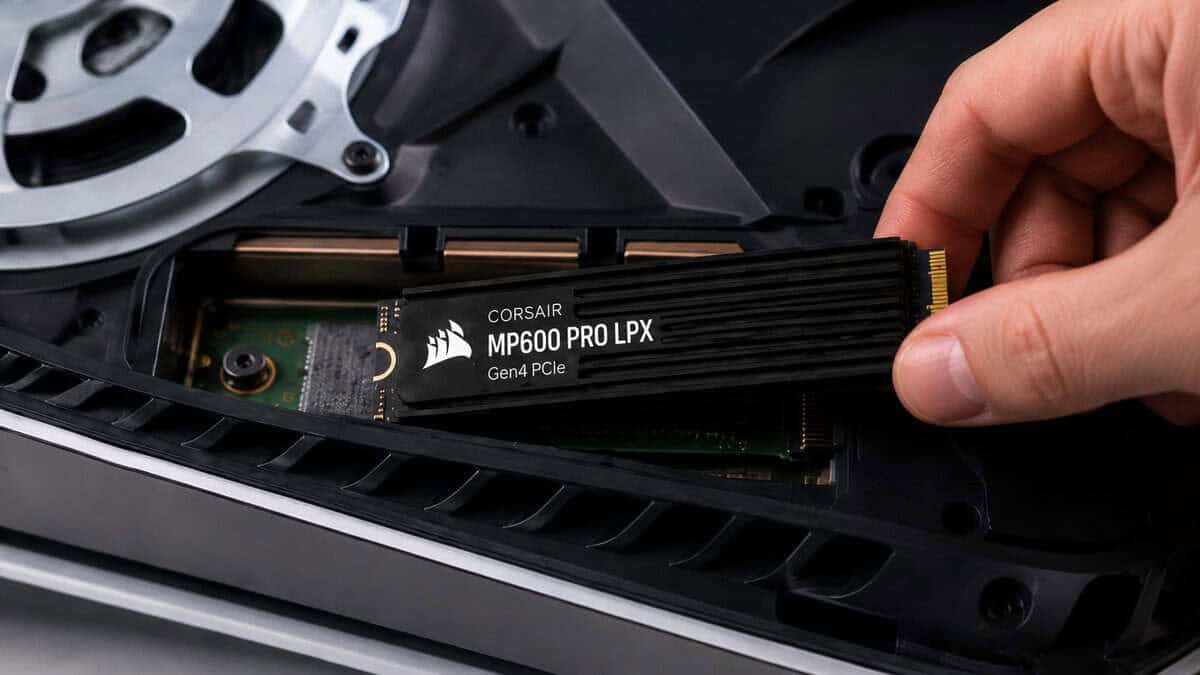
The installation itself isn’t hard, but the sloppy mistakes are the ones that turn a 10-minute job into a headache. Use a small screwdriver, shut the console down completely, and work on a clean hard surface. If your drive doesn’t already have a heatsink attached, add one before the drive goes into the bay, not after the fact when you’re wrestling with the screw.
The steps that matter
First, open the expansion bay and line up the SSD carefully in the slot. Don’t force it, and don’t tilt the board at a weird angle. Then secure it with the mounting screw, but don’t overtighten it, because the point is to hold the drive steady, not crush the hardware.
Second, make sure the thermal pad’s plastic film is removed before you close the bay. That’s the kind of mistake people make when they rush, and it defeats the whole point of using a heatsink. If you’ve ever converted an old system drive and needed a clean partition layout, the idea is similar to how you’d upgrade MBR drives to GPT, the hardware has to be prepared correctly before the system can use it properly.
First boot and formatting
Once the drive is seated, power the PS5 on and let the console format it through system software. If the drive isn’t recognized on the first boot, power down, reseat it, and check the heatsink clearance and screw position before trying again. Most failures at this stage come from simple install errors, not bad drives.
Install rule: if the drive doesn’t fit cleanly or the heatsink looks too tall, stop and fix that before you close the bay. For PS5 storage, “almost fits” is a bad outcome.
If you want a cleaner setup around the console itself, the best PS5 accessories guide is a useful companion once the SSD upgrade is done.
Which PS5 SSD Should You Buy
Skip the chase for the highest benchmark number. For PS5 storage, the drive that fits cleanly, stays cool under the console’s side panel, and delivers consistent load times is the one worth buying.
If you want the safest all-around pick, buy the Corsair MP600 Pro LPX. It’s the easiest recommendation because its low-profile heatsink avoids the usual headaches: tight heatsink clearance, awkward fit, and thermal worries that can turn a good spec sheet into a bad install. For most buyers, that’s the right answer because it gets the job done without wasting money on cosmetic premium.
If you want Sony’s own sign-off, buy the WD_BLACK SN850P. It is the only pick here with an official PlayStation license, so the bay fit is guaranteed rather than measured, and its review base is the biggest in the category. Pick it for the license, not the spec sheet.
If you want the most drive for the money and can live without the PlayStation license, the Lexar NM790 with heatsink is the value buy. Its rated reads sit well above Sony’s floor and the heatsink comes in the box, so there is nothing extra to buy before the install.
PS5 Pro owners should treat the decision the same way. The storage rules stay the same, and a compatible Gen4 drive with the right heatsink still matters more than paying extra for a bigger benchmark number.
A common mistake is buying a drive that meets the speed spec on paper but fails in the bay. Too many roundups obsess over sequential numbers and ignore heatsink height, side-panel clearance, and whether the drive can hold its pace once the console starts pushing it during actual game loads. If the drive fits cleanly and keeps its cool, it will feel the same in real use as a more expensive option that only looks better on a spec sheet.
Frequently Asked Questions
Quick answers to the questions PS5 storage buyers ask most.
What SSD speed does the PS5 actually require?
Sony recommends a PCIe Gen4 drive rated at 5,500 MB/s sequential reads or faster. All three picks here clear that floor comfortably, and beyond it the console’s own I/O system flattens the differences, which is why chasing the highest benchmark number buys very little in real load times.
Does a PS5 SSD need a heatsink?
Yes. The expansion bay is a closed compartment with minimal airflow, and Sony’s own guidance calls for a heat-dissipation structure. A drive with an integrated low-profile heatsink is the clean solution; a bare drive needs a properly sized aftermarket heatsink fitted before installation.
Can you use a Gen5 SSD in a PS5?
It will work, but the console runs it at Gen4 speeds, so you pay a premium for bandwidth the PS5 cannot touch. Put the extra money toward capacity instead; that is the upgrade you will actually feel.
Is 1TB enough for a PS5 SSD?
For most players, yes, roughly doubling usable space alongside the internal drive. Heavy libraries with several 100GB-plus titles justify 2TB. PS4 games can also live on cheap external USB storage, which frees the fast internal expansion slot for PS5-native titles.
Why are PS5 SSDs so expensive right now?
A global flash memory shortage has raised NAND prices, and many PS5 drives now cost far more than they did a year ago. If the drive you want is marked up well past its usual level, waiting is smarter than paying the premium.
If you want more no-nonsense hardware picks that favor value, fit, and durability over marketing, visit Budget Loadout. You’ll find practical buying guides that cut through the noise and help you choose the right gear the first time.
Related Articles