The textures go blurry a few minutes into a session, the frame rate dips every time you turn a corner, and the GPU meter says the card is barely trying. That pattern usually means the graphics card ran out of video memory, which is why “how much VRAM do I need” is the first question to answer before buying a new card.
The answer depends on your screen and your games far more than on the card’s name. Below is a quick answer by resolution, what Steam’s own hardware data says gamers actually own, and one card for each of the three VRAM budgets that matter in 2026.
A 16GB card that usually costs less than the RTX 5060 Ti 16GB, and 16GB rarely needs texture cuts at 1440p. The narrow bus is the tradeoff; the memory pool is the point.
- 16GB for high textures at 1440p
- Modest 450W power supply minimum
- Full x16 PCIe 5.0 link
- 128-bit bus is narrow for 16GB
- Dearest of the three picks
- Same name also ships with 8GB
Twelve gigabytes on the widest memory bus of the three gives new single-player games room for high textures at 1080p. It also has the fewest owner reviews of our picks.
- 12GB on the widest bus here
- 456 GB/s of memory bandwidth
- Room for high textures at 1080p
- Fewest owner reviews of the three
- 600W recommended power supply
- Eight PCIe 4.0 lanes, not sixteen
An honest 8GB card for 1080p esports and older games, where frame rate matters more than memory. Fast GDDR7 helps, but demanding new games can want more than 8GB.
- Fast GDDR7 at 448 GB/s
- Lowest power rating of the three
- Plenty for esports at 1080p
- 8GB caps texture settings in new games
- Not a 1440p high-settings card
- No 16GB version of the RTX 5060
- Buy VRAM for your screen: 8GB suits 1080p esports, 12GB suits 1080p in new games, and 16GB suits 1440p at high settings.
- On Steam’s hardware data, 8GB and 16GB cards are almost level as the two most common memory sizes.
- Several current cards share one name across 8GB and 16GB versions, so check the memory size on the box, not just the model.
- Texture quality uses the most video memory in most games; lowering it is the quickest fix when a card runs out.
- More VRAM only adds frames when a game was running short; past that point the GPU itself sets the frame rate.
Table of Contents
The Short Answer in One Table
The short answer to a VRAM question is a floor for each screen resolution, then room above it for heavier settings. The table below is our rule of thumb for 2026, based on how texture settings and resolution fill video memory.
| Your Screen and Games | VRAM Floor | Comfortable Amount | What Changes Above the Floor |
|---|---|---|---|
| 1080p, esports and older games | 6GB to 8GB | 8GB | Little: these games are light on textures |
| 1080p, new single-player games | 8GB | 12GB | High and ultra textures stay on |
| 1440p, most games at high settings | 12GB | 16GB | No texture cuts in demanding releases |
| 4K, or heavy ray tracing at 1440p | 16GB | 20GB or more | Room for path tracing and 4K textures |
How Much VRAM Do I Need for 1080p vs 1440p vs 4K
How much VRAM do I need for my screen comes down to how many pixels the card draws and how sharp the textures are. A 1440p frame has about 78 percent more pixels than a 1080p frame, and a 4K frame has four times as many as 1080p, so every step up in resolution asks more of the memory.
At 1080p, 8GB still runs esports titles and most older games at high settings, while 12GB keeps high textures on in new releases. At 1440p, 12GB works at medium to high settings and 16GB is the amount that avoids texture cuts. At 4K, 16GB is the floor and 20GB or more gives path tracing and ultra textures room.
Resolution sets the floor; texture quality decides how far above it you need to go.
What Steam’s Hardware Survey Says Gamers Own
Steam’s hardware survey is a monthly public snapshot of what PC gamers run, and it is the data behind this section. Every figure below comes from Valve’s Steam Hardware & Software Survey for September 2026, an opt-in survey of Steam users. Our average gaming PC specs page covers the rest of the hardware in it.
8GB and 16GB Sit Almost Level at the Top
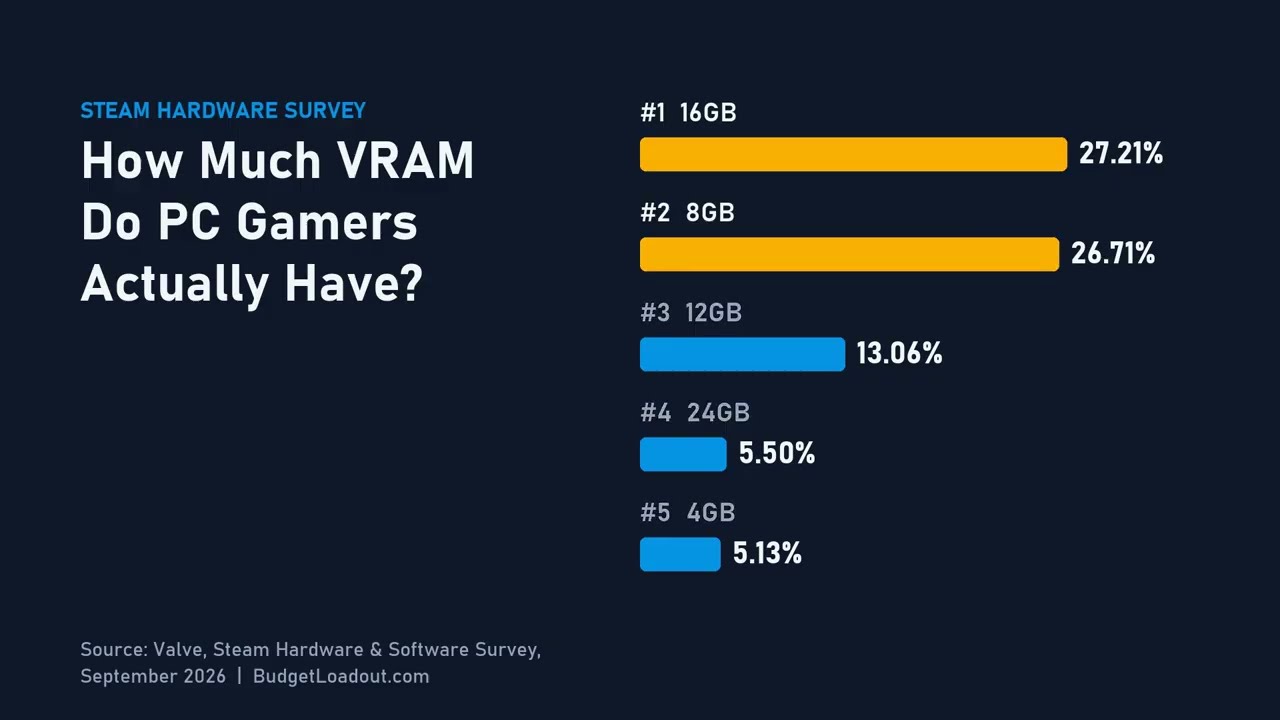
In the September 2026 results of the Steam Hardware & Software Survey, cards with 16GB of video memory are the most common at 27.21% of surveyed PCs, with 8GB right behind at 26.71%. 12GB is a distant third at 13.06%, and 24GB sits at 5.50%.
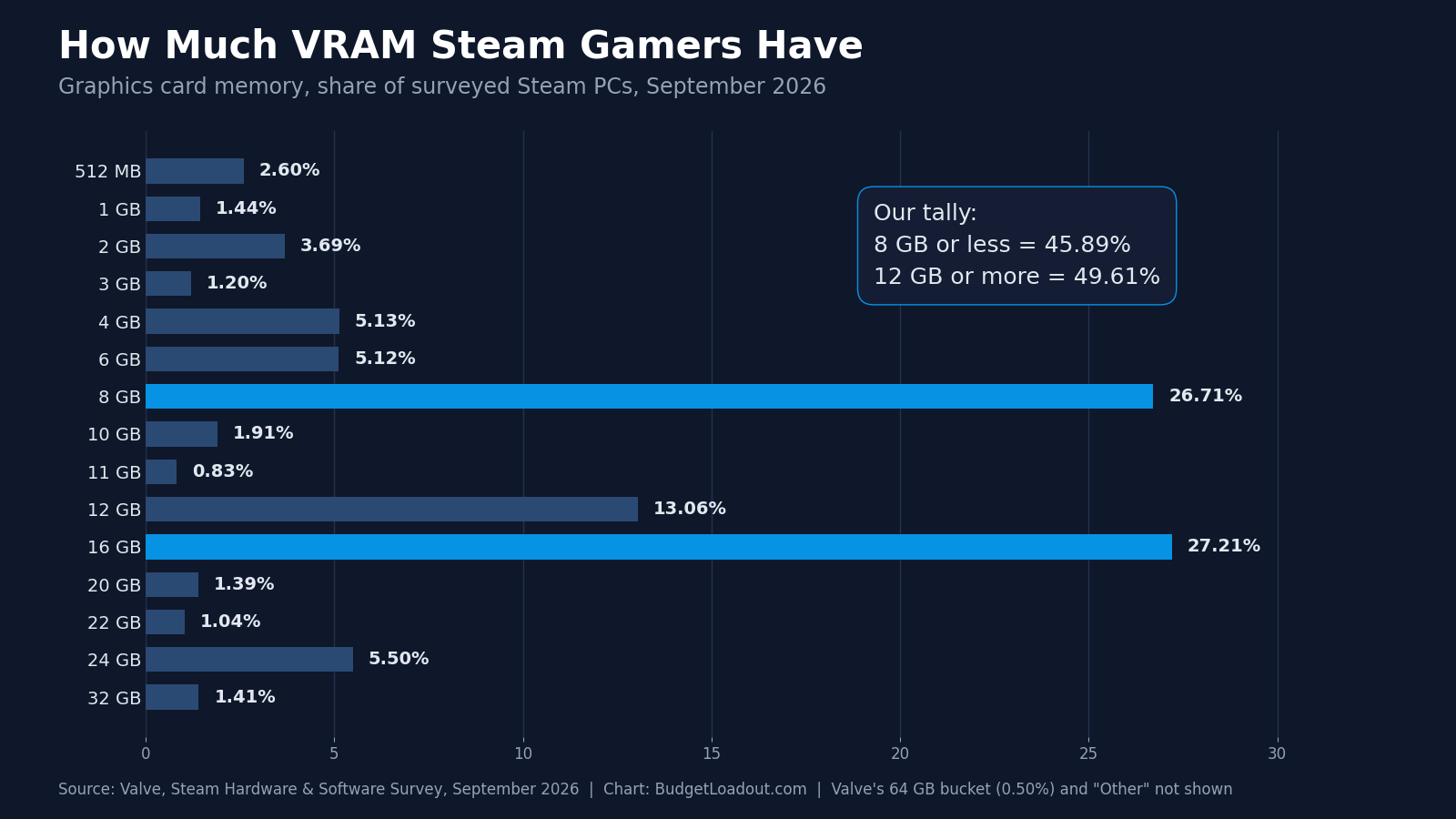
Together, 8GB and 16GB cards make up 53.92% of surveyed PCs in September 2026 (our tally from Valve’s VRAM table). Everything from 20GB up adds to 9.34% (our tally), the share held by high-end cards.
Nearly Half of Surveyed PCs Still Have 8GB or Less
Adding up Valve’s buckets from 512MB through 8GB, 45.89% of PCs in the Steam Hardware & Software Survey (September 2026) have 8GB of VRAM or less (our tally). Cards with 12GB or more add up to 49.61% (our tally, leaving out a new 64GB bucket), so surveyed PCs split almost down the middle, with the 10GB and 11GB buckets and Valve’s Other line making up the rest.
That split matters for what you buy. An 8GB card still runs current games at lower texture settings, while the high presets in demanding new releases ask for 12GB or more.
An 8GB card still runs current games; it just stops running all of them at high textures.
Reading the Survey Without Overreading It
The Steam survey is self-reported by the PCs that opt in each month, so one month’s figure is a snapshot, not a census. PC Gamer reported in February 2026 that the Steam Client Beta fixed an issue “where VRAM on some graphics cards was not reported correctly” and that PCs with more than one display adapter now report the one with the most VRAM.
The September 2026 results of the Steam survey also show a brand-new 64GB bucket at 0.50%, which we leave out of our tallies because no consumer graphics card ships with 64GB and its source is unclear. The same month shows 2560 x 1440 at 27.04%, up 5.18 points on the previous month while 1920 x 1080 fell 2.61 points. A one-month move that large is best read as a single reading, not a trend.
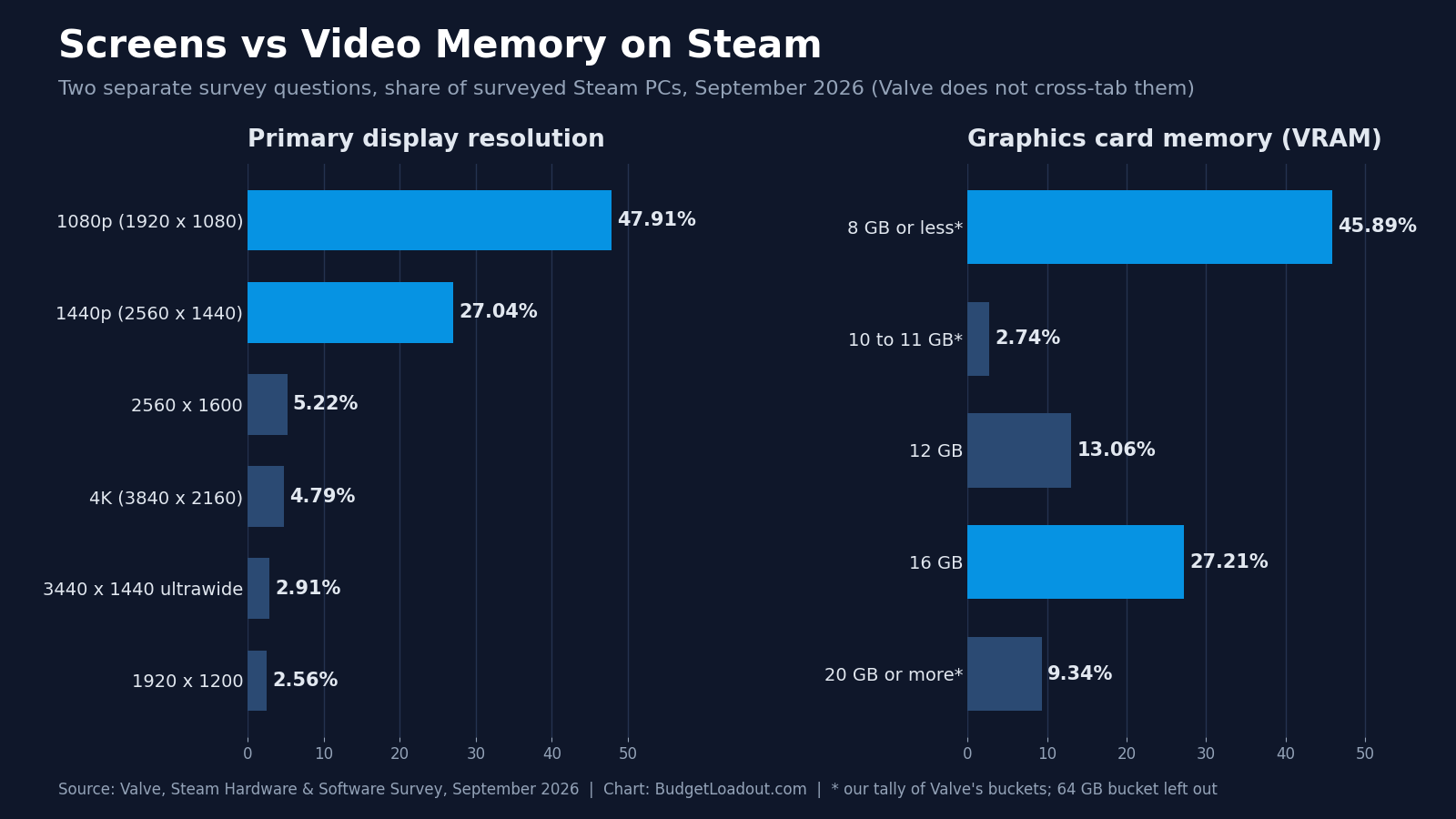
Display resolution and VRAM are separate questions, and Valve’s survey never cross-tabs them, so nobody can say from it how much VRAM 1440p players have. On the resolution side, 1920 x 1080 still leads at 47.91%, 2560 x 1440 is at 27.04% and 3840 x 2160 at 4.79%.
The charts on this page are free to republish in articles, videos and presentations. Download the image, keep it unedited, and credit it with a link to this page, for example:
<p>Source: <a href="https://budgetloadout.com/how-much-vram-do-i-need/">How Much VRAM Do I Need, Budget Loadout</a></p>
The VRAM Tier Ladder
The VRAM tier ladder runs from 8GB to 16GB for most buyers, with one card for each step. The figures below are the chip makers’ reference specs; partner cards such as the ASUS and Sparkle models can run slightly different clocks and power.
| Card | VRAM | Memory Type | Bus Width | Bandwidth | Board Power | PSU Guidance | PCIe | VRAM Tier |
|---|---|---|---|---|---|---|---|---|
| ASUS Dual GeForce RTX 5060 8GB OC | 8GB | GDDR7 | 128-bit | 448 GB/s | 145W | 550W | PCIe 5.0 | 1080p esports |
| Sparkle Intel Arc B580 Titan OC 12GB | 12GB | GDDR6 | 192-bit | 456 GB/s | 190W | 600W | PCIe 4.0 x8 | 1080p new games |
| ASUS Dual Radeon RX 9060 XT 16GB | 16GB | GDDR6 | 128-bit | Up to 320 GB/s | 160W | 450W | PCIe 5.0 x16 | 1440p high settings |
8GB: Esports and Older Games at 1080p
The 8GB tier is for 1080p players whose main games are esports titles and older releases. The ASUS Dual GeForce RTX 5060 8GB OC is the current card for it: 8GB of GDDR7 on a 128-bit bus, good for 448 GB/s of bandwidth, with a 145W graphics power rating and a 550W system power recommendation from NVIDIA.
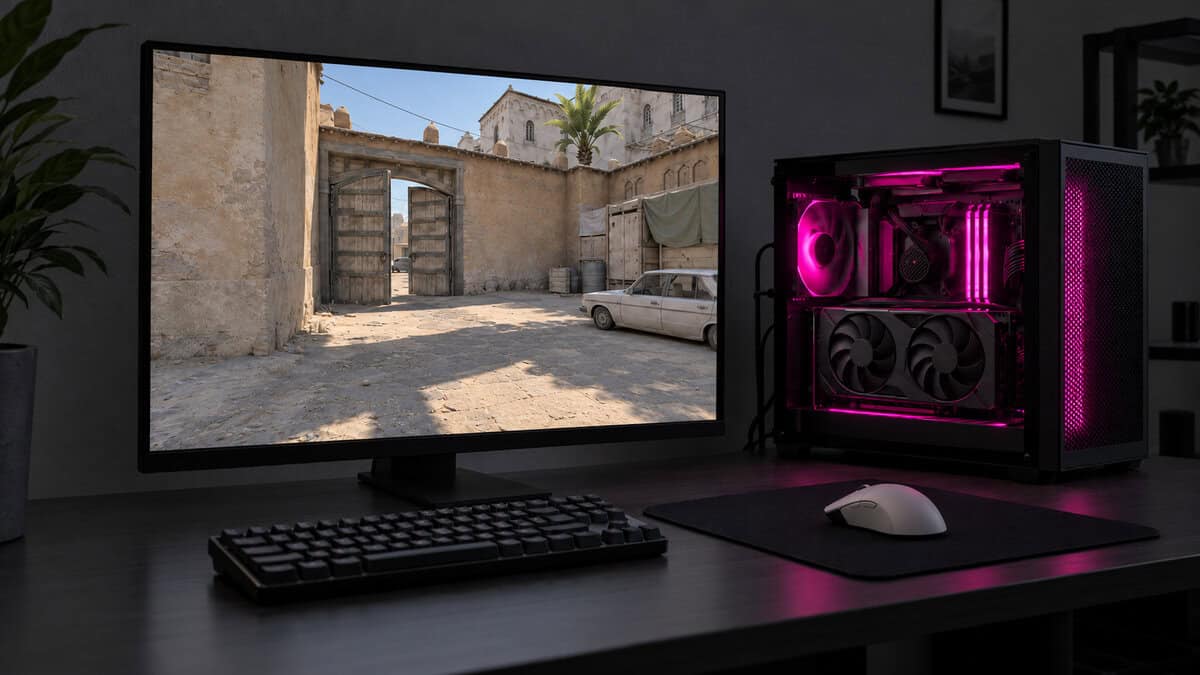
In games like Counter-Strike 2, Valorant and Fortnite at competitive settings, frame rate matters far more than texture memory, and that is where the RTX 5060 earns its slot. The limit shows up in demanding new single-player games, where high texture presets can ask for more than 8GB. If you mostly play those, step up a tier; our best mid range GPU guide covers the cards a rung above.
Eight gigabytes is an esports budget, not a 1440p plan.
12GB: Room to Breathe at 1080p
The 12GB tier is for 1080p players who want new releases at high textures. The Sparkle Intel Arc B580 Titan OC 12GB gives you 12GB of GDDR6 on a 192-bit bus, the widest of the three picks, with 456 GB/s of bandwidth and 19 Gbps memory.
Intel rates the B580 at 190W total board power and recommends a 600W power supply, the highest of the three, so check your PSU before you order. The card runs on eight PCIe 4.0 lanes rather than sixteen; on a PCIe 3.0 motherboard, those eight lanes get half the link bandwidth of PCIe 4.0 x8. It also has the fewest owner reviews of the three picks.
16GB: Where 1440p Stops Being a Compromise
The 16GB tier is where 1440p at high settings rarely needs texture cuts, as long as heavy ray tracing stays off. The ASUS Dual Radeon RX 9060 XT 16GB is our top pick for it: 16GB of GDDR6, a 128-bit bus with up to 320 GB/s of bandwidth backed by 32MB of Infinity Cache, a 160W board power rating and a 450W minimum power supply.
If you prefer NVIDIA, the ASUS Dual GeForce RTX 5060 Ti 16GB OC is the 16GB GeForce route, with GDDR7 at 448 GB/s and a 180W rating. For high refresh rates at 1440p, the ASRock Radeon RX 9070 Challenger 16GB OC pairs 16GB with a 256-bit bus. Our best graphics card for 1440p roundup compares the full field.
At 1440p, 16GB is the line between choosing settings and accepting them.
20GB and Up: A 4K and Path-Tracing Question
The 20GB-and-up tier is a 4K and path-tracing question, not a budget one. 4K textures and full ray tracing are the main workloads that push memory past 16GB, and the cards built for them are high-end models.
For most players, a 1440p monitor with a 16GB card is the better spend than 4K on a stretched budget. Our 1440p vs 4K gaming comparison covers that choice, and the RX 9070 Challenger above is the 16GB card to start from if 4K at moderate settings is the goal.
Same Card Name Two Memory Sizes
Several current graphics cards share one model name across two memory sizes, and the difference decides whether a card suits 1440p. NVIDIA sells the RTX 5060 Ti with 16GB or 8GB, and AMD sells the RX 9060 XT in 16GB and 8GB versions.
Why One Steam Entry Can Hide Two Cards
The Steam Hardware & Software Survey lists cards by name, not by memory size. In September 2026, Valve’s graphics card list shows one line for the NVIDIA GeForce RTX 5060 Ti at 3.87% and one for the AMD Radeon RX 9060 XT at 0.73%, and neither line says which memory size, so 8GB and 16GB versions cannot be told apart.
For a buyer, the lesson is simple: the box and the listing title must say the memory size. The RTX 5060 Ti 16GB and the RX 9060 XT 16GB are the versions that suit 1440p, and the 8GB versions belong in the esports tier with the RTX 5060.
Read the memory size on the box before the model number.
Bus Width Still Shapes What VRAM Can Do
Bus width is the other half of the memory story, because it sets how fast the card can move data in and out of VRAM. The Arc B580 uses a 192-bit bus, while the RTX 5060 and RX 9060 XT both use 128-bit buses.
Memory type changes the math too. The RTX 5060’s faster GDDR7 reaches 448 GB/s on its narrower bus, close to the B580’s 456 GB/s, while the RX 9060 XT’s GDDR6 tops out at 320 GB/s and leans on its Infinity Cache. Capacity decides whether textures fit; bandwidth decides how quickly they move.
Settings That Fill Video Memory First
A few graphics settings fill video memory much faster than the rest, and knowing them lets you rescue a card that is running short.
Texture Quality Is the Big One
Texture quality is the setting that uses the most video memory in most games. Each step up loads larger texture files for every surface in the scene, and those files have to sit in VRAM to draw without delay. Shadows, anti-aliasing and post-processing usually matter less to memory than they do to frame rate.
If a game warns that it is over its memory budget, drop textures one step first. On an 8GB card at 1080p, high textures instead of ultra is often the whole fix, and the difference is often hard to spot at that resolution.
Ray Tracing and Frame Generation Add to the Bill
Ray tracing and frame generation both add to the memory bill. Ray tracing keeps extra scene data in VRAM so the card can trace light against it, and frame generation stores the frames it works from. Turning both on at 1440p is one of the quickest ways to push a 12GB card to its limit.
Upscaling such as DLSS, FSR or XeSS works the other way: the game renders at a lower internal resolution, which can ease memory pressure a little. It does not shrink the textures themselves, so it cannot fully rescue a card that is short on VRAM at high texture settings.
What Running Out of VRAM Looks Like
Running out of VRAM looks different from a slow GPU. A slow card gives a steady, low frame rate. A card that is out of memory stutters in bursts, loads textures late so surfaces look blurry before they sharpen, and hitches when you turn quickly or enter a new area, because data is being swapped in from system memory.
Some newer games quietly lower texture quality when memory runs short instead of stuttering, so a game can look worse than its settings say. If textures stay smeared at close range, memory is the likely cause, not the GPU.
Checking Dedicated GPU Memory on Your Own PC
Checking dedicated GPU memory on Windows takes a minute. Open Task Manager, go to the Performance tab, and select your GPU: Dedicated GPU memory shows how much VRAM the card has and how much is in use across everything running, including the game. Run the game for a while, then look at the graph.
Many games reserve most of the VRAM available whether they need it or not, so a full dedicated line alone proves little. If dedicated memory is maxed out and Shared GPU memory climbs while the stutter happens, the card needs more VRAM or lower textures. VRAM is separate from system RAM, which holds the game’s code and working data; our how much RAM for gaming guide covers that side.
One Card for Each VRAM Budget
Each card below matches one VRAM budget. Find your screen and the games you play most in the left column.
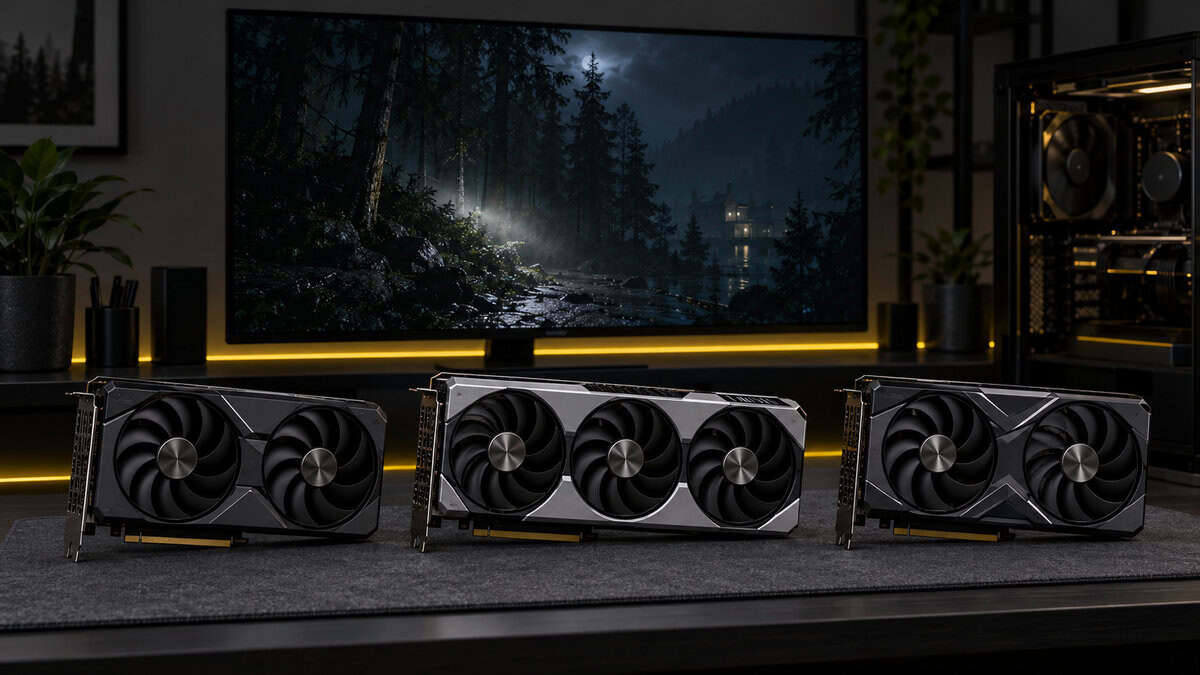
| Your Screen and Games | VRAM to Aim For | Card | Why |
|---|---|---|---|
| 1080p, esports and older games | 8GB | ASUS Dual GeForce RTX 5060 8GB OC | Frame rate matters more than memory here |
| 1080p, new single-player games | 12GB | Sparkle Intel Arc B580 Titan OC 12GB | Room for high textures and the widest bus |
| 1440p, most games at high settings | 16GB | ASUS Dual Radeon RX 9060 XT 16GB | Rarely needs texture cuts at 1440p |
If you are unsure, buy for the screen you will own in two years, not the one on your desk today. A 16GB card bought for 1080p has room for a 1440p upgrade later.
Frequently Asked Questions
Quick answers about how much video memory a gaming PC needs.
Is 8GB of VRAM enough in 2026?
For 1080p esports and older games, yes. For new single-player releases, 8GB often means lowering texture quality from ultra to high or medium. At 1440p it is a compromise, so plan on 12GB to 16GB for that resolution.
Is 12GB VRAM enough for 1440p in 2026?
Yes, at medium to high settings in most games. Demanding new releases with ultra textures or heavy ray tracing can push past 12GB at 1440p, which is why 16GB is our recommendation for that resolution.
Can you add more VRAM to a graphics card?
No. VRAM chips are soldered to the graphics card, so the only way to get more is a different card. Adding system RAM does not add video memory, although Windows can borrow some system RAM when a card runs short, which is much slower.
Does more VRAM mean more FPS?
Only when a game was running out. Once the textures and scene data fit in memory, extra VRAM sits unused and the GPU itself sets the frame rate. A faster chip with enough memory beats a slower chip with more.
Do gaming laptops need as much VRAM as desktops?
The same rules apply, because games load the same textures. Plenty of gaming laptops carry 8GB GPUs and drive 1080p or 1440p screens, so treat an 8GB laptop like an 8GB desktop card and lower textures in demanding games.
Looking for more budget gaming gear? Check out Budget Loadout for the latest reviews and recommendations.
Related Articles