Most first-time streamers get the same bad advice: buy any cheap green cloth, clamp it up, and fix the rest in software.
That usually backfires.
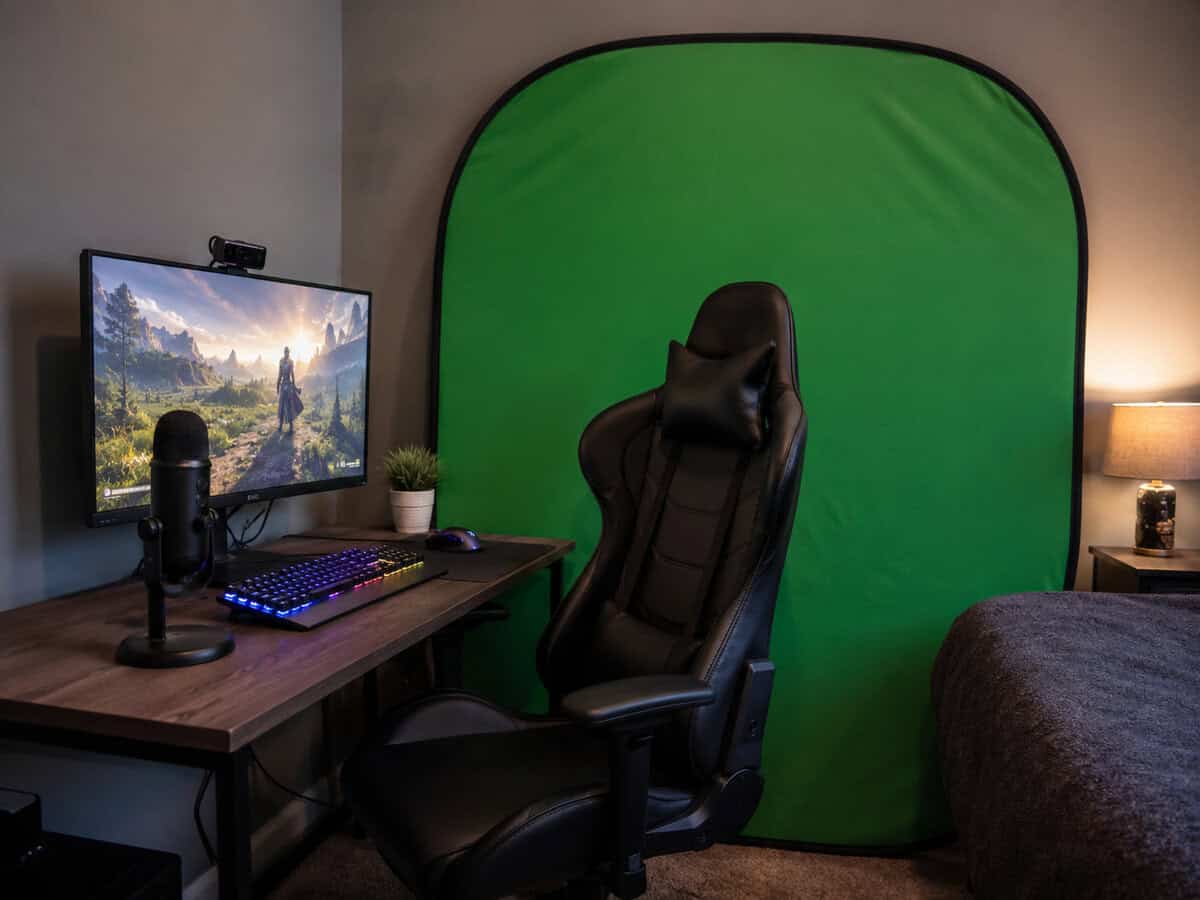
A green screen isn’t just a background. It’s part of your production workflow. If the fabric wrinkles, sags, tears, or takes too long to set up, you pay for it every stream in extra tweaking, worse edges, and more frustration. For FPS streams where your face cam sits over gameplay, sloppy keying looks distracting fast. For MMO creators, talking-head streams, and variety channels, it can make the whole setup feel unfinished.
The best green screen for streaming isn’t always the cheapest one. It’s the one that stays usable, sets up fast, and gives you a clean key without turning every stream into a lighting project.
- Stand adjusts in height and width
- Machine-washable, laser-cut fabric
- Packs into the included carry bag
- No lights included, so budget for one
- Fabric wrinkles if stored folded
- Stand takes a few minutes to set up
- 10-second setup that actually works as advertised
- Wrinkle-resistant fabric means cleaner chroma key out of the box
- Stores flat against a wall or under a desk when not in use
- 58×74 inch panel limits how wide your shot can be
- Doesn’t include lighting; you supply the softboxes
- Frame mechanism can stiffen over time with daily use
- A green screen only works if the lighting and material work: buy a kit with both, not a screen alone, if you’re starting from scratch.
- Wrinkles are your enemy; a pneumatic/retractable frame solves more chroma key problems than spending more on the fabric itself.
- A fabric backdrop on a stand offers more flexibility for taller frames and group shots, but takes longer to set up than a pop-up panel.
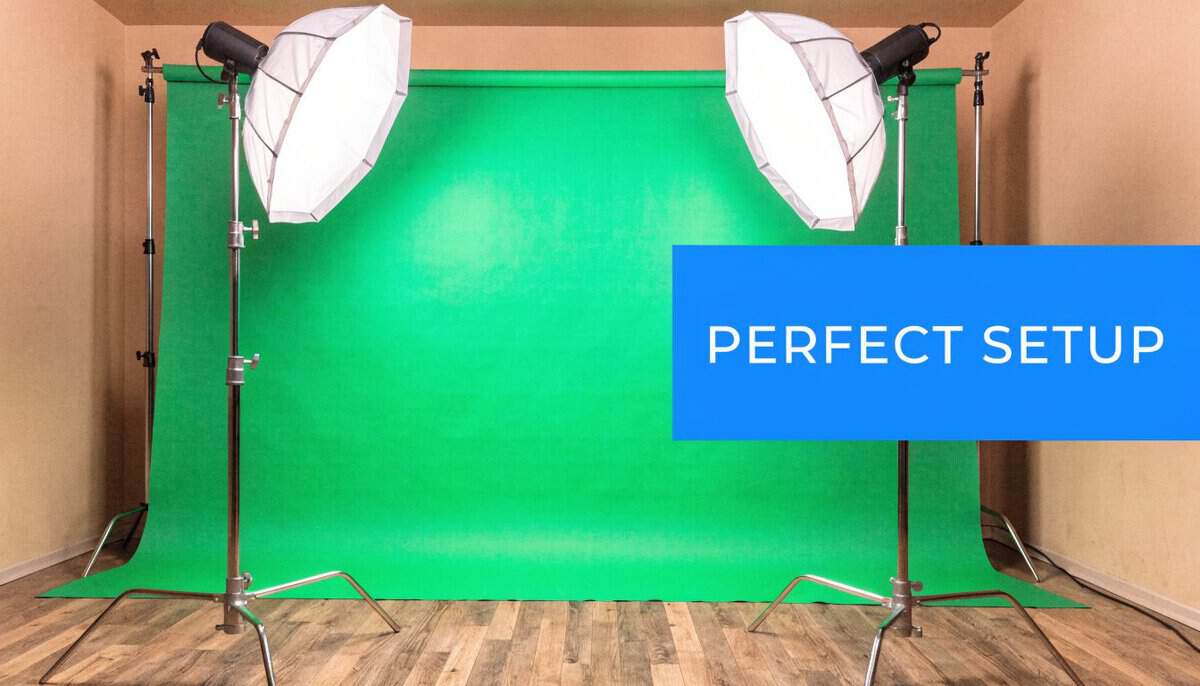
- The best lighting setup uses two softbox lights at 45° angles to evenly light the screen and minimize shadow spill.
- Don’t buy a green screen until you’ve tested whether you actually want to stream with one; virtual backgrounds in OBS work for testing without any physical setup.
Table of Contents
Why Your First Green Screen Is a Critical Investment
The cheapest option is often the most expensive one to live with.
Long-term reviews and user forum analysis show that premium screens tend to last for years, while budget options under $50 often develop permanent creases and tears after 3 to 6 months of regular use. The same review roundup notes that 15% of user complaints cited wrinkling as a major issue in cheaper screens, which is exactly the kind of problem that keeps showing up on camera and never really goes away (long-term green screen durability notes).
That matters because a bad screen wastes more than money. It wastes setup time, creates ugly edges around your shoulders and headset, and makes your stream look less polished than the rest of your gear.
Practical rule: If a green screen needs constant steaming, clipping, or repositioning, it isn’t a bargain. It’s another chore.
A lot of beginners focus on the obvious purchases first. Mic, webcam, capture card, headset. That’s fair. But if you’re serious enough to start streaming on Twitch with a workable setup, the backdrop deserves the same kind of thinking.
The same logic applies to the rest of your stream package. Audio choices, for example, can create copyright headaches if you grab random tracks, so it’s worth learning how to find safe audio for Twitch streaming before you go live.
What cheap screens usually get wrong
- Fabric tension: Loose fabric creates uneven color and visible folds.
- Frame quality: Weak stands wobble, sag, or become annoying to rebuild every session.
- Daily use: Bedroom streamers who pack up after every stream wear out flimsy gear faster than they expect.
If you’re choosing between “cheap now” and “usable for a long time,” pick the second one.
Understanding Green Screen Types and Materials
The physical design of the screen changes the digital result. That’s the part many buyers miss.
A green screen works best when the color stays even across the whole background. That depends on two things: the material and how tightly it’s held in place. If the fabric bunches up or reflects light unevenly, your software has to guess where you end and the background begins. That guess is where halos, missing hair detail, and rough edges show up.
The main screen styles
Retractable screens suit small rooms and shared spaces. They store neatly, deploy fast, and usually keep better tension than basic hanging cloth.
Stand-mounted fabric screens give you flexibility and larger coverage. They’re useful for full-body framing, co-op streams, or creators who want more room to move, but they take more floor space and usually need more care.
Static wall-mounted screens make sense if your stream area never changes. They’re less convenient for multi-use rooms but can be a smart option if you want a permanent background solution.
Material matters more than most specs
Cotton can work, but it tends to show wrinkles faster. Polyester is common in value-focused kits and can be perfectly usable if you light it well. Dacron-style materials generally hold shape better and reduce the amount of fixing you have to do before going live.
A clean chroma key starts with a flat, evenly lit surface. Software helps, but it doesn’t erase bad fabric.
If you’re shopping for the best green screen for streaming, don’t start with color alone. Start with tension, surface consistency, and how much hassle the material adds to your week.
How to Choose the Right Screen for Your Stream
The right screen depends on your room, your camera framing, and how often you need to pack everything away.
If you only stream head-and-shoulders gameplay, you don’t need the same setup as someone doing full-body content or moving around on camera. A small office, dorm room, or bedroom setup also changes what feels practical after a month of real use.
Match the screen to your use case
Ask yourself these questions first:
- Do you leave your setup up all the time? If yes, a larger fixed or stand-mounted option is easier to justify.
- Do you tear down after every stream? If yes, convenience and fast setup matter more than raw size.
- Do you need full-body coverage? MMO social streams, fitness content, or standing presentations need more background area than a typical seated FPS stream.
- Is your webcam the weak point? If your camera struggles with color and edge detail, upgrade that before chasing exotic backdrop solutions. This guide on budget webcams for streaming helps sort that out.
Practical fit for common stream styles
For seated FPS players, a compact, tensioned screen is usually enough. You want something that frames your chair area cleanly and doesn’t eat half the room.
For MMO creators, chat-heavy streamers, or anyone layering themed scenes, a cleaner key matters because the face cam stays on screen for long stretches.
If you’re building a more character-driven channel, short-form ideas matter too. That’s where resources like creative TikTok ideas for Vtubers can help you think beyond the live stream itself and plan content around your on-camera setup.
Buy for your real room, not the setup you wish you had.
The common mistake is buying a giant screen for a tiny space, then discovering you can’t light it evenly or store it without frustration.
Best Budget Green Screens for Value-Focused Streamers
If you’re trying to stretch your money, bundled kits make the most sense when the included parts are usable. The goal isn’t to buy the cheapest package. It’s to buy one that gets you on air with fewer extra purchases.
Here’s the quick comparison first.
Budget Green Screen Comparison (2026)
| Model | Type | Size | Key Advantage | Main Trade-Off |
|---|---|---|---|---|
| Hemmotop 8×7.5ft Kit | Backdrop with stand | 8.2×6.5ft fabric | Wide, adjustable stand at a low price | No lighting included |
| EMART Collapsible | Pop-up panel | 58×74 inch coverage | 10-second pop-up setup with retractable frame | Slightly smaller than full studio backdrops |
The best starting point for most people
The strongest budget pick is the Hemmotop 8×7.5ft kit if you want a full backdrop and stand without paying for a bundle. Pair it with even one soft light, because many cheap screens fail less from the screen itself and more from bad lighting around it.
That matters because many cheap screens fail less from the screen itself and more from bad lighting around it.
Honest trade-offs
The Hemmotop 8×7.5ft kit makes sense for first-time streamers who want a big, adjustable backdrop. The downside is long-term fabric durability. Polyester can be fine, but it won’t age like more premium material.
Stand-mounted fabric kits are better when you want wider coverage for duo shots or broader framing. The catch is daily setup fatigue. Large stand kits can become annoying fast if your room doubles as a bedroom or office.
Pop-up panels like the EMART Collapsible work well for smaller spaces and lighter use. They’re easier to live with, but they give you less flexibility if you change camera angles later.
If you’re pricing out your whole setup, keep the full gear budget in view. A broader budget streaming gear guide helps keep the screen purchase in proportion with your camera, mic, and lights.
When to Spend More on Setup Speed
There are times when spending more is the budget move.
The clearest example is the retractable pull-up class. Wrinkle-resistant fabric on an X-frame springs into a clean chroma key surface in seconds and packs flat when the stream ends. For streamers who care about speed and consistency, that convenience is the whole pitch.
Who should actually pay more
This kind of screen makes sense if any of these sound familiar:
- You stream from a small room: retractable storage keeps the setup out of the way.
- You set up and tear down often: quick deployment saves energy every session.
- You care about consistency: fewer wrinkles mean fewer chroma-key surprises.
- You stream several times a week: durability matters more when the gear gets handled often.
When it isn’t worth it
If you’re still testing whether you even like streaming, a lower-cost kit is the safer entry point.
But once the screen itself becomes a recurring annoyance, the premium option stops looking expensive. It starts looking efficient. This upgrade isn’t just image quality. It’s removing one more failure point from your routine.
Essential Setup and Lighting for a Clean Chroma Key
Even the best green screen for streaming looks bad under poor lighting.
Independent OBS benchmarks show that a properly lit, high-quality screen can deliver up to 85% cleaner keying than wrinkled, poorly lit fabric alternatives (OBS chroma key benchmark notes). That’s why lighting usually matters more than buying a slightly bigger backdrop.
A setup that works in real rooms
Use two lights to cover the background as evenly as possible. Keep the screen lit separately from your face if you can. Then light yourself from the front so your webcam sees clean edges and natural skin tone.
The biggest mistakes are simple:
- Standing too close to the screen: this creates shadows and green spill.
- Letting auto exposure wander: your camera shifts brightness during the stream and makes the key unstable.
- Trying to fix everything in software: the cleaner the original image, the less aggressive your chroma settings need to be.
If you need help choosing fixtures, this guide to streaming lighting that fits a budget setup is a good next step.
Small tweaks that save a lot of cleanup
In your streaming software, lower-key settings are usually safer than aggressive ones. Push too far and you start eating into hair, hoodie edges, and chair outlines.
Keep some distance between you and the backdrop. It makes edge cleanup easier and cuts down on green spill.
This is also the same principle behind clean cutout work in photo editing. If you’ve ever tried to photoshop yourself into a picture, you’ve seen how much easier subject separation becomes when the background is evenly lit and clearly distinct.
Frequently Asked Questions
Can I just paint my wall green?
Yes, and a painted wall is actually one of the cleanest options because there are zero wrinkles. The catch is that you need the right paint (matte chroma key green, not glossy) and even lighting to avoid hot spots. If you can dedicate a room or wall section to streaming, painting beats fabric. If you can’t, a fabric or pop-up screen is the practical compromise.
What’s the best way to remove wrinkles?
Steam it lightly with a handheld steamer (not an iron; direct heat melts the synthetic fabrics). For collapsible panels, store them deployed if possible to keep tension on the fabric. For backdrops on stands, use clamps to stretch the fabric tight before each session. The single biggest wrinkle-killer is buying a wrinkle-resistant fabric in the first place.
Why do I see a green halo around my shoulders?
That’s “green spill”: light bouncing off the screen and reflecting onto you. Two fixes: increase the distance between you and the screen (3+ feet helps), and add a back light or rim light to push you off the green tone. In OBS, the Color Key filter’s “spill reduction” slider helps clean up what physical setup can’t.
Do I need special software settings?
OBS’s built-in Chroma Key filter handles most setups out of the box. For better results, switch from Chroma Key to Color Key (more granular control), and tweak the similarity, smoothness, and spill reduction sliders. Don’t over-key; pulling too hard creates jagged edges. Lighting your screen evenly does more than any software filter ever will.
If you want practical gear advice without the usual hype, Budget Loadout is worth bookmarking. It focuses on value, durability, and real trade-offs, so you can build a setup that works now and still makes sense after months of streaming.
Related Articles