You’re probably staring at a parts list that looks settled except for one annoying decision: which is the best AM4 motherboard for the build. The CPU makes sense. The GPU choice is clear enough. Then AM4 boards show up in a mess of B450, B550, and X570 labels, with wildly different prices and feature lists that don’t always tell you what matters in games.
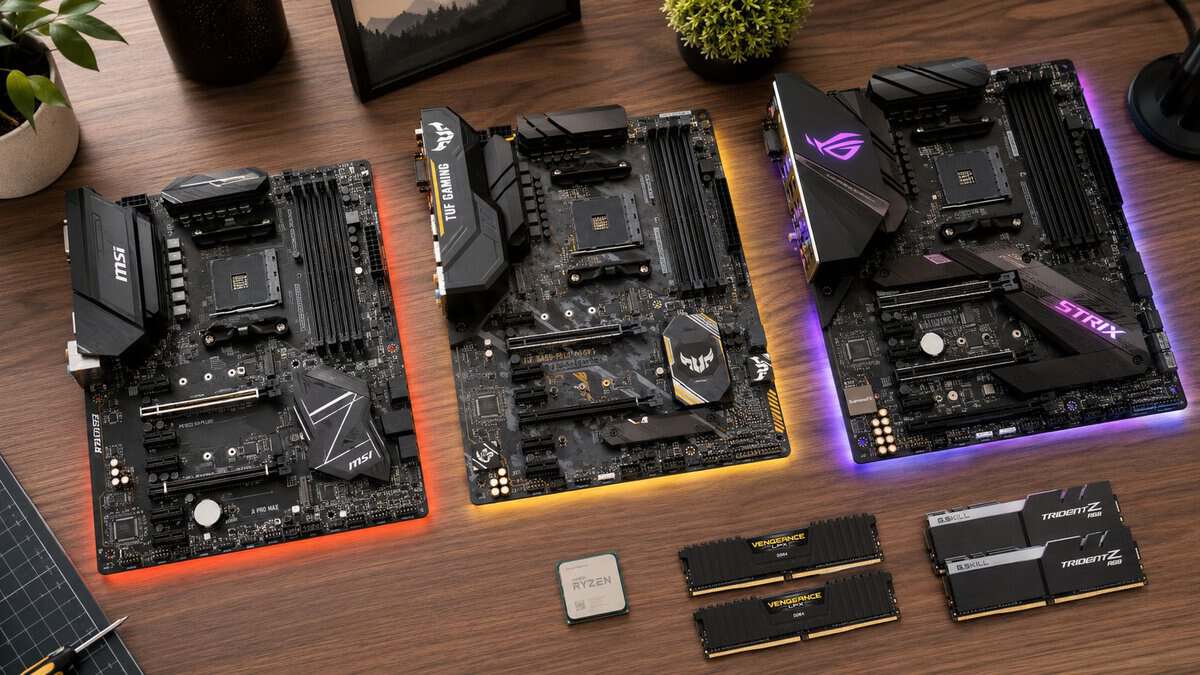
That’s where users often either overspend or buy the wrong board for the CPU they want to run. A value-focused AM4 build isn’t about getting the cheapest board on the shelf. It’s about getting one that stays stable in long FPS sessions, doesn’t choke when you stream, and still gives you sensible upgrade room later.
- 12+2 phase VRM with a real heatsink
- Wi-Fi 6, 2.5GbE, and a front USB-C header
- Headroom for a later Ryzen 5000 CPU upgrade
- DDR4 and PCIe 4.0 only (the end of the AM4 road)
- Pricier than bare-bones B550 boards
- No PCIe 5.0 or DDR5 (not available on AM4)
- Great price for a current B550 board with Wi-Fi
- BIOS Flashback for easy Ryzen compatibility
- PCIe 4.0 and dual M.2 in a compact footprint
- Entry-level VRM, fine for mid-range Ryzen not heavy OC
- Micro-ATX limits fan headers and expansion
- Basic audio and rear I/O
- Strong thermals for long gaming and streaming sessions
- Durable TUF build with solid VRM cooling
- Wi-Fi 6, 2.5GbE, and BIOS Flashback included
- DDR4 and PCIe 4.0 only (AM4 platform limit)
- Costs a bit more than entry B550 boards
- No flashy extras beyond the essentials
- The best AM4 motherboard in 2026 is a current B550 board, good B450 stock has largely sold through and X570 is EOL or scalped.
- GIGABYTE B550 AORUS Elite AX V2 is the all-round value pick: strong VRM, Wi-Fi 6, and real upgrade headroom.
- ASUS Prime B550M-A WiFi II covers tight budgets with Wi-Fi 6, BIOS Flashback, and PCIe 4.0 in a compact micro-ATX board.
- ASUS TUF Gaming B550-PLUS WiFi II is built for long streaming and gaming sessions with strong thermals and a durable build.
- Prioritize VRM quality and BIOS support over feature-list bling, AM4 caps out at DDR4 and PCIe 4.0 regardless of board.
Table of Contents
Choosing Your AM4 Motherboard Without the Headache
Most buyers get stuck on the wrong question. They ask which chipset is “best” instead of asking which board is best for their CPU, case, storage needs, and the kind of games they play. A board can look great on paper and still be a bad fit if the power delivery is weak or the feature set doesn’t match your build.
For AM4, the practical split is simple. B450 is the value-first route, B550 is the balanced option for most serious gaming builds, and X570 only makes sense when you know exactly why you need the extra platform features. If you’re still sorting out the whole build, this gaming PC build guide helps put the motherboard choice in context.
What to decide first
Before looking at any specific model, lock down these four things:
- Your CPU target. A board that’s fine for a Ryzen 5 can be a poor match for a higher-end chip under long gaming or streaming loads.
- Your use case. High-FPS shooters, MMO sessions with lots happening on screen, and streaming all stress a system a bit differently.
- Your storage plan. One NVMe drive is easy. Multiple drives, capture files, and large game libraries change what matters.
- Your case size. ATX, Micro-ATX, and Mini-ITX each force trade-offs in slots, cooling space, and expansion.
Practical rule: Buy the board tier that fits the CPU you’ll actually run for the next few years, not the one that flatters a hypothetical upgrade you may never make.
What usually isn’t worth paying extra for
A lot of motherboard pricing comes from extras that don’t change your frame rate or long-session stability.
- Heavy RGB styling usually adds cost, not useful performance.
- Excessive rear I/O sounds nice until you realize you’ll never fill half the ports.
- Premium branding can hide a board that’s only average where it counts, especially in VRM cooling and layout quality.
The best AM4 motherboard for a value-focused gamer is the one that’s stable, durable, and sensible. That’s less exciting than spec-sheet bragging, but it’s the right way to buy.
AM4 Chipsets and CPU Compatibility Explained
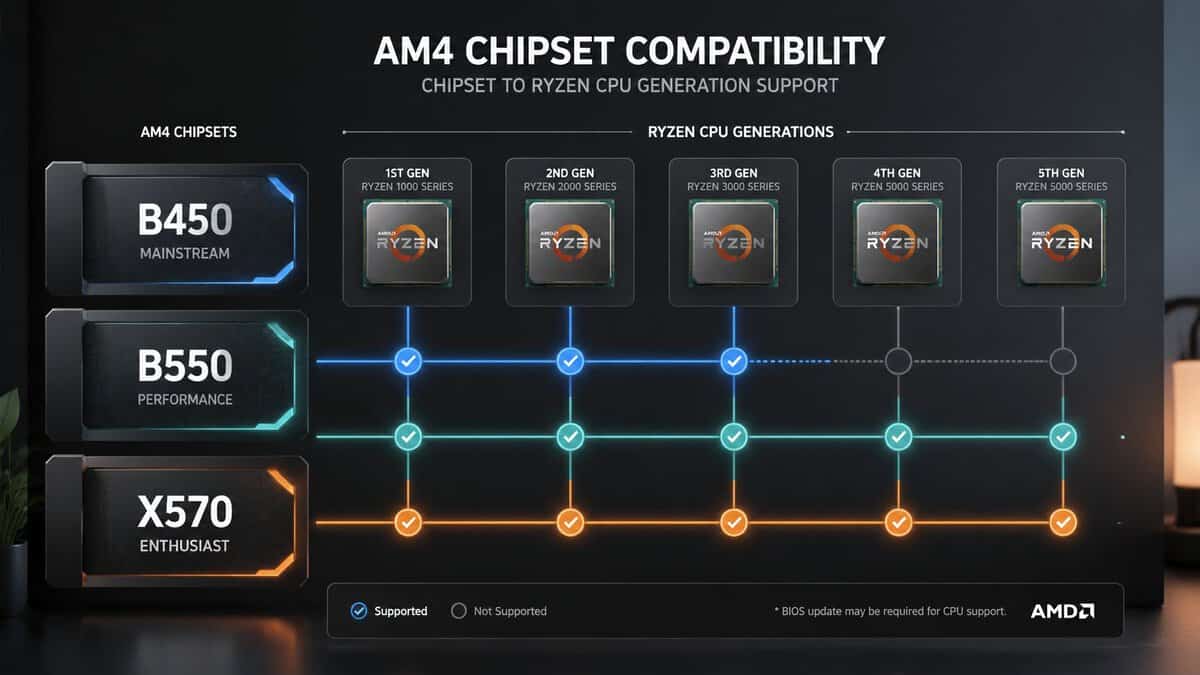
You find a cheap AM4 board, pair it with a Ryzen chip that looks like a great deal, build the system, hit the power button, and get no display because the BIOS is too old. That is the compatibility problem on AM4 in one sentence.
The socket lasted a long time, which is great for value buyers, but it also created a messy used and old-stock market. Two AM4 boards can share the same socket and still offer very different CPU support out of the box. For a budget gamer trying to build once and keep the system stable for years, chipset choice is really about avoiding bad pairings and dead-end upgrades.
If you are still deciding on the processor itself, this guide to the best CPU for gaming helps narrow down which AM4 chip is worth building around.
B450 for low-cost builds that still make sense
B450 still works well if the goal is a Ryzen 5 class gaming system at the lowest sensible cost. It covers the basics, and a good B450 board can still run popular AM4 gaming CPUs without issue. For a build with one GPU, one NVMe drive, and no need for newer platform extras, it can be enough.
The risk is age. BIOS support varies a lot, especially on older inventory and secondhand boards. Some B450 models support later Ryzen CPUs after an update. Some need an older compatible CPU just to perform that update. If a seller does not clearly list BIOS version or CPU readiness, treat that as a real cost, not a small inconvenience.
B550 is the safe middle ground
For most value-focused gamers, B550 is the AM4 chipset that ages the best. Board makers usually paired it with better layouts, better CPU support, and more useful high-speed connectivity. You also have a better chance of buying a board that is ready for later AM4 CPUs without extra setup work.
That matters if the plan is to start with something like a 6-core chip now and move to a faster 8-core AM4 CPU later. B550 is usually the cleaner path for that kind of upgrade.
X570 makes sense for a smaller group of buyers
X570 is still fine, but it is easy to waste money here. Many gaming builds will not use what separates it from a solid B550 board. If your system is mainly for gaming, some streaming, and normal storage needs, the B550 usually gives you a better return.
X570 starts to make more sense if you already know you need its extra connectivity and expansion options. If you do not know that yet, you probably do not need it.
CPU compatibility on AM4 needs a board-by-board check
Do not buy any AM4 motherboard based only on the chipset label. Check the exact board model, the CPU support list, and whether the board ships with a BIOS version that supports your processor. This is especially important with Ryzen 5000 chips on older B450 stock.
Use this quick filter before you buy:
- Match the motherboard to the exact Ryzen generation you plan to run.
- Confirm out-of-box BIOS support from the seller or manufacturer support page.
- Be careful with older B450 listings that use vague phrases like “supports AM4 CPUs.”
- If you want an easier upgrade path later, B550 is usually the smarter place to spend a little more.
AM4 is still a good platform for budget gaming in 2026. The smart buy is the board that boots your CPU today, stays stable under long sessions, and leaves room for one realistic upgrade later. If you are still deciding which chip that upgrade should be, our best AM4 CPU guide sorts the Ryzen 5000 picks by what is already in your socket.
Why VRMs and Build Quality Are Your Top Priority
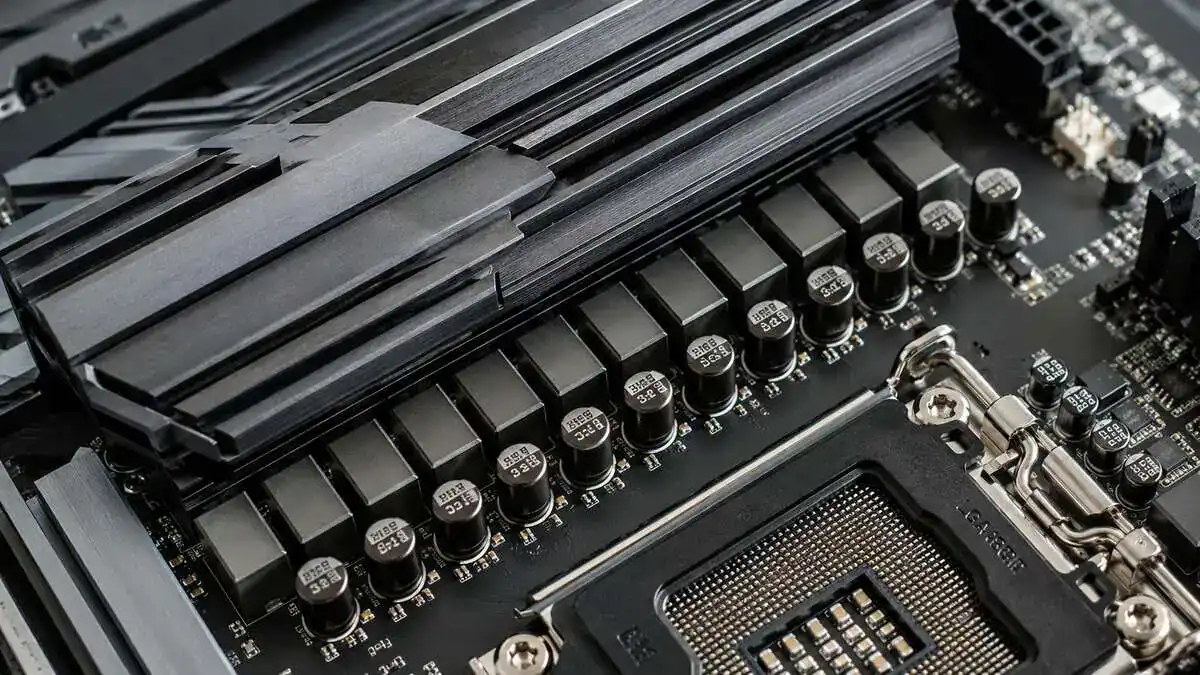
A lot of AM4 boards look fine on a spec sheet, then start showing their limits after an hour of gaming with a hotter Ryzen chip. The usual problem is power delivery. If the VRM runs hot and the heatsink is undersized, the board can struggle to hold boost clocks under sustained load. For a budget gaming build, that matters more than RGB, extra armor, or marketing labels.
This is one of the easiest places to waste money or cut too hard.
What good VRM design actually does
The VRM feeds the CPU clean, stable power. Better boards do that with less heat and less voltage fluctuation, especially during long sessions, shader compilation, background downloads, or gaming while voice chat and recording software are running.
That matters even if you never touch manual tuning.
A decent VRM with real heatsink mass gives you more headroom for an 8-core upgrade later and lowers the chance that the board becomes the weak link. Cheap AM4 boards can still be perfectly fine with a 6-core gaming chip at stock settings. Pair that same board with a power-hungrier Ryzen 7 or run sustained all-core loads, and the margin gets a lot thinner.
The practical goal is simple. Buy a board that stays boring under load.
Build quality shows up after the first week
You usually notice motherboard quality in small ways first. The system posts consistently. Memory training is less fussy. Fan control works properly. M.2 drives do not sit in awkward spots right under a hot GPU. BIOS updates are easier, and the board is less likely to become annoying after one CPU or RAM change.
Physical design matters too:
- VRM heatsinks with actual size and surface area help the board hold performance during longer CPU-heavy sessions
- A better PCB and cleaner component layout usually means fewer stability headaches over time
- Well-placed fan headers and front-panel connectors make the build easier to cool and maintain
- BIOS support and firmware maturity matter for long-term usability more than flashy extras on the box
If you plan to push clocks at all, this guide on how to overclock your CPU only makes sense if the motherboard can handle the added heat and power draw.
What to avoid on value builds
For a value-focused gamer, the goal is not to buy the fanciest AM4 board. It is avoiding the weak ones that create stability problems later.
| Sign | What it usually means |
|---|---|
| Tiny or decorative VRM heatsinks | Less cooling capacity for sustained CPU loads |
| Very bare power section around the CPU socket | Lower margin for higher-end Ryzen upgrades |
| Layout compromises that choke airflow | More heat around the VRM and M.2 area |
| Poor BIOS history or vague CPU support notes | More setup hassle and more risk with future upgrades |
A good AM4 motherboard does not need premium branding. It needs to run a budget gaming system today, stay stable through long sessions, and leave enough power and thermal headroom for one realistic CPU upgrade without turning into the reason your frame times get worse.
Navigating I/O Form Factors and Feature Trade-Offs
A lot of AM4 buyers get tripped up here. The board looks great on a spec sheet, then six months later they are short on USB ports, out of storage slots, or stuck with a cramped case that runs hotter and is annoying to work on.
The right call depends less on marketing features and more on how the system will be used over the next few years.
PCIe 4.0 versus PCIe 3.0
On AM4, PCIe 4.0 is a nice upgrade, but it is easy to overspend on it. B550 boards usually give you PCIe 4.0 support for the main graphics slot and one NVMe slot, while older budget boards often stay on PCIe 3.0.
For gaming alone, the difference is usually modest. Load times and day-to-day play do not suddenly improve just because the slot runs at a higher standard. PCIe 4.0 matters more if you regularly move large files, record gameplay, edit video, or want faster top-end NVMe storage for a system that also does work outside gaming.
If storage is part of your decision, this guide to the best SSD for gaming will help you match the drive to the board instead of paying for speed you will rarely notice.
Form factor changes the build experience
ATX is still the safe pick for most gamers. You get more fan headers, more room between components, more rear I/O, and fewer layout compromises during the build. It is also easier to upgrade later if you add more storage or a capture card.
Micro-ATX often gives the best value if the budget is tight. A good mATX AM4 board can run a gaming build perfectly well, but the trade-off is usually fewer USB ports, fewer expansion slots, and a tighter layout around the bottom edge of the board. That matters if you hate cramped cable routing or plan to add hardware later.
Mini-ITX is the niche option. It makes sense for a compact build with a clear size target, but you are accepting fewer memory slots, less expansion, and a smaller margin for cooling mistakes under long gaming sessions.
Features worth paying for
Some extras age well. Some do not.
Pay for features that solve a known problem in your build:
- A second M.2 slot if you know one drive will fill up quickly
- Built-in Wi-Fi if Ethernet is not practical where the PC will live
- Plenty of rear USB if you already use multiple peripherals, external storage, or a webcam
- BIOS flashback if you are pairing the board with a later AM4 CPU and want an easier update path
- 2.5Gb Ethernet if you keep large files on a local network or want a bit more headroom for the future
Features you can usually skip
Here, value builds stay sensible.
- Extra full-length PCIe slots if you are running one GPU and no add-in cards
- High-end onboard audio marketing unless you already use headphones or speakers that justify it
- Chunky cosmetic heatsink covers that add visual bulk but no useful function
- RGB-heavy board premiums if the same money could go toward a better SSD, cooler, or GPU tier
Buy for the setup you will keep on your desk. A stable board with the right ports, enough storage support, and a case-friendly layout will age better than a feature-packed board full of things that never get used.
Best AM4 Motherboard Picks for Gaming in 2026
You finish a budget gaming build, load into a long session, and everything looks fine for the first 20 minutes. Then clocks dip, frametimes get messy, and the system starts feeling cheaper than it looked on the spec sheet. That is why the right AM4 board still matters in 2026. The goal is not to buy the board with the longest feature list. It is to buy one that stays stable under sustained load and still makes sense if you drop in a better AM4 CPU later.
Top AM4 Motherboard Picks at a Glance
| Model | Chipset | Best For | Key Feature |
|---|---|---|---|
| GIGABYTE B550 AORUS Elite AX V2 | B550 | Best overall value for most gamers | Strong VRM, Wi-Fi 6, 2.5GbE |
| ASUS Prime B550M-A WiFi II | B550 | Solid budget AM4 build | Wi-Fi 6 and BIOS Flashback on a value board |
| ASUS TUF Gaming B550-PLUS WiFi II | B550 | Streaming and long gaming sessions | Strong thermals and a durable build |
Best overall value for most AM4 gamers
The GIGABYTE B550 AORUS Elite AX V2 is the easy recommendation for builders who want a board that will not become the weak link six months later.
It gets the basics right. VRM cooling is good enough for real gaming loads with CPUs like the Ryzen 5 5600, Ryzen 7 5700X, and even the 5800X3D if the rest of the case airflow is competent. The slot layout is clean, rear I/O is useful without padding the price with junk, and the board usually lands in the range where spending more stops helping a value-focused gamer.
That balance matters. A cheap board can work on day one, but if it runs hotter, needs more BIOS babysitting, or cuts too many corners on ports and storage, the savings disappear fast.
Best budget AM4 motherboard in a mATX size
The ASUS Prime B550M-A WiFi II is the smart budget pick now that the best B450 boards have largely sold through. It keeps the essentials and skips the fluff.
You still get the B550 platform’s PCIe 4.0, a usable VRM for CPUs like the Ryzen 5 5600 and Ryzen 7 5700X, dual M.2, Wi-Fi 6, and BIOS Flashback for painless CPU compatibility. For a fresh AM4 build or a reuse-and-upgrade path, it anchors a stable 1080p or entry-1440p system without gambling on bottom-tier board quality.
The trade-offs are modest:
- Micro-ATX layout: fewer fan headers and expansion slots than a full ATX board
- Entry-level VRM cooling: great for mid-range Ryzen, not heavy overclocking
- Value-tier audio and rear I/O: compared with pricier B550 boards
Best for streaming and heavier sustained loads
The ASUS TUF Gaming B550-PLUS WiFi II is a smart pick for the builder who stresses the system for hours at a time.
Gaming while recording, running voice chat, keeping browser tabs open on a second monitor, and pushing longer sessions exposes weak boards faster than a quick benchmark run does. This one tends to hold up well because the power delivery and board cooling are built for steady work, not just spec-sheet appeal.
It also makes sense for anyone trying to keep AM4 alive for another few years. If you are pairing the board with a stronger CPU and planning the rest of the build carefully, this quick guide on how much RAM you need for gaming helps round out the platform.
Your Final AM4 Purchasing Checklist
The last step is making sure the board fits your actual build, not just your browser tabs. The easiest buying mistakes happen right before checkout.
Quick checks before you buy
- Confirm CPU support. Don’t assume AM4 socket equals ready-to-go compatibility.
- Check BIOS status. Older stock can still trip up an otherwise solid build.
- Match VRM quality to the CPU. A modest chip and a high-end chip don’t ask the same thing from the board.
- Verify the form factor. Make sure the board fits your case and leaves room for airflow.
- Count your storage needs. Think beyond day one. Games, clips, and project files add up.
- Review rear I/O carefully. Buy for the accessories you use, not the ports you might use.
- Look at durability details. Heatsinks, slot reinforcement, PCB quality, and a clean layout all matter.
If you’re still balancing the rest of the platform, this quick read on how much RAM you need for gaming helps round out the build before you order parts. For the kits themselves, our best DDR4 RAM guide covers what is worth buying on AM4 today.
The simplest way to choose
If you want the shortest answer, it’s this:
- Pick B450 when your goal is maximum value and your build is straightforward.
- Pick B550 when you want the best all-around AM4 experience for gaming and streaming.
- Pick X570 only when you know why the extra platform features are worth it.
A good AM4 board should feel boring in the best way. It should boot cleanly, stay stable, handle long sessions without throttling, and keep the rest of the system from being held back.
Building on the newer platform instead? See our best AM5 motherboard picks.
Frequently Asked Questions
The questions AM4 builders ask most before they buy.
Is B450 or B550 better for an AM4 build in 2026?
B550 is the safer choice now. It adds PCIe 4.0, generally stronger VRMs, and better out-of-box BIOS support for Ryzen 5000, and most good B450 boards have sold through. B450 can still work for a reused or used build, but new B550 boards are widely available and not much more expensive.
Will an AM4 motherboard need a BIOS update for a Ryzen 5000 CPU?
Sometimes. Many current boards ship Ryzen-5000-ready, but older stock may need a BIOS flash. Boards with BIOS Flashback (like the ASUS Prime and TUF picks here) let you update without a CPU installed, which removes most of the risk. You can confirm a board’s CPU support on AMD’s processor specifications before buying.
Is AM4 still worth buying in 2026?
For budget builders, yes. AM4 with a Ryzen 5 5600 or 5700X3D remains a strong value for 1080p and entry-1440p gaming, and boards and CPUs are cheap. If you want PCIe 5.0, DDR5, and a long upgrade path, step up to AM5 instead.
Do I need PCIe 4.0 on an AM4 board?
It is nice to have but not essential for gaming. PCIe 4.0 mainly benefits fast NVMe SSDs; current GPUs see little difference between PCIe 3.0 and 4.0. All three picks here support PCIe 4.0, so it is not something you have to chase.
If you want more practical, no-hype buying advice for gaming and streaming gear, Budget Loadout is a good place to start. It focuses on value, durability, and the parts that improve your setup instead of pushing expensive extras you won’t notice in real use.
Related Articles