Hall effect switches have gone from esports curiosity to the default recommendation for competitive keyboards, and the price of entry keeps falling. Magnetic sensors instead of metal contacts mean adjustable actuation, rapid trigger, and switches that do not wear out the way mechanical ones do. The catch is that the category now spans everything from bargain boards to flagship esports hardware, and the spec sheets all promise the same features. (The same magnetic idea now has a successor sensor on the controller side; our TMR vs hall effect comparison covers it.)

The right board depends on how you play and how you type. A competitive FPS player, an MMO grinder, a streamer who wants a cleaner desk setup, and a mixed-use buyer who works and games after hours all need different trade-offs. That’s why the best Hall effect keyboard isn’t one universal pick, it’s the one that fits your input habits, build-quality expectations, and software tolerance.
- Rapid trigger and adjustable actuation
- 8K polling for low latency
- Wired, 2.4GHz and Bluetooth
- Simpler case and stabilizers than pricier boards
- No numpad or dedicated nav cluster
- Software is more basic than big-brand suites
- Polished build with aluminum frame option
- Wireless, wired, and QMK flexibility
- Great typing feel for mixed use
- Costs well above the value pick
- Wireless mode adds latency vs wired
- 75% layout still omits the numpad
- Deepest actuation tuning in the roundup
- Rapid tap and protection mode for competitive play
- OLED display and quality PBT keycaps
- Flagship pricing
- More board than casual players need
- Full feature set leans on SteelSeries GG software
Picks and availability last verified: October 26, 2026
- Hall effect boards use magnetic sensors instead of metal contacts, enabling rapid trigger, adjustable actuation, and switches that essentially never wear out.
- The Gamakay NS75 delivers genuine rapid trigger, adjustable actuation and wireless play for less than any other pick here.
- The Keychron K2 HE is the mixed-use sweet spot, adding QMK support and a work-friendly build to the Hall effect feature set.
- The SteelSeries Apex Pro TKL Gen 3 is the esports flagship, with per-key actuation from 0.1 to 4.0 mm plus rapid tap.
- Check software and remapping support before buying: some boards handle everything onboard while others depend on vendor apps.
Table of Contents
Why Choose a Hall Effect Keyboard
A lot of people reach this category after one frustrating moment. They have a decent mechanical board, they like the feel, but in a movement-heavy shooter or any game with repeated key taps, the reset timing never feels as clean as they want. Hall effect keyboards exist for that exact pain point.
The core appeal is simple. Hall effect switches use magnetic sensing rather than physical contact, which is why they can support 100+ million keystrokes per key and avoid switch bounce, which removes debounce delay and can reduce input latency. That matters most if you care about repeatable movement inputs, fast key resets, and a board that can take heavy daily use without wearing out the same way a standard contact switch can. For a plain-language breakdown of switch types, see this mechanical keyboard switch guide.
Practical rule: If your biggest complaint is sluggish reset timing, Hall effect makes sense. If your biggest complaint is typing feel or desk noise, the answer is less obvious.
The other reason people move here is adjustable actuation. Modern Hall effect boards can let you tune actuation from roughly 0.1 mm to 3.8 mm or 4.0 mm, depending on the model, which gives you a much finer control range than a fixed mechanical switch. For FPS gaming, that can help with fast movement taps and cleaner directional changes. For typing, a deeper setting can cut down on accidental presses, which matters more for mixed-use buyers than spec sheets usually admit.
The trade-off is straightforward. Hall effect does not fix poor design on its own. A board can use magnetic switches and still feel hollow, sound sharp, or be annoying to configure if the case, stabilizers, and firmware are weak. Buyers who split time between work and games usually get the best value when they judge the whole keyboard, not just the switch type.
Understanding Hall Effect Switch Technology
The underlying principle is the Hall effect, where a magnetic field changes voltage in a sensor without any physical contact.
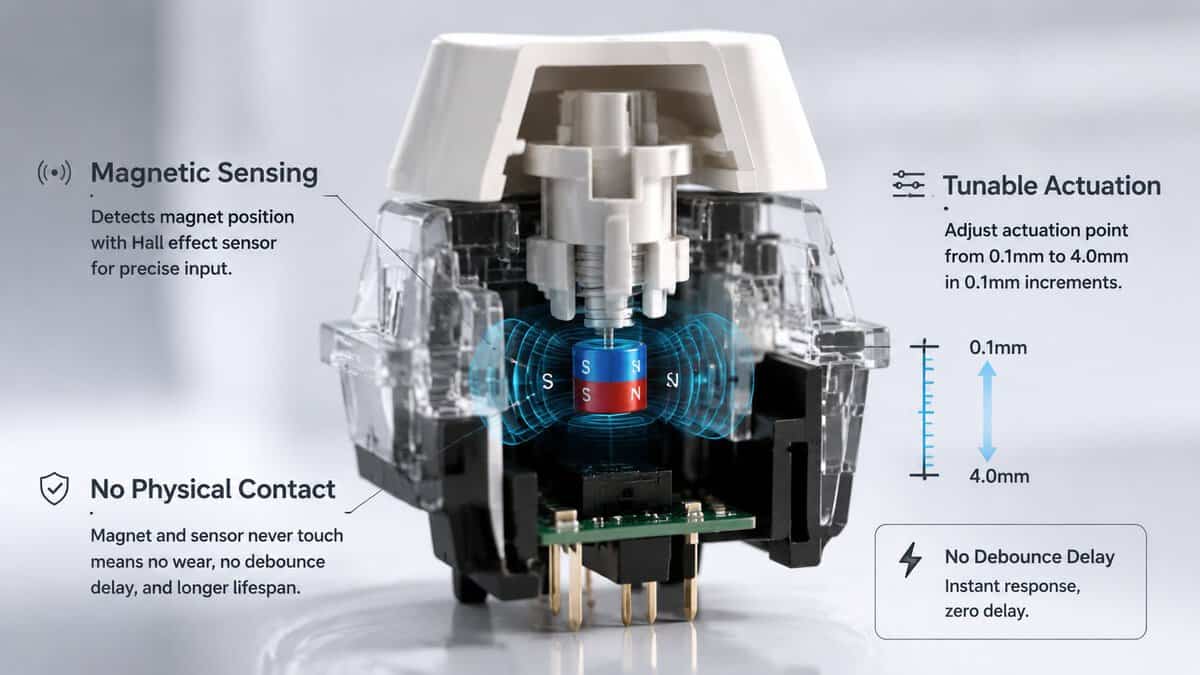
A Hall effect switch reads motion with a magnet and a sensor, not with two metal contacts touching. That changes how the key registers input, because the switch can measure movement across the travel range instead of waiting for a fixed contact point. For mixed-use buyers, that matters because the same keyboard can be tuned for fast game inputs one moment and calmer typing the next.
The durability case is strong as well. Hall effect switches are commonly rated for 100+ million keystrokes per key, which is higher than many conventional mechanical switches, and the sensing method avoids switch bounce, so there is no debounce delay to work around. That does not guarantee a faster-feeling board in every setup, but it does give the switch design a real advantage for repeatable inputs and long-term wear.
Why adjustable actuation matters
Adjustable actuation is the part that separates Hall effect from a basic durability upgrade. A board that lets you set actuation from roughly 0.1 mm to 4.0 mm gives you room to make movement keys trigger early and less important keys trigger deeper. That can help in games where fast resets matter, and it can also reduce accidental presses during daily typing.
The trade-off shows up fast in real use. A shallow setting feels quick, but sloppy finger placement will trigger keys more easily. A deeper setting is calmer and more forgiving, but it can feel less immediate if you are used to a light mechanical board. The better boards let you choose that balance instead of forcing one compromise across every key.
If you want a plain-language overview of switch types before buying, Budget Loadout’s mechanical keyboard switch guide is a useful starting point.
What the tech does and doesn’t solve
Hall effect solves the sensing part of the keyboard. It does not fix weak case construction, rattly stabilizers, or firmware that handles input poorly. A board can use magnetic switches and still sound hollow, feel sharp, or be awkward to set up.
That is why the category makes the most sense for buyers who care about both speed and everyday comfort. If you want low-latency movement and tunable actuation, the technology has a clear appeal. If your priority is a board that feels good during long typing sessions, the rest of the build still matters just as much as the switch.
Comparing Hall Effect with Mechanical and Membrane
A side-by-side view makes the trade-offs easier to read. Hall effect is not automatically better in every category, and mechanical or membrane boards still make sense for some buyers.
| Criterion | Mechanical | Membrane | Hall Effect |
|---|---|---|---|
| Actuation feel | Fixed switch behavior, familiar and widely available | Soft, shallow, less defined | Tunable actuation with fine control |
| Durability | Strong, but lower than Hall effect in many cases | Usually the least durable of the three | Long key life is common in the category |
| Latency potential | Good, but depends on switch and firmware | Usually fine for casual use | Can be very low because it avoids switch bounce and debounce delay |
| Noise | Ranges from quiet to fairly loud | Usually quietest | Depends on case and stabilizers, not just switch type |
| Customization | Good on many models | Limited | Often strongest, especially for actuation and rapid trigger |
| Price | Wide range | Usually lowest | Higher entry cost, though budget models now exist |
Hall effect’s spec ceiling also matters. Some boards in the category are built for very fast polling and very fine actuation steps, which shows how the category competes on precision instead of simple gimmicks. That does not mean every buyer needs those numbers, only that the ceiling is real.
For a broader switch-type comparison beyond Hall effect, the guide at Budget Loadout’s mechanical vs. membrane keyboard breakdown is useful.
How each type fits real use
FPS players tend to benefit most from Hall effect because rapid resets and shallow actuation are directly useful. MMO players care more about reliable key consistency, macro behavior, and whether the board can handle lots of commands without feeling mushy. Streamers and mixed-use buyers usually care about build quality, sound, and software stability more than absolute latency.
Membrane boards still win on price and quietness. Mechanical boards still make sense if you want a proven typing feel and do not care about adjustable actuation. Hall effect sits in the middle only if you will use the features. For buyers weighing daily typing against casual gaming, the same trade-offs apply as in Budget Loadout’s mechanical vs. membrane keyboard breakdown.
Key Factors for Choosing a Hall Effect Keyboard
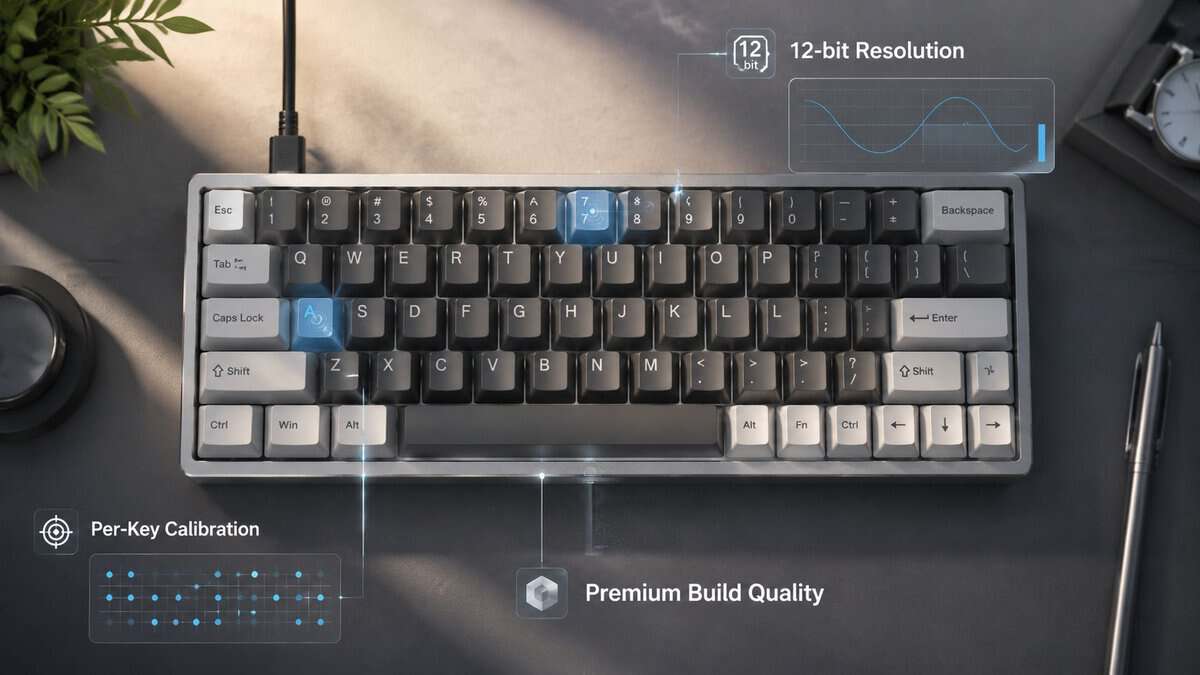
The sensor is only one part of the purchase. A board that looks advanced on paper can still feel inconsistent if the resolution, calibration, and firmware are weak. Those are the details that separate a keyboard you enjoy from one you end up tuning forever.
Hall effect keyboards are judged less by the magnet sensor itself than by the support around it. Independent buyer guidance notes that lower-resolution boards can fall short for precision use, while higher-resolution options are better suited to fine actuation control. Poor magnet tolerances can also create noticeable actuation-point variation across keys if the board does not support per-key calibration, and that is the kind of inconsistency that shows up in fast gaming inputs and repeated shortcuts. For a broader switch-focused breakdown, Budget Loadout’s gaming switch guide is a useful companion.
A keyboard can use magnetic switches and still feel sloppy if calibration is weak. Precision starts in firmware, not in the marketing copy.
Use this checklist before you buy
- Resolution and calibration: Look for high-resolution sensing and per-key calibration if you care about consistent inputs in FPS play or frequent shortcut use.
- Actuation control: Decide whether you want shallow triggers for gaming, deeper travel for typing, or separate settings for different key groups.
- Build quality: Check case rigidity, plate feel, stabilizer tuning, and overall durability. A firm shell matters more than flashy lighting.
- Layout and size: A 60%, TKL, or full-size board changes desk space and key access. Pick based on whether you need function rows, arrows, or a numpad.
- Wired or wireless: Wired is usually the safer choice for the cleanest performance, while wireless makes more sense for a cleaner setup and mixed-use desks.
- Software quality: Good software should be stable, readable, and easy to use for calibration instead of making basic changes hard to find.
- Price tier: Budget is relative in this category, so compare what you get against the rest of the Hall effect market, not against generic mechanical boards.
The practical question is whether the board fits how you use a keyboard. A casual player who types all day will care about comfort, consistency, and software more than headline latency. A mixed-use buyer who wants one board for work and gaming should spend more time on calibration, layout, and build feel than on raw spec sheets.
When to Use a Hall Effect Keyboard
A Hall effect keyboard makes sense when the board is part of how you play, not just something sitting on the desk. Competitive FPS players are the clearest fit, because rapid-trigger behavior and adjustable actuation help with movement-heavy play, especially if you are tapping, counter-strafing, or resetting keys repeatedly.
MMO players use keyboards differently. They do not need the same split-second movement advantage, but they can still benefit from consistent per-key behavior, especially on boards that let you tune actuation by key group. If your setup leans toward long raid sessions, heavy hotkey use, and fewer twitch inputs, Hall effect can still be a solid choice, but the payoff depends more on software quality and build stability than on raw speed.
Good fit and poor fit
Streaming changes the priorities again. A board that feels stable, sounds controlled, and does not get in the way of configuration matters more than marketing around rapid trigger. Mixed-use buyers who type during the day and game at night should be especially careful, because aggressive actuation can make everyday typing less comfortable if you are not willing to tune it.
Casual players and mixed-use buyers are the group that gets overlooked most often. Coverage tends to focus on esports features and product rankings, while typing comfort, software stability, and value outside shooters get less attention, as noted in HL Planet’s discussion of Hall effect keyboards. That gap matters because a lot of buyers do not need a pure competitive board, they need a dependable all-rounder. If you lean closer to general gaming and everyday typing, the best fit may be a setup that keeps the Hall effect advantages without asking you to chase them every time you open a document.
If you mostly play single-player games, browse, and type, a good mechanical board can still be the smarter buy.
A quieter membrane board can also win on value if your top priority is low cost and low noise. Hall effect is strongest when you actually use the tuning, latency, and rapid-reset advantages. If you will not, the extra money goes toward features you may barely notice. For a mixed-use buyer, that is a real trade-off, not a small one.
The most practical way to judge it is simple. If you want fast actuation for games, frequent profile changes, and a keyboard that can be tuned around your habits, Hall effect is worth a closer look. If your day is mostly writing, browsing, and light gaming, the better purchase may be the board that feels calmer to live with, even if it is less exciting on a spec sheet.
If you want a more grounded example of how that decision changes by game type, the buying logic in this Marvel Rivals keyboard guide follows the same pattern, because the right board depends on whether you are chasing speed, comfort, or both.
Best Hall Effect Keyboard Picks by Tier
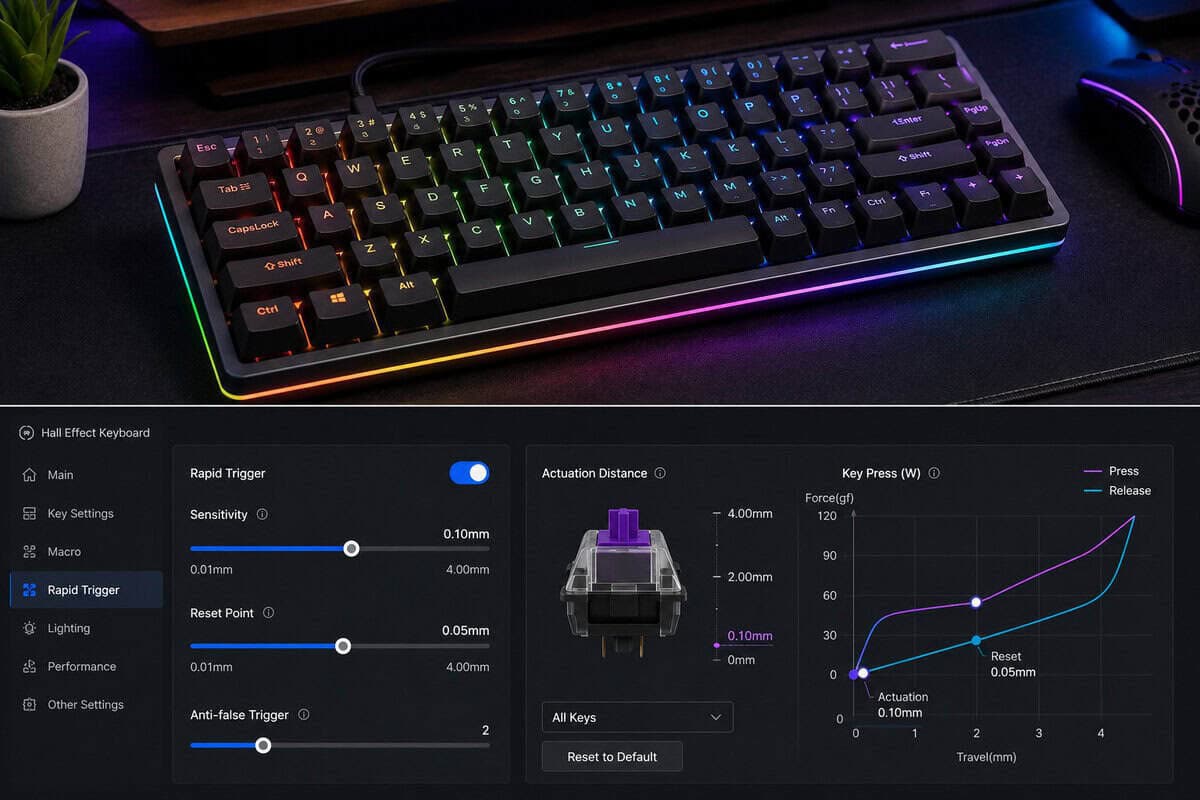
The cleanest way to shop this category is by tier. That matches how the market is split right now, with true budget models often sitting around the lower end of the range and more complete boards moving into a higher price band, as noted in independent budget roundups. “Budget” here is only useful as a relative label. It tells you what is inexpensive for this category, not what is cheap in absolute terms.
| Tier | Our pick | What you get | Best for | Trade-off |
|---|---|---|---|---|
| Value | Gamakay NS75 | Core Hall effect performance, rapid-trigger behavior, lower cost | FPS players who want the feature set without overspending | Usually weaker case materials and simpler software |
| Mid-range | Keychron K2 HE | Better build quality, stronger software, more polished feel | Mixed-use buyers, streamers, and everyday gamers | Costs more than the entry tier |
| Flagship | SteelSeries Apex Pro TKL Gen 3 | Advanced sensors, top-end tuning, fuller feature set | Enthusiasts who want the most control | You pay a premium for refinement |
Value Tier: A Budget Wooting Alternative
If you want the core feature set without paying flagship money, the value tier is the place to start. The Gamakay NS75 is our pick here: a 75% board with genuine Hall effect switches, rapid trigger, adjustable actuation, and wired, 2.4GHz or Bluetooth connections for less than our other picks. If you came here looking for a Wooting alternative, the NS75 covers the same core features: Hall effect switches, rapid trigger and adjustable actuation. These boards usually keep rapid-trigger behavior and adjustable actuation, while giving up some refinement in case quality or software polish. The trade-off is easy to understand. You get the Hall effect advantages that matter in play, but you do not always get the quietest case or the nicest stabilizers.
This tier makes the most sense for casual FPS players and mixed-use buyers who want a faster board without turning their desk into a hobby project. It is also the tier I would check first if you are moving up from a cheap mechanical board and want to see whether Hall effect changes your day-to-day use. If your routine is more games, browsing, and a little typing than constant competitive play, this class usually gives the clearest return for the money.
Mid-Range: The Balanced Choice
The mid-range is where Hall effect boards start feeling complete instead of merely interesting. You usually see better build quality, steadier firmware, and a more polished stock experience, which matters if the keyboard has to serve both game time and work time on the same desk. That matters more than a spec bump if you are not only chasing fast inputs but also living with the board for hours at a time.
This is the safest recommendation for mixed-use buyers. The Keychron K2 HE owns this tier: Gateron double-rail magnetic switches, wireless plus wired modes, QMK support, and a build that feels at home during work hours too. If you want a board that can handle FPS nights, MMO sessions, and everyday typing without feeling disposable, this tier usually makes the most sense. The trade-off is straightforward: you spend more, but the chassis, software, and overall feel tend to justify it better than the cheapest options do.
Flagship: Maximum Control
A flagship Hall effect board is for people who know exactly why they want one. The SteelSeries Apex Pro TKL Gen 3 is the flagship pick, pairing OmniPoint 3.0 magnetic switches with rapid trigger, rapid tap, and per-key actuation from 0.1 to 4.0 mm. Enthusiasts who want the deepest tuning available should also look at the Wooting 80HE, though it sells direct-only and often carries a wait.
The strongest versions of the category can push very high polling rates, and some top-end models add extremely fine actuation adjustment, which gives you tighter control over how the board responds. That level of tuning is useful if you care about the smallest possible edge in fast games or you want the most precise setup available.
The downside is just as clear. You are paying for refinement, not only for function. For some players, that premium makes sense because of stronger wireless support, better software, and a more rigid case. For others, the gap from a solid mid-range board will not justify the jump.
The practical takeaway is simple. Buy the value tier if you are testing the category, the mid-range tier if you want the best balance for work and play, and the flagship only if the extra tuning and finish matter to you. If you are narrowing the choice for a fast-paced shooter, Budget Loadout’s game-specific keyboard guide is a useful reference for how the same board can make more or less sense depending on what you play.
Maintenance and Compatibility Tips
Keep firmware current, because Hall effect boards rely on calibration and software behavior more than simple switch mechanics. After updates, recheck actuation settings and test a few keys across the board to make sure the calibration held. If a key feels inconsistent, reset the calibration first before assuming the switch has failed.
Dust, keycap wear, and loose stabilizers still matter. If you swap keycaps, check that the stem fit is clean and that your new profile doesn’t interfere with travel. For general cleaning habits, the routine in Budget Loadout’s keyboard cleaning guide applies here too, especially if you game with snacks nearby.
Cross-platform support can be a real deciding factor. Windows usually gets the fullest feature set, while macOS and Linux users should verify whether calibration, remapping, and profiles work without a messy workaround. If wireless connectivity drops or the board won’t hold settings, contact support after you’ve checked firmware, cable, and calibration first.
Still deciding whether the technology is for you? See our Hall effect vs mechanical keyboard comparison.
Frequently Asked Questions
Is a Hall effect keyboard worth it for non-gamers?
Sometimes, but only if you care about tuning, durability, and a cleaner input feel. If you mostly type and don’t need rapid trigger, a good mechanical board can be better value.
How noisy are Hall effect switches?
The switches themselves aren’t the main noise source. Case design, stabilizers, and keycaps shape the sound more than the Hall sensor.
Can I remap keys without vendor software?
Not always. Some boards support onboard changes, while others lean heavily on software for calibration and profiles, so check that before buying.
What warranty support should I expect?
It varies by brand and tier, so look for clear coverage terms, firmware support, and a responsive replacement process. In this category, support matters because software and calibration are part of the product.
If you’re ready to narrow the choice down to a board that fits your budget, play style, and desk setup, start with the current Hall effect picks at Budget Loadout.
Related Articles