Finding the best portable monitor means balancing performance and portability. It’s a tactical upgrade that provides a dedicated second screen for managing stream chat, guides, or other apps without alt-tabbing out of your game. For budget-conscious gamers who want value, brands like Arzopa and KYY offer a solid 1080p IPS panel, a 75Hz+ refresh rate, and acceptable build quality for under $150.
This isn’t just about having extra screen real estate; it’s about getting a practical advantage that improves how you play and stream.
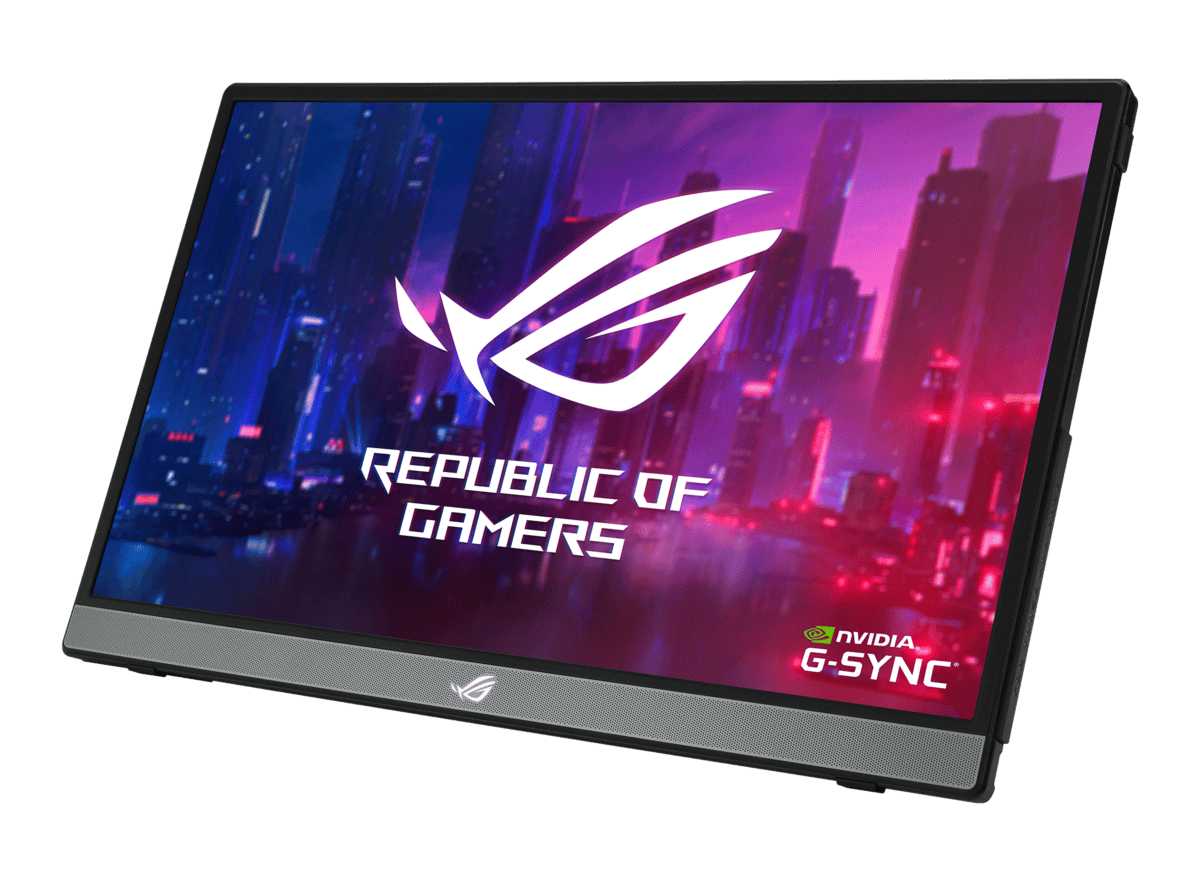
- Portable gaming monitors with 1080p 144Hz panels deliver surprisingly smooth gameplay and cost between $150-250 for quality options
- USB-C connectivity with power delivery means a single cable can connect and power most portable monitors from a laptop
- IPS panels are the best choice for portable monitors, offering wide viewing angles that matter when you can’t always sit perfectly centered
- A 15.6 to 16-inch screen is the sweet spot for portable gaming — large enough to enjoy but still easy to carry in a backpack
Table of Contents
- 144Hz refresh rate for smooth competitive gaming
- Built-in battery and solid kickstand for true portability
- 100% sRGB color accuracy for vibrant, accurate visuals
- Premium price vs other portables
- 1080p trails some mid-range options
- 15.6" limits immersion for casual play
- 2K resolution delivers sharper detail than 1080p panels
- 120Hz handles both gaming and creative work well
- Metal body construction feels durable and premium
- 5ms response slower than the ASUS
- No battery; needs external power
- Heavier metal build for travel
- Lowest price for a functional portable monitor
- Slim, lightweight build travels easily
- USB-C and Mini HDMI inputs for broad compatibility
- 60Hz limits competitive gaming
- ~64% sRGB color accuracy
- Plastic build; less premium than metal
Why a Portable Monitor Is a Practical Tool
Let’s look past the “more screen space” argument. For a gamer or streamer, a portable monitor acts as a command center. It allows for efficient multitasking without compromising your main gameplay screen.
Consider this use case: you’re streaming a competitive FPS like Valorant. Instead of alt-tabbing—a move that could cost you the round—your stream chat and OBS dashboard are always visible on your second screen. You can interact with your audience instantly while staying locked into the game.
The advantage is just as clear for MMO players. You can keep a raid guide or an interactive map open right next to you during a session. There’s no need to memorize complex mechanics or switch windows.
The key benefit is efficiency. These screens consolidate critical information directly into your line of sight.
Justifying the Investment
You are making trade-offs. A portable monitor will not replace your primary gaming display’s performance or size. Think of them as specialized tools designed for function and portability, not raw horsepower.
Build quality is a critical factor. A flimsy stand or an easily scratched screen will degrade the experience quickly, so spending a little more for a durable aluminum body is a practical move.
The market for these devices is growing, with its value projected to hit $2.3 billion by 2034. For those searching for the best portable monitor on a budget, this growth is good news.. Competition is driving prices down and making high-quality panels with solid features more affordable.
A portable monitor’s value isn’t just in having a second screen, but in how it reclaims your primary display for its intended purpose—uninterrupted gaming.
How to Decode Portable Monitor Specifications
Buying a portable monitor means cutting through marketing jargon to find the specs that actually matter for gaming and streaming. A flashy spec sheet doesn’t always translate to a better experience. Understanding the trade-offs is how you find real value.
The most discussed spec is refresh rate, measured in Hertz (Hz). This number indicates how many times the screen updates per second. For fast-paced shooters like Valorant or Apex Legends, a 120Hz or higher refresh rate provides a legitimate advantage, making motion feel smoother and helping you track targets more precisely.
For slower games like MMOs, turn-based strategy titles, or monitoring stream chat, the jump from 75Hz is less noticeable. Do not get upsold on a high refresh rate if your main use cases won’t benefit from it.
Panel Type and Color Quality
The screen’s panel technology dictates color, contrast, and viewing angles. You will mainly encounter two types: IPS (In-Plane Switching) and OLED (Organic Light Emitting Diode), though OLED is rare in the budget category.
IPS panels are the standard for value monitors. They deliver good color accuracy and wide viewing angles, making them a solid all-around choice for gaming and content creation. Their main compromise is contrast—blacks can sometimes appear grayish.
OLED panels offer perfect blacks and vibrant colors because each pixel generates its own light. This creates a more immersive feel in single-player games with dark environments. The downsides are a much higher price and the potential for screen burn-in over time.
For most gamers on a budget, a quality IPS panel provides a good balance between performance and cost. If you are a streamer who also does video editing, find a monitor with a high sRGB color gamut—99% or more—to ensure your content’s color accuracy.
A monitor with a sturdy, adjustable stand and durable frame provides more long-term value than one with a slightly faster panel but a flimsy, unreliable build.
Connectivity and Power Delivery
Connectivity can be a point of frustration if you get it wrong. Most portable monitors use a single USB-C cable for both video signal and power. For this one-cable setup to work, your laptop or device’s USB-C port must support DisplayPort Alternate Mode.
If your device lacks this feature, or if its port cannot supply enough power, you will need to use a separate power source. Many monitors also include a mini-HDMI port, which is useful for connecting to consoles like the Nintendo Switch or older graphics cards. Always check your device’s ports before you buy. To explore more about display technologies, you can find a variety of guides on different types of monitors.
Build Quality and Durability
Never overlook build quality. A portable monitor is meant to be carried around, so durability is a requirement. Look for models with an aluminum chassis, as they are more rigid and dissipate heat better than plastic ones.
Pay close attention to the included stand or case. Many included folio covers are flimsy and offer unstable viewing angles. A monitor with a solid, integrated kickstand is a significant improvement, providing better stability and adjustment. This is an area where spending slightly more is a smart investment.
Comparing the Best Value Portable Monitors
Finding the best portable monitor is not about getting a perfect screen. It’s about choosing your compromises. It’s a game of trade-offs. Instead of listing specs, this section will guide you through which compromises make sense for specific needs. We will examine top contenders and how they stack up in performance, build quality, and overall value.
Best for Competitive FPS Gaming
When playing fast-paced shooters like CS:GO or Valorant, a high refresh rate is a non-negotiable advantage. A screen with a 144Hz panel makes a noticeable difference, delivering smoother motion that helps you track targets more clearly. The trade-off? To achieve this speed at a lower price point, these monitors often sacrifice some color accuracy.
Build quality is another critical factor. You will want a model with a sturdy, integrated kickstand, not a flimsy folio cover that wobbles. A shaking screen during a firefight is a major distraction. Also, consider details like port placement—side-mounted ports are generally better for cable management. For this use case (FPS gaming), the focus is purely on performance.
A 144Hz portable monitor is a strategic buy for competitive FPS players. But that same monitor, with its average color gamut, is a poor choice for streamers who also edit video, where color fidelity is critical.
Best for Streaming and Multitasking
If you are a streamer or a fan of MMOs and RPGs, your priorities are different. You do not need a very fast refresh rate; a stable 75Hz panel is sufficient. What you do need is good panel quality and enough screen real estate to manage OBS, your chat window, and game guides without constantly alt-tabbing.
Look for an IPS panel covering at least 99% sRGB. This ensures color consistency between your portable screen and main display, which is important for your stream’s appearance or for light video editing. A durable but lightweight build is also key, as this monitor will likely be part of both your desk setup and travel kit. A balanced feature set for streaming and MMOs is the goal.
Best All-Around Value
For the gamer who does a bit of everything—from casual gaming to productivity work—the goal is a balanced, versatile monitor. This typically means a 1080p IPS screen, a solid 75Hz refresh rate, and a robust build, preferably with an aluminum frame for rigidity. This combination delivers a good experience across various tasks without charging for niche features you might not use.
This type of monitor can serve as a second screen for your laptop on a trip or as a dedicated display for a Nintendo Switch. It won’t provide a competitive edge in esports, but its reliability and versatility make it a practical purchase. If you’re also looking for a main display, see how these specs compare to our picks for the best budget gaming monitor.
Portable Monitor Value Comparison
This table breaks down our recommended portable monitors to help you see the trade-offs at a glance. We are focusing on the specs that matter most for gamers and streamers on a budget, cutting through marketing fluff to show where each model performs best.
| Model | Price Tier | Refresh Rate / Response Time | Panel & Color Quality | Build & Durability | Best Use Case |
|---|---|---|---|---|---|
| ASUS ROG Strix XG16AHPE | Premium | 144Hz / 3ms | Good IPS, 100% sRGB | Excellent, solid kickstand | Competitive FPS Gaming |
| UPERFECT 16″ 2K 120Hz | Mid-Range | 120Hz / 5ms | Excellent IPS, 100% sRGB | Good, metal body | All-Around Gaming & Creative |
| KYY K3 15.6″ | Budget | 60Hz / 5ms | Standard IPS, ~64% sRGB | Decent, slim plastic build | Streaming & Productivity |
Each of these monitors targets a different need. Your choice depends on whether you prioritize raw speed for competitive play, color accuracy for creative work, or a simple, reliable screen for everyday multitasking. They all represent good value within their respective categories.
Understanding Real-World Performance Tradeoffs
Finding the best budget portable monitor is not about getting a perfect screen. It’s about choosing your compromises. Every dollar you spend is a vote for one feature over another. Knowing which trade-offs to make is how you end up with a monitor that works for you.
Let’s consider a common scenario. You are looking at two monitors, both priced around $150. This is where you will face a critical decision.
The Speed vs. Stability Dilemma
Your first option emphasizes performance. It is a monitor with a 144Hz refresh rate. The body is thin plastic, and it comes with a typical magnetic folio cover that folds into a wobbly stand. Its main selling point is fluid motion for competitive gaming.
Your second option is a standard 60Hz monitor. It has the same screen size and resolution. But its key feature is a solid, all-aluminum frame with an integrated, fully adjustable kickstand. The build quality feels dense and durable.
So, which one is the better purchase? The answer depends on your actual use case.
The most common mistake is overpaying for a single high-performance spec—like a fast refresh rate—while ignoring the component that will frustrate you daily, like a flimsy, unreliable stand.
Scenario 1: For the FPS Gamer
If you are an FPS player who will primarily use this monitor at a stable desk, the 144Hz model is the logical choice. Your main goal is gaining a competitive edge. The smooth motion is a real advantage for tracking targets in fast-paced games like Valorant or Apex Legends.
You can tolerate the flimsy stand. Since it will remain on your desk, you can prop it up or position it to minimize wobble. Here, you are making a deliberate compromise, trading build quality for a direct boost in gaming performance. The weaker construction is a calculated risk for superior speed where it matters.
Our pick here is the UPERFECT 16″ 2K 120Hz. Its 120Hz panel and 2560×1600 resolution deliver the smooth, responsive visuals this setup demands, and the price keeps your overall build budget-friendly.
Scenario 2: For the Traveling Streamer or MMO Player
Now, let’s flip the script. Imagine you are a streamer who travels frequently, or an MMO player who just needs a second screen for Discord and quest guides. In this case, the 60Hz monitor with the premium build is a much smarter long-term investment.
Your priorities are durability and stability. You need a screen you can put in a backpack without worry and set up securely on any surface—a wobbly café table or a cramped hotel desk. The integrated aluminum kickstand offers a level of reliability the folio cover cannot match.
A 60Hz refresh rate is perfectly adequate for managing stream chat or displaying a guide. The high refresh rate of the other monitor would be wasted. You are trading raw speed you don’t need for the practical benefit of a tough, dependable build. This choice prioritizes longevity and functional stability over a spec that offers no real advantage for your tasks.
For this use case, the ASUS ROG Strix XG16AHPE is the clear choice. Its integrated aluminum kickstand, built-in 7800mAh battery, and premium build quality make it a reliable travel companion that will last for years.
Integrating a Portable Monitor into Your Setup
You’ve unboxed your new portable monitor. Getting it running is usually simple, but a few quick checks will ensure you’re getting the performance you paid for.
Taking a minute to do this right avoids common frustrations like a choppy refresh rate or incorrect resolutions, turning a potentially clumsy first impression into a seamless one.
The physical connection is straightforward. For most modern laptops, a single USB-C to USB-C cable is all you need. It handles both the video signal and power, provided your laptop’s port supports DisplayPort Alternate Mode.
If you’re connecting a console like the PS5, Xbox, or Nintendo Switch, you’ll typically use the mini-HDMI to HDMI cable for video and a separate USB-C cable for power.
Optimizing Your Display Settings
Once it’s plugged in, do not assume everything is optimized. Your operating system often defaults to a lower refresh rate, like 60Hz, even if your new monitor can handle 144Hz.
Here’s how to fix that on Windows:
Right-click on your desktop and choose Display settings.
Scroll down and click on Advanced display.
Make sure your portable monitor is selected from the dropdown menu.
Under Choose a refresh rate, set it to the highest option available.
This small adjustment makes a significant difference, especially in fast-paced games. For streamers, it’s also a good idea to ensure your resolution and scaling are consistent across both screens. You can find more tips on that in our complete streaming setup for beginners guide.
A common mistake is to plug in a high-refresh-rate monitor and never actually activate its top speed in the OS settings. Always verify your display is running at its advertised refresh rate to get your money’s worth.
Essential Accessories for a Better Experience
The included folio cases and stands are functional at best. They often wobble and offer poor ergonomics. A few inexpensive accessories can completely change the experience.
A dedicated compact tablet stand will provide far better viewing angles and stability than any folio cover, preventing neck strain during long sessions. To improve cable management, a set of right-angle USB-C and HDMI adapters is a good investment. They prevent cables from sticking straight out, which reduces strain on the ports and creates a cleaner look.
If you are building a full mobile workstation, you could also look into peripherals like folding Bluetooth keyboards. Technology is improving and becoming more affordable, with features like USB-C and touchscreens becoming standard even on budget models.
Common Questions About Portable Monitors
When shopping for a portable monitor, a few practical questions often come up. Here are direct answers to help you make an informed decision.
Can I Power It Directly from My Laptop or Console?
Most modern portable monitors can run off a single USB-C cable from your laptop, which handles both power and video. However, your laptop’s USB-C port must support DisplayPort Alternate Mode and deliver sufficient wattage.
For high-performance gaming monitors with 120Hz+ refresh rates, you will often achieve better brightness and stability by using the separate, dedicated power input. When connecting a console like the Nintendo Switch, you will almost always need to use its official power adapter to supply enough power for both devices to run correctly.
Is a High Refresh Rate Really Worth It?
This depends entirely on your use case. If you primarily play fast-paced, competitive shooters like Valorant, Apex Legends, or CS:GO, then yes—a 120Hz or 144Hz screen provides a tangible advantage. The smoother motion makes tracking targets easier.
However, if you are a streamer who needs a second screen for chat, or you mostly play slower-paced MMOs, RPGs, or strategy games, a standard 60Hz or 75Hz monitor is sufficient. Do not overspend on a high-end spec you won’t use. That money is better invested in a model with a sturdier build or more accurate colors.
For budget-conscious gamers, the smartest move is to match the refresh rate to your primary use case. Paying a premium for 144Hz just to display a static Discord window is a waste of money.
Do I Need a 4K Portable Monitor?
For the typical 15.6-inch screen size of most portable monitors, 1080p (Full HD) resolution is the ideal balance. At this size, the pixel density is already quite sharp, making the visual benefit of 4K minimal for most users.
A 4K panel also costs significantly more and consumes more power—a major drawback for a portable device. You will have a better gaming experience with a high-quality 1080p IPS panel that has a good refresh rate and solid colors than with a cheap 4K screen that has slow response times and poor visuals. For this form factor, focus on panel quality, not just pixel count.
At Budget Loadout, we believe in getting the best performance for your dollar. Our guides cut through the hype to help you build a setup that wins without breaking the bank. Find more honest, value-focused reviews at https://budgetloadout.com.
Related Articles