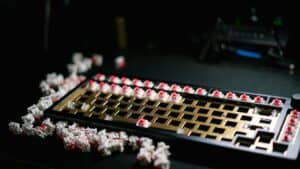
Finding a high-performance gaming keyboard under $100 isn’t about compromise anymore—it’s about making smart choices. The top gaming keyboards under $100 can deliver the responsive switches and durable build you’d expect from models costing twice as much. This guide cuts through the marketing to show you that a competitive gaming feel doesn’t require a premium price tag.

- Under $100 you can get a quality mechanical gaming keyboard with genuine Cherry MX or Gateron switches — no need to settle for membrane
- TKL (tenkeyless) keyboards free up valuable desk space for wider mouse movements without sacrificing essential keys
- Hot-swappable keyboards in this price range let you experiment with different switch types without buying a whole new board
- Brand-name gaming keyboards often charge a premium for RGB software suites — lesser-known brands deliver equal typing quality for less
- PBT keycaps and aluminum frames are the two build quality markers that separate good budget keyboards from disposable ones — prioritize these over flashy features
Table of Contents
- IP32 water-resistant design protects against spills
- Included magnetic wrist rest for added comfort
- Quiet membrane switches for noise-sensitive setups
- Membrane lacks mechanical feel
- Not hot-swappable
- TKL layout; no number pad
- Hot-swappable Gateron mechanical switches
- Clean, minimal design suits office and gaming
- Solid build quality with USB-C connectivity
- Wired only; no wireless
- Stock ABS keycaps are basic
- No software for key remapping
- Mecha-membrane switches deliver a satisfying tactile click with a soft cushioned landing
- Per-key Chroma RGB with Razer Synapse offers deep customization and game integration
- Included magnetic wrist rest adds comfort during long typing and gaming sessions
- Mecha-membrane feel may not satisfy gamers seeking a true mechanical switch experience
- Full-size layout takes up more desk space than TKL or 60% alternatives
- At ~$70, it sits near the upper end of budget pricing for a non-mechanical board
- Full aluminum body feels premium and provides excellent rigidity for the price
- Double-shot PBT keycaps resist shine and legend fading better than ABS alternatives
- HyperX Red linear switches offer smooth, quiet keystrokes ideal for gaming
- 60% layout lacks dedicated arrow keys and function row, requiring key layer combos
- Compact size may feel cramped for gamers used to full-size or TKL boards
- Wired-only with detachable USB-C — no wireless connectivity option
Your Search Ends Here
Our analysis is direct, designed to help you buy a keyboard that genuinely improves your gameplay, not just one that looks the part. Let’s break down the real-world tradeoffs you’ll face at this price point.
Common Tradeoffs in This Price Range
Build Materials: Keyboards under $100 typically use ABS plastic for the case and keycaps instead of more resilient PBT plastic or a full aluminum frame. While the build quality can be solid, ABS keycaps will develop a shine after heavy use.
Software and Features: You’ll often find simpler, less polished software for tweaking lighting and macros. Extras like dedicated media keys or a USB pass-through port are also less common.
Switch Variety: While plenty of solid mechanical switches are available, you’re less likely to find specialized options like Hall Effect or specialized switches without making sacrifices elsewhere.
Despite these tradeoffs, the core performance is reliable. Key metrics like switch responsiveness, anti-ghosting, and low input latency are no longer luxury features. You can get a board that feels and performs well for FPS, MMO, and streaming without overspending.
The critical takeaway is this: you don’t need to spend over $150 for a competitive advantage. A well-chosen keyboard under $100 provides the speed and reliability needed for any gaming scenario, from casual sessions to competitive matches.
Before we dive deep, here’s a quick look at our top picks to give you an immediate overview of the best value out there.
Top Gaming Keyboards Under $100 At a Glance
This table offers a quick summary of our top recommended keyboards, highlighting their key strengths and who they’re for, helping you make a fast, informed decision.
| Keyboard Model | Primary Use Case | Key Feature | Price Range |
|---|---|---|---|
| SteelSeries Apex 3 TKL | Streaming & Quiet Gaming | Water-resistant, quiet switches | ~$35 |
| Keychron C1 | FPS Gaming & Typing | Hot-swappable switches, Mac/Win support | $60 – $70 |
| Razer Ornata V3 | RGB Enthusiasts & Streamers | Individually backlit keys, quiet feel | ~$70 |
| HyperX Alloy Origins 60 | FPS Gaming & Compact Setups | 60% layout, PBT keycaps, aluminum frame | ~$70 |
Each of these keyboards nails the fundamentals for its target audience, proving you can get specialized performance on a sensible budget.
Understanding the Keyboard Specs That Actually Matter
When you’re hunting for the top gaming keyboard under $100, it’s easy to get lost in marketing terms. To make a smart choice, you need to ignore the noise and focus on the core components that dictate how a keyboard actually feels and performs when you’re in a game.
Let’s cut right to it.
The first, and most important, decision you’ll make is the switch type. This mechanism under each keycap is the heart of the keyboard. It controls the feel, sound, and responsiveness of every press. In the sub-$100 bracket, you’re almost exclusively looking at mechanical switches, which are a significant upgrade in durability and feel over older membrane tech.
These mechanical switches generally fall into three camps.
Linear, Tactile, or Clicky Switches
Linear Switches (e.g., Red): These are defined by smooth, uninterrupted travel. There’s no bump or click—just a straight press from top to bottom. This makes them well-suited for FPS and action games where you need to repeatedly press keys quickly. Streamers often prefer them since they’re relatively quiet.
Tactile Switches (e.g., Brown): If you want confirmation that your keypress registered, this is your choice. Tactile switches provide a noticeable “bump” midway through the press, letting you feel the actuation point. This makes them a balanced all-around option for both gaming and typing.
Clicky Switches (e.g., Blue): These give you both the tactile bump and an audible “click.” Many people find that sound satisfying for typing, but it can be loud. If you stream or play with an open mic, your teammates and audience will hear every press.
While brands like Cherry MX are well-known, many budget keyboards use high-quality alternatives from Gateron or Kailh. These switches often deliver a nearly identical feel and are still rated for 50 million keystrokes or more, so you’re not sacrificing long-term durability. To get a better handle on the subtle differences, you can check out our guide on what Cherry MX switches are and how they compare to the competition.
Build Quality and Durability
A keyboard’s frame is just as important as its switches. A flimsy plastic chassis that flexes under pressure is distracting and feels cheap. Pay close attention to the materials.
Many of the best options under $100 use a hybrid design: a sturdy plastic base topped with an aluminum top plate. This gives the keyboard rigidity and a satisfying weight without increasing the price significantly. It feels stable on your desk and makes a tangible difference in durability. A full aluminum body is rare at this price.
Keycaps are the other part of the durability equation. Most boards in this range use ABS (Acrylonitrile Butadiene Styrene) plastic. It’s tough and inexpensive, but it has one downside—over time, the oils from your fingers will make the keys develop a smooth, shiny look. A few budget models might offer PBT (Polybutylene Terephthalate) keycaps, which have a textured feel and are far more resistant to that shine.
The real indicator of a durable budget keyboard is a combination of a rigid frame (look for a metal top plate) and reliable switches. Even with ABS keycaps, a well-built board will withstand years of competitive use.
Form Factor: Finding Your Size
Finally, you need to pick a size, or form factor. This isn’t just about aesthetics; it directly impacts your ergonomics and how much room you have for your mouse, which is critical for aiming in many games.
Full-Size (100%): This is the traditional layout with a dedicated number pad. It’s a good choice if your gaming rig doubles as a workstation or if you play MMOs and want those extra keys for binding abilities.
Tenkeyless or TKL (80%): This is the most popular layout for gamers. By removing the number pad, you free up desk space for large mouse movements. For FPS players who use low sensitivity, this extra room is a major advantage.
Compact (60% or 65%): These minimalist boards remove the function row, arrow keys, and navigation cluster. They offer the maximum desk space, but the tradeoff is that you have to use key combinations to access those missing functions. It’s a clean look, but can be impractical for productivity or certain games.
A Head-to-Head Comparison of Top Contenders
Now for the main event. It’s time to pit the most promising keyboards in the sub-$100 category against each other in a detailed, side-by-side analysis. To keep things direct, I’m judging each model on the same framework, focusing on what matters to a budget-conscious gamer.
I’ve zeroed in on four key areas for this showdown:
Build Quality and Design: How does it feel to use? Is the construction solid enough to handle the stress of intense gaming, or does it feel flimsy?
Switch Performance: How do the keys respond in-game? I tested for actuation speed, consistency, and overall feel across different genres.
Software and Usability: Is the software intuitive for setting up macros and customizing lighting, or is it frustrating to use?
Overall Value: Does the keyboard justify its price tag with a strong balance of features, performance, and durability?
This quick visual breaks down the core specs that define a quality gaming keyboard in this price range. It’s the blueprint for what we’re looking for.
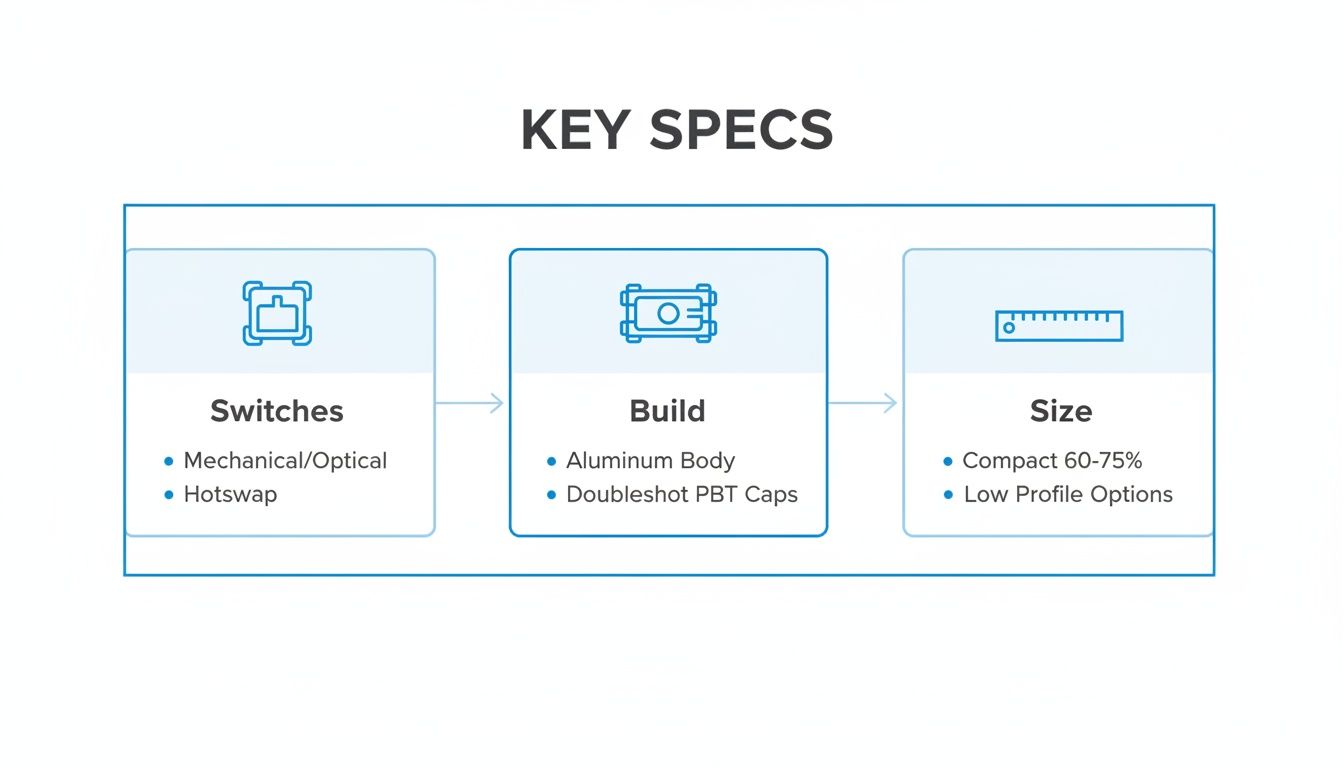
As the graphic shows, the best options consistently blend tactile mechanical switches, durable build materials like aluminum and PBT, and compact, gamer-friendly layouts.
SteelSeries Apex 3 TKL: Quiet & Resilient
The SteelSeries Apex 3 TKL uses its own “Whisper Quiet” tactile switches instead of traditional mechanical ones. They offer a soft, almost membrane-like feel but with durability and responsiveness closer to a true mechanical keyboard.
For FPS gamers or streamers in a shared space, this is a significant advantage. The near-silent operation means your microphone won’t pick up distracting key clicks, and the subtle tactile bump provides just enough feedback to confirm your actions without the noise. The TKL form factor also frees up critical desk space for wide mouse movements.
Its build quality is rugged for the price, featuring an IP32 water and dust resistance rating. This makes it a durable choice for anyone prone to accidental spills. The main tradeoff is the feel; if you’re a mechanical purist, the softer press might feel less precise than a genuine linear or tactile switch.
The Apex 3 TKL’s key strength is its blend of quiet operation and spill resistance. It’s a practical choice for gamers who need a reliable, low-profile keyboard that won’t disturb others.
The software, SteelSeries Engine, is a plus. It’s clean, easy to use, and offers extensive customization for its 8-zone RGB lighting and macro programming—a feature often lacking on budget boards.
Keychron C1: The FPS Player’s Choice
The Keychron C1 stands out for one primary reason: hot-swappable switches. This feature, normally found on more expensive keyboards, lets you change out the mechanical switches without any soldering. This offers a level of customization that is unmatched at this price point.
You can start with Gateron Red linear switches for fast-paced FPS gaming and later swap in Tactile Browns for a better typing experience. This flexibility makes the C1 an excellent long-term investment for gamers who like to tinker with their setup.
The build quality is solid, with a plastic frame reinforced by an aluminum top plate that eliminates any noticeable flex. Its durability is a key advantage. It also comes with a detachable USB-C cable, which adds to its portability and longevity. As a thoughtful touch, it includes keycaps for both Windows and macOS.
The Keychron C1’s hot-swappable switches offer unmatched customization at this price, but its firmware-based setup may deter macro-heavy gamers who prefer dedicated software.
The main tradeoff here is the lack of dedicated software. Customization is handled through firmware like QMK/VIA, which is powerful but has a steeper learning curve than the apps from Razer or SteelSeries. If you’re an MMO player who relies on complex, easily programmed macros, this could be a dealbreaker.
Razer Ornata V3: The Mecha-Membrane Option
The Razer Ornata V3 is aimed squarely at gamers who prioritize aesthetics and a quiet typing experience. Its biggest draw is the individually backlit keys, which allow for per-key RGB customization through Razer’s Chroma Studio software. For streamers wanting to sync their keyboard lighting with their on-screen action, this is a major feature.
This keyboard uses Razer’s mecha-membrane switches, a hybrid design that combines a soft membrane cushion with a tactile click midway through each keypress. This makes it a good fit for shared living spaces or for streamers who don’t want their mic picking up constant clicking. The performance is solid for casual gaming, but competitive players will miss the crisp actuation of a mechanical switch.
The build quality is standard for an all-plastic board. It’s lightweight but feels sturdy enough for regular use and includes spill resistance. Durability is a consideration; membrane keyboards don’t have the same lifespan as mechanicals. This is largely because mechanical switches are rated for 50-100 million presses compared to the 5-10 million of most membrane switches.
The Ornata V3 is a strong choice for RGB enthusiasts and streamers on a budget. Its per-key backlighting and software integration are excellent, but the membrane switches are a clear tradeoff for competitive performance.
For players already invested in the Razer ecosystem, the Ornata V3 integrates seamlessly, offering a cohesive visual setup. If your budget is a bit tighter, you can explore other options in our guide to the best gaming keyboards under $50 that still offer good value.
HyperX Alloy Origins 60: The Compact Mechanical Option
The HyperX Alloy Origins 60 takes a different approach to budget gaming keyboards with its ultra-compact 60% form factor. By eliminating the numpad, arrow keys, and function row, it frees up massive desk space for mouse movement — a real advantage for FPS players who use low sensitivity settings.
Under the hood, it uses HyperX Red linear mechanical switches that deliver smooth, quiet keystrokes with a fast actuation. The double-shot PBT keycaps are a standout at this price, resisting shine and legend fading far better than the ABS caps found on most budget boards. Full RGB backlighting is customizable through HyperX NGENUITY software.
The build quality punches above its weight. The full aluminum body feels premium and adds rigidity you won’t find on plastic-framed competitors. At ~$70, it sits at the top of this article’s budget, but the PBT keycaps, aluminum frame, and genuine mechanical switches make a strong case for the investment. The main tradeoff is the 60% layout itself — if you rely on dedicated arrow keys or a function row, you’ll need to use key layer combinations, which takes some adjustment.
Detailed Spec Comparison of Budget Gaming Keyboards
To help you see the differences at a glance, I’ve broken down the key specifications of our top contenders. This table cuts through the marketing fluff and gets straight to what matters for your gaming setup.
| Model | Switch Type | Form Factor | Keycaps | Build Material | Connectivity | Software Support |
|---|---|---|---|---|---|---|
| SteelSeries Apex 3 TKL | Whisper Quiet (Hybrid) | TKL | ABS | Plastic with IP32 | Wired (Attached) | SteelSeries Engine |
| Keychron C1 | Gateron Mechanical (Hot-Swap) | TKL | Double-Shot ABS | Plastic + Aluminum Plate | Wired (Detachable USB-C) | QMK/VIA (Firmware) |
| Razer Ornata V3 | Mecha-Membrane | Full-Size | ABS | Plastic | Wired (Attached) | Razer Synapse/Chroma |
| HyperX Alloy Origins 60 | HyperX Red Optical | Full-Size | ABS | Plastic + Aluminum Plate | Wired (Attached) | HyperX NGENUITY |
Ultimately, the best choice comes down to your personal priorities. Whether you value quiet performance, deep customization, brilliant RGB, or macro dominance, there’s a keyboard here that delivers without emptying your wallet.
Choosing the Right Keyboard for Your Playstyle

The best gaming keyboard under $100 isn’t a single product—it’s the one that fits the games you play. A keyboard that’s ideal for the frantic action in Valorant can feel wrong for managing cooldowns in Final Fantasy XIV. This section gives you practical recommendations based on specific use cases.
We’re going to look at four common types of players and match them with the keyboard that best fits their needs. This way, you’re choosing based on real-world performance, not just a spec sheet.
For the Competitive FPS Player
FPS players need instant actuation, zero input lag, and a layout that gives their mouse as much room as possible. For games like CS2 and Apex Legends, a Tenkeyless (TKL) form factor is almost a requirement.
Your ideal keyboard needs fast, linear switches. The smooth, straight-down press of a linear switch lets you double-tap and strafe without the slight resistance of a tactile bump. The build quality must also be solid enough to handle high-pressure moments without flexing.
Based on these demands, the Keychron C1 with Gateron Red linear switches is an excellent fit. Its TKL layout provides ample space for low-sensitivity mouse aiming, and the aluminum top plate ensures a durable, rock-solid feel. Because it’s hot-swappable, you can install even faster switches later on.
For the MMO and RTS Player
MMO and RTS gamers have a different set of priorities. When you’re managing complex ability rotations in World of Warcraft or firing off unit commands in StarCraft II, programmable key layers are your best friend. A compact layout is usually the way to go.
For this player, being able to record a sequence of commands and assign it to a single key press is a massive advantage. The keyboard’s software has to be functional and easy to use, and a wrist rest is a huge plus for long raid nights.
The HyperX Alloy Origins 60 is the clear choice here. It provides a compact mechanical layout and software that’s robust enough to handle complex programming. Its full-size layout, included magnetic wrist rest, and USB/audio passthrough are built for comfort during long sessions. The linear mechanical switches deliver smooth response times than traditional mechanical alternatives, giving you an edge in reaction-heavy moments.
For the Streamer and Content Creator
For streamers, it’s a balance between gaming performance and audio quality for the audience. A loud, clacky keyboard can be a huge distraction on a microphone, forcing you to use noise suppression that can degrade your audio. Aesthetics also matter; a clean setup with good RGB lighting looks more professional on camera.
A good streaming board needs a quiet feel that doesn’t sacrifice responsiveness. Per-key RGB lighting lets you sync up your gear for a cohesive look, while a solid build ensures it looks good on stream.
For streamers, a keyboard’s sound profile is a critical feature, not an afterthought. Loud, clicky switches can force you to rely heavily on noise suppression software, which can degrade audio quality.
The Razer Ornata V3 is built for this exact scenario. Its mecha-membrane switches are quiet, and its per-key Chroma RGB is among the best at this price for creating a visually engaging stream. If you need a mechanical feel, our guide to the quietest mechanical keyboard switches can point you toward alternatives that won’t bleed into your mic.
For the Hybrid Gamer and Typist
Many people use the same keyboard for everything—work, school, and gaming. If that’s you, you need a versatile board that offers a great typing experience without compromising on gaming features. Tactile switches are usually the best middle ground, giving you satisfying feedback for typing accuracy while still being fast enough for gaming.
A clean, minimalist design is often a plus, as is a reliable build that can handle thousands of words being typed every day.
The Keychron C1 with Gateron Brown tactile switches is the top contender for this hybrid role. Its excellent typing feel, durable build, and easy Mac/Windows compatibility make it a true workhorse. The TKL layout saves desk space, and its understated design looks appropriate in any setting.
Our Final Verdict on Value and Performance
After testing these keyboards, one thing is clear: finding the best gaming keyboard under $100 is about choosing the right tradeoffs. You don’t have to spend a lot to get a competitive edge, but you do have to be smart about which features matter most to you.
We’ve seen boards that prioritize switch performance, others that focus on customization, and some that are built for durability. The good news is that core gaming essentials—like reliable switches and a sturdy frame—are no longer premium luxuries. Let’s break down our final picks based on what kind of player you are.
Best Overall Value
For the gamer who needs a keyboard that balances performance, build quality, and features, our top pick for all-around value is the Keychron C1 (Hot-Swappable version). It nails the balance between a great mechanical feel, a rugged build with its aluminum top plate, and the long-term flexibility of hot-swappable switches.
That last feature is a game-changer. It means you can experiment with different switch types down the road without having to buy a whole new keyboard. Its clean, TKL layout is ideal for most gaming setups, and while it lacks flashy software, its core performance and durability are so good that it remains the best complete package for the money.
Top Performer for Raw Speed
If your entire focus is on reaction time in competitive shooters, the HyperX Alloy Origins 60 with HyperX Red linear switches is your weapon of choice. These linear switches are built for fast, smooth actuation.
Their 1.5mm actuation distance and light-based activation mean your inputs register 25% faster than traditional mechanical switches. It’s a tangible advantage in reaction-based games where a split second makes all the difference. The solid build, 4000Hz polling rate, and included wrist rest are bonuses, but you’re buying this for its raw, unfiltered performance. It’s a no-nonsense tool for the serious competitor.
A sub-$100 keyboard can absolutely deliver a competitive and satisfying gaming experience. The decision comes down to knowing which features to prioritize—like switch type or form factor—and which trade-offs, such as ABS keycaps or simpler software, are acceptable for your specific needs.
Most Feature-Rich Option
For streamers, MMO players, and anyone who wants their keyboard to be a command center, the HyperX Alloy Origins 60 wins again, but this time for its impressive feature set. Finding dedicated macro keys, HyperX Red mechanical switches, PBT keycaps, and a The aluminum frame adds premium durability at this price point.
This keyboard gives you the tools to manage complex gameplay, whether you’re programming intricate ability rotations in an MMO or firing off stream commands with a single keypress. The fact that all these features are packed into a durable frame makes it a versatile and powerful hub for any gaming station.
Got Questions? We’ve Got Answers
Stepping into the world of budget gaming keyboards can bring up a lot of questions. Let’s tackle the most common concerns to help you lock in your choice.
Are Mechanical Keyboards Under $100 Actually Durable?
Yes, as long as you know what to look for. The durability in this price range comes from the switches. While you might not see Cherry MX branding, you’ll find solid alternatives from Gateron or Kailh, which are typically rated for 50 million keystrokes. That’s far more than the 5-10 million presses a standard membrane keyboard can handle.
The main durability tradeoff you’ll notice over time is in the keycaps. Most boards under $100 use ABS plastic, which can develop a slick, shiny look from finger oils. To maximize durability, look for a model with a rigid aluminum top plate. It prevents the chassis from flexing and protects the keyboard’s internal components better than an all-plastic frame.
What’s the Biggest Sacrifice When Buying a Keyboard Under $100?
The most common tradeoffs are in three areas: materials, software polish, and brand-name components. You’re likely to find ABS keycaps, less intuitive companion software, and switches from manufacturers other than Cherry MX.
The crucial thing to understand is that core performance is no longer the main sacrifice. Things like low input latency and consistent switch feel are surprisingly competitive with pricier keyboards, giving you a high-performance experience where it counts.
Where manufacturers cut costs is on luxury features like dedicated media controls, USB pass-through ports, and premium PBT keycaps. The good news is that none of those things directly impact your in-game performance.
Is a Wired Keyboard Better Than Wireless for Gaming Under $100?
For anyone playing competitive games on a budget, a wired connection is still the best option. It guarantees the lowest possible latency and eliminates any worries about battery life or signal interference. That’s the foolproof consistency you need in a fast-paced FPS or MMO.
At Budget Loadout, we believe you shouldn’t have to overspend to get a competitive edge. Our guides are designed to help you find high-performance gear that fits your budget. For more honest reviews and value-focused recommendations, visit us at https://budgetloadout.com.
Related Articles