When you’re hunting for the best gaming headsets under $50, the smart money is on wired models from established brands like HyperX or Razer. They consistently deliver better sound and durability than a no-name wireless set at the same price. For pure gaming performance, a solid stereo headset is your most reliable bet. This guide cuts the marketing hype and tells you what to look for.
- The HyperX Cloud Stinger 2 at ~$20 is the best pure value in budget gaming headsets, delivering 50mm driver audio for less than most earbuds
- The Logitech G432 brings 7.1 surround sound via DTS Headphone:X 2.0 at ~$37, a rare feature under $50
- Prioritize audio clarity and mic quality over flashy features — in competitive games, hearing footsteps clearly matters more than RGB lighting
- A 3.5mm wired connection ensures universal compatibility across PC, PlayStation, Xbox, and Nintendo Switch without adapter hassles
- Memory foam ear cushions and lightweight builds under 300g are key for comfort during long gaming sessions
Table of Contents
- Exceptional value at ~$20 with genuine 50mm driver audio quality
- Swivel-to-mute mic is intuitive and reliable for quick communication control
- Lightweight design with memory foam cushions stays comfortable during long sessions
- Wired-only 3.5mm connection with no USB or wireless option
- Plastic build feels lighter compared to premium headsets in the $40-50 range
- No virtual surround sound — stereo output only without software enhancement
- DTS Headphone:X 2.0 delivers 7.1 surround sound for spatial audio advantage
- Dual connectivity with both USB and 3.5mm for PC and console flexibility
- 50mm drivers provide rich, balanced audio across game genres
- Leatherette ear pads may feel warm during extended summer gaming sessions
- Heavier at ~280g compared to ultralight budget alternatives
- Surround sound features require USB connection and Logitech G Hub software
What a Gaming Headset Under $50 Actually Delivers
Let’s be direct. When you’re spending less than $50 on a gaming headset, you’re buying a set of compromises. The goal isn’t finding a perfect headset—it’s finding one with the right compromises for how you play. You’re looking for value, not just the cheapest option.
This isn’t a niche market. Entry-level headsets are extremely popular. Industry reports show the under-$50 category pulled in about 43% of all gaming headset revenue in 2024. That proves there’s massive demand from gamers who want something that works well without breaking the bank. You can learn more by checking out the latest gaming headset market research.
The Realities of Budget Audio
First, forget about wireless. To get a wireless headset under $50, manufacturers have to gut the quality of everything else—audio drivers, microphone, and build quality. A wired connection is non-negotiable if you want the best performance for your dollar.
If you’re specifically shopping for wired headphones with a noise cancelling mic, ArmorSound has a detailed guide that breaks down the best options and what to look for.
It delivers clean, reliable audio with zero latency, which is critical in competitive shooters where a split-second delay means losing a gunfight.
You also need to be skeptical of buzzword features like “7.1 virtual surround sound.” At this price, it’s usually just a software gimmick that muddies the audio, making it harder to pinpoint where enemy footsteps are coming from.
A clean, well-tuned stereo headset will give you more accurate directional audio than a poorly implemented virtual surround system. For competitive play, clarity beats gimmicks every time.
Build Quality and Durability
This is where most cheap headsets fail—literally. The real difference between a $25 piece of junk and a solid $45 headset is build quality. Look past the RGB lights and inspect the fundamentals.
Headband: Is it a single piece of creaky plastic, or does it have a metal-reinforced core? That metal strip is what helps it survive being dropped or tossed on your desk.
Joints and Hinges: These are classic weak spots. Cheap models use thin plastic that cracks under stress. A good budget headset will feel more robust where the earcups connect to the headband.
Cable: A thin, non-detachable rubber cable is a liability. The moment it frays, the headset is trash. Look for models with a thicker braided cable or, even better, a detachable 3.5mm cord you can replace if it gets damaged.
By focusing on these core elements—reliable wired sound and a sturdy build—you can find a gaming headset under $50 that performs well and lasts long enough to be a smart purchase.
The Four Pillars of a Great Budget Headset
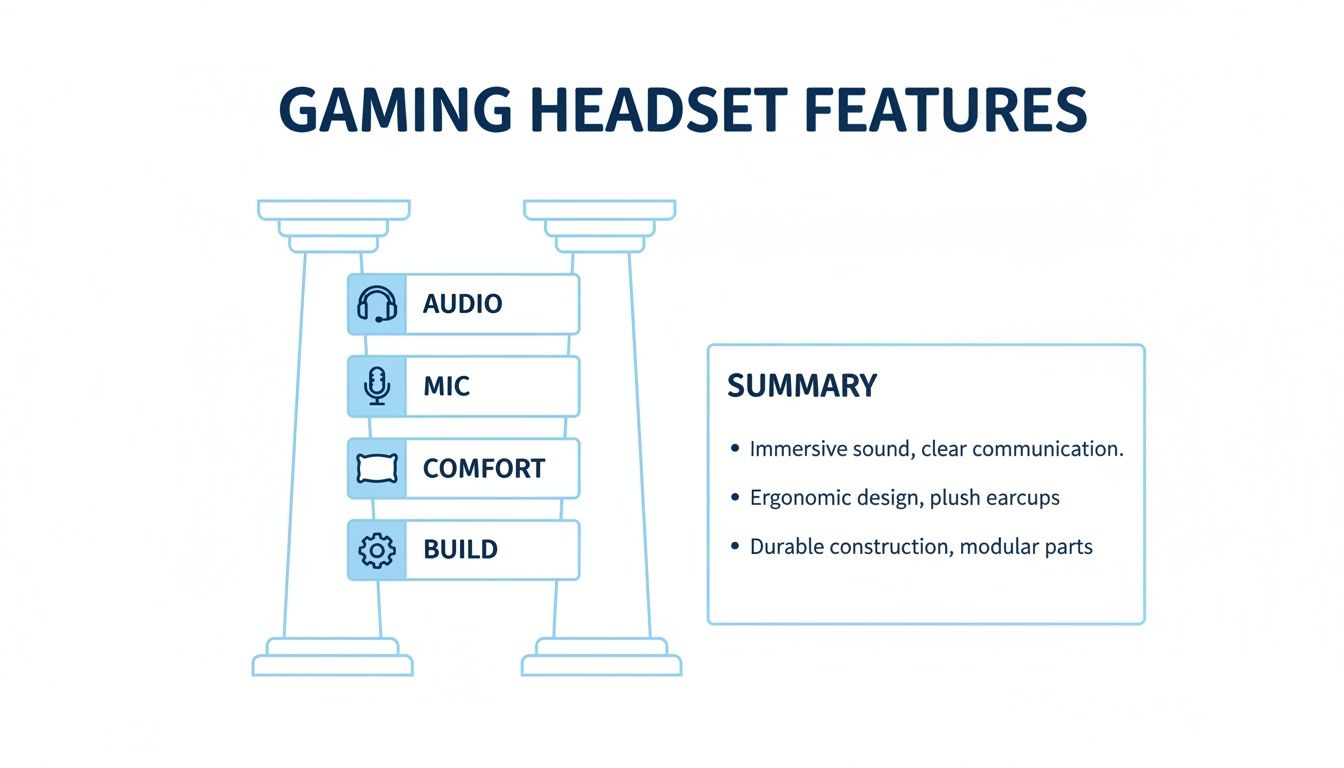
When you’re looking for a gaming headset under $50, it’s easy to get lost in specs and marketing nonsense. To cut through the noise, focus on four things. Get these right, and you’ll have a headset that’s an asset, not junk destined for a drawer.
These are the four pillars: Audio Performance, Microphone Clarity, Comfort, and Build Quality. A failure in any one of these ruins the entire experience. Let’s break down what actually matters for each at this price point.
Pillar 1: Audio Performance That Gives You an Edge
First, forget “7.1 surround sound” software. In the sub-$50 bracket, this is almost always a cheap gimmick that makes the audio worse. What you need is clean, accurate stereo sound.
Good stereo imaging creates a “soundstage,” letting your brain naturally pinpoint the direction and distance of critical in-game sounds.
For FPS Gaming (e.g., Valorant, Apex Legends): This is non-negotiable. You need to hear the subtle clink of a grenade pin to your left or the precise location of enemy footsteps above you. A muddy, bass-boosted headset just drowns out these vital cues.
For MMOs and RPGs (e.g., Final Fantasy XIV, Elden Ring): Clear audio makes the world feel alive. Environmental details and the score hit much harder with a well-balanced headset.
For Streaming: A bass-heavy headset can be fatiguing to listen to for hours. A balanced profile is better for monitoring your own voice and game audio during long sessions.
Pillar 2: Microphone Clarity for Clean Comms
A bad microphone doesn’t just suck for you; it annoys your entire team. The goal under $50 isn’t to find a broadcast-quality mic for streaming. The goal is simple: find one that delivers your voice clearly without a ton of background noise.
Look for mics advertised as unidirectional or cardioid. This just means they’re designed to pick up sound from right in front of them (your mouth) and reject ambient noise like your keyboard or a fan. A muffled, distorted mic is a classic sign of cost-cutting in cheap headsets.
The test is simple: can your teammates understand your callouts during a chaotic firefight without asking you to repeat yourself? If the answer is no, the mic has failed its job.
Pillar 3: All-Day Comfort for Long Sessions
A headset can sound great, but if it gives you a headache after 30 minutes, it’s useless. Comfort comes down to three things, and it’s a personal checklist.
Clamping Force: This is how tightly the headset squeezes your head. Too much, and you’ll get pressure points, especially if you wear glasses. Too little, and it will slide off.
Earcup Materials: Most budget headsets use pleather or fabric. Pleather offers better noise isolation but can get hot and sweaty. Fabric is more breathable but lets in more outside sound.
Weight: Lighter is almost always better. For long gaming sessions, a headset under 300 grams will be far more comfortable than a heavy, clunky one.
Pillar 4: Build Quality and Real-World Durability
This might be the most important pillar for a budget headset. Durability is what separates a smart investment from something you’ll replace in six months. The failure points are almost always the same.
Weak Plastic Joints: Listen for creaky, thin plastic where the earcups connect to the headband. This is where most budget headsets snap.
Non-Detachable Cables: A permanently attached cable is a single point of failure. Once it frays or gets yanked, the headset is trash. A detachable 3.5mm cable is a massive durability win.
Headband Integrity: The best budget options have a flexible metal strip running through the plastic headband. It’s a small detail that adds significant strength and resilience.
Our Best Gaming Headsets Under $50
Let’s cut to the chase. Finding the best gaming headset under $50 means sifting through options that all look the same. We’ve compared dozens, focusing on what matters in-game: clear audio, a decent mic, and a build that won’t fall apart.
Below are the headsets that deliver genuine value. We’ll be direct about what they do well and, just as importantly, where they cut corners.
In this price bracket, everything is a trade-off. A headset that nails its audio might use cheaper plastic to hit the sub-$50 price. Understanding that give-and-take is key.
HyperX Cloud Stinger 2: The Reliable All-Rounder
The HyperX Cloud Stinger 2 has dominated the budget space for years because it gets the fundamentals right. This is a no-frills workhorse that prioritizes performance over flashy lights.
Audio Performance: The sound is smartly balanced for gaming. In Valorant, the audio is clean enough to pick out enemy footsteps without muddy, overpowering bass getting in the way. It’s not rich enough for cinematic RPGs, but its stereo imaging is precise. Best for: FPS gaming.
Microphone Clarity: The mic is solid. Your teammates on Discord will hear you clearly without much static or background hum. It’s not streamer-quality, but for competitive callouts, it’s reliable. The flip-to-mute feature is practical.
Build and Durability: This is where the Stinger 2 pulls ahead. It has a steel slider in the headband, giving it surprising durability. The rest is plastic, but it feels sturdy and doesn’t have the cheap creakiness common at this price.
The Tradeoff: Comfort can be an issue. The earcups are small, and the clamping force is noticeable, especially if you have a larger head or wear glasses. It’s lightweight, but it wasn’t built for eight-hour marathon sessions.
Logitech G432: The Feature-Packed Contender
If you play for long sessions, the Logitech G432 should be on your list. It’s incredibly lightweight and designed to be worn for hours without causing fatigue.
Audio Performance: The G432 is tuned with a much heavier bass response. This makes explosions in single-player games feel punchy. The downside? That bass can muddy the audio in competitive shooters, making subtle positional cues harder to hear.
Microphone Clarity: The cardioid microphone is a standout. It focuses on your voice and cuts down background noise like keyboard clicks. It’s one of the clearer mics in this price range. Best for: Gamers who want surround sound and a versatile headset for both competitive and casual play.
Build and Durability: The entire headset is made of polycarbonate plastic to keep the weight down to a feather-light 230 grams. While key to its comfort, this makes it feel less substantial than the Stinger 2. The non-detachable cable is also a potential failure point.
The Tradeoff: You’re sacrificing ruggedness for comfort. The build materials, while making it easy to wear, mean you’ll need to handle it with more care than a headset with metal components.
Finding Deals on Budget Headsets
It’s also worth pointing out that when you buy can make a huge difference. The budget peripheral market is hyper-competitive, and seasonal sales can dramatically shift prices. Manufacturers aggressively compete for price-conscious gamers during major sales events.
The Takeaway: That $55 headset you’re eyeing could easily drop to $45 during a big sale. If you’re not in a hurry, waiting for a promotion can often get you a slightly better model that still fits your budget.
Navigating Tricky Platform Compatibility
When you’re shopping for the best gaming headset under $50, you’re almost certainly going to be dealing with a 3.5mm jack. You’d think that would make life simple—it’s the most common audio plug on the planet, right? Not so fast.
Just because the plug fits doesn’t mean you’re guaranteed a smooth ride on every device. I’ve seen it a hundred times: a headset sounds perfect on a PS5 controller but creates an echo on a PC. Or the mic flat-out refuses to work with an older Xbox One controller. These compatibility quirks are the number one headache for budget-conscious gamers.
Knowing what to look for before you buy is key.
Connecting to Your PC
On PC, the most common issue is the 3.5mm jack itself. Most modern gaming PCs and laptops have a single combo jack that handles both headphone audio and microphone input through one port. This is what most gaming headsets are designed for.
But if you have an older desktop, you might see two separate ports: a green one for audio and a pink one for the mic. If your headset only has one plug, it won’t work without a Y-splitter adapter. Many budget headsets include one, but you absolutely must double-check.
Console Gaming Specifics
Consoles have their own rules. What works perfectly on one system might have a weird limitation on another.
PlayStation (PS4/PS5): This is usually the easiest setup. Nearly any 3.5mm headset plugs into the DualShock 4 or DualSense controller, and everything—game audio and mic—just works.
Xbox (One/Series X|S): Things get trickier here. Newer controllers have a 3.5mm jack built right in. Older Xbox One controllers, however, don’t. They require a separate Stereo Headset Adapter that clips onto the bottom.
Nintendo Switch: In handheld mode, the Switch is great with any 3.5mm headset. But in-game voice chat for titles like Fortnite often requires using Nintendo’s separate Switch Online mobile app. That’s a platform issue, not a headset problem.
A huge pitfall to avoid is assuming any USB headset will work on a console. While some are designed for it, many PC-focused USB headsets rely on special software and drivers that are simply not compatible with a PlayStation or Xbox. Always, always check the product page for explicit console support before buying a USB model.
Getting these details right is crucial, especially if you’re building out an affordable gaming or streaming rig from scratch. You can find more tips on building a killer setup without breaking the bank in our guides to budget streaming gear.
How to Maximize Your Budget Headset’s Performance
Even the best gaming headset under $50 isn’t perfect out of the box. But a few minutes with free software can make a cheap headset sound way better than its price tag suggests.
You can get a competitive edge without spending another dime. It just takes a little tweaking, because default audio settings are rarely designed for serious gaming.
Unlocking your headset’s potential starts with equalization (EQ). This is just a term for adjusting specific audio frequencies to make important sounds pop. For PC gamers, the best free tool for this is Equalizer APO.
Tuning Your EQ for Specific Games
Different games need different sound profiles. What works for Cyberpunk 2077 won’t help you in Valorant. Using a tool like Equalizer APO, you can create and save presets for whatever you’re playing.
For FPS Games: The magic happens in the mid-to-high frequencies, around 2kHz to 6kHz. This is where you’ll find audio cues like enemy footsteps, reloads, and bomb plants. Giving this range a slight boost will make those sounds cut through the chaos.
For Immersive RPGs: A classic “V-shaped” EQ works well here. Slightly boost the low-end for deep, impactful bass during cinematic moments and also lift the high-end for crisp, clear environmental details.
The goal isn’t to make your headset sound like a home theater system. It’s to sculpt the audio to feed your brain the most useful information for the game you’re playing, turning sound into a weapon.
Don’t Forget Your Microphone
Your mic is just as important as your headphones. A poorly configured mic is distracting at best and will get you muted at worst. The key is finding the right input level.
Hop into your settings on Windows, Discord, or your console and look at the audio meter. You want your voice to consistently peak in the yellow part of the meter, never slamming into the red. This means you’re coming through loud and clear without distortion.
If you’re getting serious about your audio quality, it’s worth checking out a full guide to building a beginner’s streaming setup for more advanced tips on things like mic placement. You’ll be shocked at how much better you can sound with just a few simple adjustments.
Common Questions About Budget Gaming Headsets
Diving into budget audio can be a minefield. Here are straight answers to the questions we see gamers ask all the time when hunting for the best gaming headset under $50.
Is a Wireless Gaming Headset Under $50 Worth It?
Almost never. To hit that sub-$50 price, manufacturers have to slash the budget for everything: audio drivers, mic quality, and durability. You’re giving up performance just for the convenience of no wires. At this price, it’s a terrible trade. A wired headset is the only practical choice—it gives you a cleaner, zero-latency audio signal and is built from better parts.
Can I Use These Headsets for Streaming on a Budget?
You can, but it’s a temporary fix, not a long-term solution. The microphones on these headsets are designed for one thing: making your voice understandable during in-game chat. They aren’t built to deliver the rich, clear audio you need for streaming.
They tend to pick up background noise, especially the clatter of a mechanical keyboard. If you’re serious about content creation, your first audio upgrade should be a standalone USB microphone. Using a quieter keyboard also makes a big difference, as we break down in our guide to the quietest mechanical keyboard switches.
Do I Really Need 7.1 Surround Sound?
No. In fact, you should actively avoid it on cheap headsets. The “7.1 surround sound” advertised is almost always virtual surround sound (VSS). It’s a software gimmick that uses digital tricks to mimic a multi-speaker setup.
In most cases, a quality stereo headset provides more accurate positional audio cues than a poorly implemented VSS system. For competitive play, clean stereo imaging gives you a real advantage, not a software trick.
How Long Should a Gaming Headset Under $50 Last?
If you treat it with reasonable care, a well-chosen budget headset should last one to two years of regular gaming. The make-or-break factor here is build quality.
The most common points of failure are always the same:
The Cable: It gets yanked, twisted, and bent. Models with a braided or, even better, a detachable cable have a huge durability advantage.
Plastic Joints: The hinges and adjustment points on the headband are classic weak spots. This is where most cracks and breaks occur. Look for headsets with a metal-reinforced headband for a much longer lifespan.
When your old headset finally gives out, don’t toss it in the trash. Electronics contain materials that should be disposed of properly – you can recycle old electronics at dedicated e-waste facilities.
At Budget Loadout, we believe you shouldn’t have to overspend to get a great gaming experience. Our guides are here to help you find durable, high-performing gear that fits your budget. For more honest reviews and recommendations, visit us at https://budgetloadout.com.
Related Articles