If you’re looking for a smooth, fast keystroke, a linear switch is the right choice. The best linear switches provide an uninterrupted press, making them a common option for competitive gamers and anyone who wants a quieter keyboard.
They are designed for speed and consistency, removing the tactile bump or audible click found in other switches. This makes them a practical pick for specific use cases like FPS gaming, where rapid actuation is necessary, and streaming, where clean audio is a priority.
- Exceptionally smooth factory lube that rivals hand-lubed switches
- Shorter 1.6mm pre-travel for faster input registration in games
- Dustproof stem design adds long-term durability and consistency
- Sound profile may lean slightly higher-pitched for some preferences
- 50g actuation may feel heavier than ultralight alternatives
- Availability can vary by region for the V3 Creamy Yellow Pro specifically
- Milky housing creates a deeper, more satisfying sound profile
- Improved factory pre-lube over standard Gateron Reds for smoother feel
- Widely available and compatible with most hot-swap keyboards
- Slightly heavier 50g weight compared to some ultralight gaming switches
- Factory lube may not be as refined as Akko’s out-of-the-box finish
- Milky housing reduces RGB light passthrough compared to clear-top switches
- Premium factory pre-lube delivers the smoothest feel in this price range
- Noticeably less stem wobble than standard budget linear switches
- Distinctive gold-tinted stem adds a unique visual touch to builds
- May be harder to find in stock compared to mainstream Gateron options
- Performance gains over Milky Yellow Pro V2 may feel subtle to casual users
- Linear switches provide a smooth, uninterrupted keystroke with no tactile bump, ideal for competitive gaming where speed matters
- Gateron Yellow and Kailh Box Red are top budget picks offering premium-feel smoothness at a fraction of Cherry MX prices
- Actuation force and travel distance are the key specs, lighter switches (45g) favor rapid tapping while heavier ones (60g+) reduce accidental presses
- Simple mods like lubing and adding switch films can dramatically improve a budget linear switch to near-premium quality
- Budget linear switches like Gateron Reds offer smooth keypresses at a fraction of the cost of premium options like Cherry MX
Table of Contents
What Defines a Linear Switch and Why Gamers Use Them
At its core, a linear switch is defined by its feel: a smooth, consistent press from the moment you touch the key until it bottoms out. There’s no bump to push through and no click to announce the key has been registered. That single characteristic is why many gamers use them.
This smooth action can provide a performance advantage in certain games. For an FPS player in a Valorant or Apex Legends match, the lack of a bump allows for faster, more repeatable double-taps and split-second strafes. Streamers often choose them because their quieter operation is less likely to be picked up by a sensitive mic, keeping the focus on their voice.
The Core Differences
To determine if linears are for you, it helps to see how they compare to the other two main switch types. The right choice is based on your personal preference for feel and sound. Our complete guide on mechanical keyboard switches provides a more detailed breakdown.
| Switch Type | Feel | Sound Profile | Primary Use Case |
|---|---|---|---|
| Linear | Smooth, consistent press | Quiet to moderate | Fast-paced gaming, streaming, quiet offices |
| Tactile | A noticeable “bump” on actuation | Moderate noise | Typing, hybrid gaming/work, programming |
| Clicky | A tactile bump with an audible “click” | Loud and distinct | Typists who prefer audible feedback |
Understanding the Specs That Actually Matter
To find the right linear switch, you need to look past marketing and get familiar with a few key numbers. These specs directly control how a switch feels and performs. Understanding them is an important step in making an informed choice.
The two specs with the biggest impact are actuation force and actuation point. They dictate how much effort and how much travel it takes to register a keypress.
Actuation Force and Point
Actuation Force is the pressure needed to register that press, measured in grams (g). A lower number, like 45g, means you only need a light touch. This can be useful for fast-paced FPS games where you’re constantly pressing keys to crouch or lean, potentially improving reaction time. The tradeoff is that a heavy-handed typist might find this too sensitive and make more typos.
A switch with a higher actuation force can be useful in MMOs, helping to prevent accidental presses of a key with a long cooldown. It’s a direct trade-off: speed versus deliberate precision.
The Actuation Point is the distance the key travels before the press registers, measured in millimeters (mm). A short actuation point of 1.2mm means the switch activates almost instantly, while a more standard switch is closer to 2.0mm.
When you combine a light actuation force with a short actuation point, you get what is often called a “speed switch.” It’s a setup built to minimize the physical effort and time between a thought and an in-game action.
Travel Distance and Spring Type
Total Travel Distance is how far the key goes until it bottoms out completely. Most switches sit around 4.0mm of total travel, though shorter travel distances are becoming more popular. This spec mostly comes down to personal preference for how deep and substantial you want a keypress to feel.
Finally, the Spring Type influences the entire experience. Longer springs, for example, often provide a snappier, quicker rebound, which can make typing feel more responsive. The spring’s design also shapes the force curve, how the resistance builds up as you press the key down.
Comparing Top Budget Linear Switches
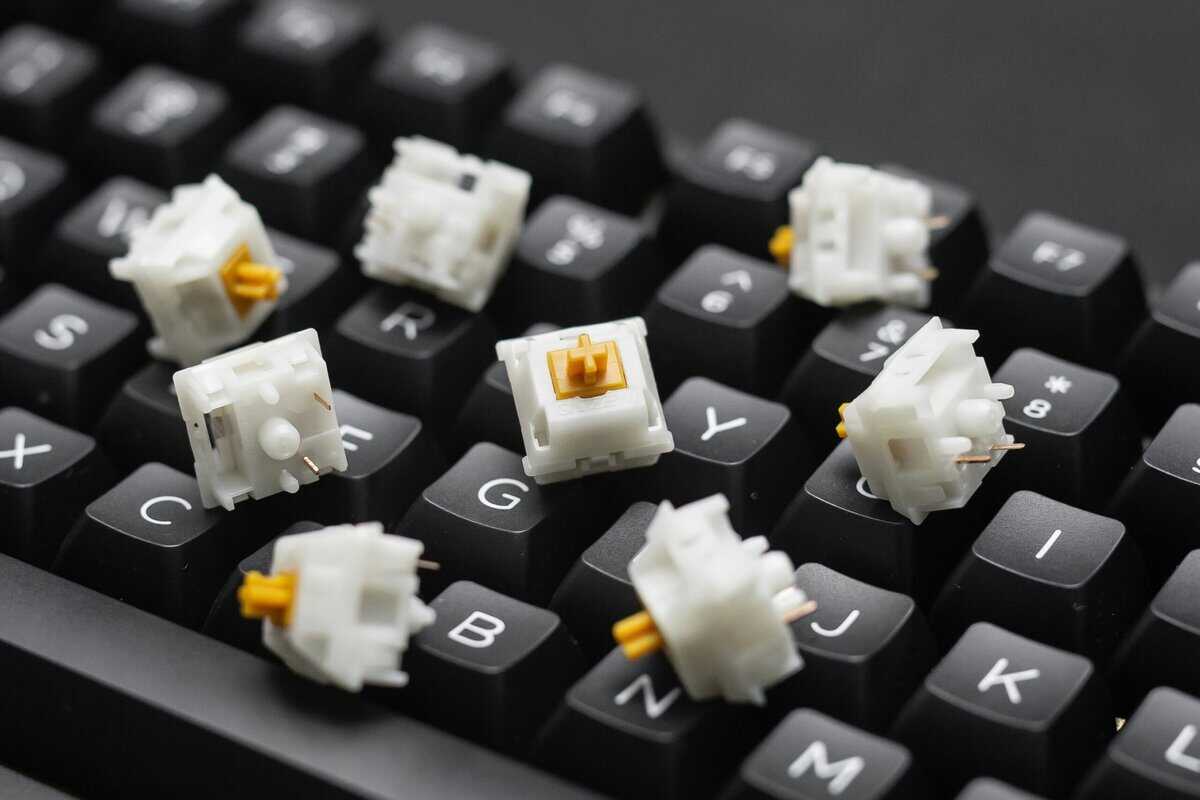
Evaluating budget linear switches is all about feel. Specs on a sheet are one thing, but how a switch performs under your fingers during a gaming session is what really matters. We’re going to look at three popular value-focused switches and break down the real-world trade-offs.
Each of these contenders has a distinct characteristic out of the box. Your decision will depend on what you prioritize most: smoothness, a clean sound profile, or stability.
Gateron Milky Yellow Pro V2: A Solid Starting Point
The Gateron Milky Yellow Pro V2 has become one of the most recommended budget linear switches in the community. Its milky top housing produces a softer, deeper sound profile compared to standard clear-top switches, and the factory pre-lube is noticeably smoother than basic Gateron Milky Yellow Pro V2s. The 50g actuation force provides a balanced feel that works well for both gaming and typing.
The main trade-off is that the 50g weight feels slightly heavier than ultralight options. At ~$0.22 per switch, the Milky Yellow Pro V2 punches well above its price with smooth travel and minimal stem wobble. It’s become the go-to recommendation for first-time builders who want a premium feel without the premium cost.
Akko V3 Creamy Yellow Pro: The Smoothness Option
Akko has earned a strong reputation for delivering switches that feel polished right out of the box. The Akko V3 Creamy Yellow Pro continues that tradition with excellent factory lubrication that rivals hand-lubed switches. The result is a refined, buttery-smooth keystroke with virtually no scratchiness from the first press.
With a 50g actuation force and a shorter 1.6mm pre-travel, these switches register inputs quickly, a nice advantage for fast-paced gaming. The dustproof stem design also adds long-term reliability. The sound profile leans slightly higher-pitched compared to some other linears, which can be divisive. At ~$0.22 per switch, they offer remarkable value for anyone who wants a premium feel without any modding.
The core decision here is straightforward: Do you want a switch that is very smooth from the factory, or do you prefer to customize and mod your own? If you value out-of-the-box performance, the Akko V3 Creamy Yellow Pro is hard to beat at this price.
Gateron Goldenrod Yellow Pro: Built for Performance
The Gateron Goldenrod Yellow Pro represents Gateron’s premium linear offering without the premium price. Its standout feature is the factory pre-lube quality, which is a clear step above the standard Milky Yellow line. Each keypress feels consistent and refined, with noticeably less stem wobble than budget alternatives. The 5-pin PCB-mount design and gold-tinted stem give it both versatility and a distinctive look.
With a 50g actuation force and 2.0mm pre-travel, the Goldenrod hits the sweet spot between responsiveness and control. The trade-off? At ~$0.45 per switch, it costs a bit more than other budget linears. But for gamers who want the smoothest possible feel without hand-lubing, that extra cost buys a noticeably more refined experience.
To make the choice clearer, let’s compare these switches side-by-side. This table breaks down their core specs and what they are best suited for.
Value Linear Switch Comparison
| Switch Model | Actuation Force | Pre-Travel | Bottom-Out Force | Factory Lube Quality | Best For |
|---|---|---|---|---|---|
| Gateron Milky Yellow Pro V2 | 50g | 2.0mm | 62g | Good / Pre-lubed | A premium-feel all-rounder for first-time builders |
| Akko V3 Creamy Yellow Pro | 50g | 1.6mm | 58g | Excellent / Factory-lubed | Gamers wanting a smooth, out-of-the-box experience |
| Gateron Goldenrod Yellow Pro | 50g | 2.0mm | 63.5g | Premium / Pre-lubed | Smoothest feel without hand-lubing |
Ultimately, there is no single “best” switch here, just the best one for your specific needs. If you prioritize a smooth feel above all and don’t want to lube switches yourself, Akko V3 Creamy Yellow Pro is a solid pick. If you want a dependable, versatile linear experience at a great price, Gateron Milky Yellow Pro V2 is the new standard. And if you want the absolute smoothest factory experience without modding, the Gateron Goldenrod Yellow Pro is hard to beat.
Matching the Right Switch to Your Primary Use Case
The “best” linear switch is the one that feels right for what you do most. A switch that works for a competitive FPS player can cause mistakes in an MMO. The practical way to make a choice is to connect the specs on paper to how you will actually use the keyboard.
Different activities reward different characteristics. A fast-paced shooter values instant response time, while content creation demands clean, quiet audio. Your primary use case should be the deciding factor.
Competitive FPS Gaming
In games like Valorant or Apex Legends, speed is a key factor. You may want a switch with a light actuation force (around 45g or less) and a short pre-travel distance (under 2.0mm). This combination can reduce actuation time, making rapid movements like strafing and counter-strafing feel more responsive.
The trade-off is sensitivity. These “speed switches” are easy to press by accident, which can be a liability in other genres. But for pure FPS performance, a light and fast linear is a common choice.
MMO and MOBA Gaming
For titles like World of Warcraft or League of Legends, accidentally firing off a key with a long cooldown can be a problem. This is where a slightly heavier linear switch is a better fit. Look for an actuation force between 50g and 60g.
This added resistance provides enough feedback to help prevent misclicks when you’re resting your fingers on the keys. It keeps the smooth travel of a linear but adds a layer of deliberate control, ensuring you only activate an ability when intended. You can learn more about finding the perfect balance in our guide to the best switches for gaming.
Streaming and Content Creation
If you’re a streamer, your microphone is an important piece of gear. A loud keyboard can affect your audio quality and distract viewers. Here, the priority shifts to switches known for their quiet operation and deeper sound profile.
Many factory-lubed switches or those made from materials like POM or nylon excel at dampening sound. Their goal is to produce a muted, low-pitched “thock” rather than a sharp “clack,” keeping your audio clean.
Typing and Everyday Use
For daily tasks and general typing, a moderate-weight linear offers a balance of comfort and precision. A switch with an actuation force around 45-55g is typically suitable. It’s light enough to help prevent finger fatigue during long sessions but not so sensitive that it leads to frequent typos.
How to Improve Your Budget Switches with Simple Mods
A common practice in the custom keyboard community is modifying switches. With some time and a few supplies, you can make a $20 set of switches feel like they belong on a more expensive board. The two mods that make the biggest difference are lubing and filming.
Lubing is one of the most significant upgrades you can make for smoothness and sound. It’s the process of applying a very thin layer of specialized grease to the inside of the switch, hitting key friction points like the stem and the housing rails. This simple step can eliminate scratchiness and turn a decent keystroke into a very smooth one.
Lubing for a Smoother Feel
For linear switches, the community standard is a thicker lubricant like Krytox 205g0. The key is to apply a paper-thin, even coat. If you go too heavy, you’ll end up with switches that feel sluggish. When done correctly, the result is a deeper, cleaner sound and a more refined feel.
This is a useful modification for FPS players or streamers. Smoother travel provides more consistent actuation, and the quieter sound means your mic is more likely to pick up your voice, not your keyboard.
The goal of lubing isn’t to silence a switch; it’s to refine its sound. You want to reduce unpleasant noises like spring ping and plastic scratch, leaving a solid, satisfying tone, not a mushy one.
Filming for Improved Stability
Another common issue with budget switches is stem wobble, where the keycap feels loose and rattly. Switch films are tiny plastic shims you place between the top and bottom housings. This tightens the tolerances and makes the whole assembly more secure, making each keystroke feel more solid and planted.
When you combine lubing and filming, the change is noticeable. A properly modded budget switch will often outperform a stock premium switch, giving you a high-end feel without the high-end price tag.
Final Recommendations for Budget-Conscious Gamers
Let’s summarize. The final decision comes down to balancing performance, feel, and price. After comparing these options, we have identified three distinct switches that deliver good value for different kinds of gamers.
These are our top choices for anyone on a budget who wants performance that exceeds its price tag. Each one solves a different problem, whether you need competitive speed or something quiet enough for streaming.
Best Overall Value
For the best all-around performer, the Akko V3 Creamy Yellow Pro is our top pick. It hits a good balance with a 50g actuation force, making it responsive for gaming without feeling overly sensitive. Its main strength is the quality of the factory lube job, it feels buttery smooth out of the box, which is uncommon at ~$0.22 per switch. The dustproof stem design also adds long-term reliability.
The only real trade-off is its sound profile, which is a bit higher-pitched. Some may prefer a deeper “thock,” but for out-of-the-box smoothness and consistency, it’s a strong contender. Once you have your switches, you can check out our guide on the best budget keyboard for gaming to find a board to put them in.
Top Choice for FPS Gaming: Gateron Milky Yellow Pro V2
When split-second reactions matter, the Gateron Milky Yellow Pro V2 is a strong choice. Its 50g actuation force and 2.0mm pre-travel offer fast, predictable input with minimal stem wobble. The improved factory pre-lube over standard Gateron Reds means smoother keystrokes right out of the box, giving you a performance edge in FPS titles. The milky housing also dampens sound for a less distracting gaming experience.
Best Quiet Switch for Streaming
For streamers and content creators, the Gateron Silent Red is a clear winner. This switch is engineered with internal dampeners that mute both the downstroke and the upstroke, reducing the keyboard noise your mic picks up. The trade-off is a slightly softer feel compared to standard linears, but the acoustic benefit is significant. Its build quality and durability are consistent with the standard Gateron line.
This is a smart investment all around. Entry-level linear switches from brands like Kailh or Gateron cost 30-50% less than premium Cherry alternatives while still matching their impressive 70 million keystroke durability.
New switches deserve caps to match, and our best keycaps guide covers PBT sets worth buying.
Common Questions About Linear Switches
Let’s address a couple of common questions that come up when deciding if linear switches are the right fit for your setup.
Are Linear Switches Good For Typing?
Yes, many people find linear switches suitable for typing. The main benefit is their smooth, uninterrupted travel, which can reduce finger fatigue during long work or writing sessions.
The trade-off is the lack of a tactile bump. Some typists rely on that physical bump to confirm a keypress without bottoming out. If you prioritize speed and a light touch, linears are a good hybrid choice for both gaming and typing.
It comes down to muscle memory versus physical feedback. With a linear switch, your fingers learn the actuation point. With a tactile switch, you get a physical cue. Neither is better, it just depends on your personal typing style.
Do I Need To Lube My Switches?
It is not mandatory, but lubing budget linear switches is one of the best value-for-money upgrades you can make. It transforms the experience.
A good lube job smooths out factory scratchiness, quiets down spring ping, and helps create a deeper, more satisfying sound. While many budget switches come “pre-lubed,” a careful hand-lubing session almost always delivers a more consistent and refined feel.
At Budget Loadout, we provide clear, hype-free recommendations to help you build a high-performance gaming setup without overspending. Find more value-focused guides on our site. Budget Loadout
Related Articles