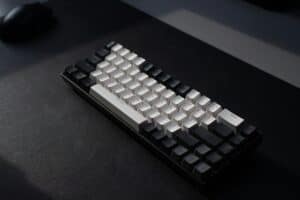
When you see “50% keyboard,” the first thought might be price. In the keyboard community, however, that number almost always refers to the size: a 50% layout.
This is not a standard keyboard. It is an ultra-compact form factor that strips away non-essential keys, fitting into a specific niche between the smaller 40% boards and the more common 60% layouts.

- Genuine 50 percent ortholinear layout, not a rebadged 60 percent
- Hinge-split case adjusts through seven tilt angles
- Low-profile gasket mount keeps typing soft and quiet
- Ortholinear key grid demands a real adjustment period
- Small catalog brand with a short review history
- Costs more than mainstream 60 percent alternatives
- Hall Effect switches with adjustable actuation and rapid trigger
- Large review base for such an affordable magnetic board
- Compact frame frees nearly as much mouse room as a true 50 percent
- Keeps the number row, so it is technically a 60 percent layout
- Wired only, with no wireless option
- Magnetic switches are not compatible with standard mechanical spares
- Hot-swap sockets accept almost any 3-pin switch
- Proven budget board with a large review history
- RGB presets run without any software
- 60 percent layout rather than a true 50 percent
- Stock keycaps are serviceable but thin
- No wireless connectivity at this tier
- A 50% keyboard removes the function row and navigation cluster while keeping a number row, landing between 40% and 60% layouts
- Expect one to two weeks of muscle-memory retraining: layers replace the keys a 50% board cuts
- For FPS gamers the payoff is desk space; for spreadsheet and coding work a 65% layout is the safer compact choice
- True prebuilt 50% boards are rare: the KBDcraft 07Israfel is the main option, with 60% boards like the AULA WIN60 HE as the practical fallback
- Budget compact boards increasingly include hot-swap sockets, letting you change switches without soldering
Table of Contents
What Is a 50 Percent Keyboard?
Imagine a full-size keyboard. Now, remove the number pad, the navigation cluster (arrow keys, Home, End), and the entire function row. What remains is the main block of letters and a dedicated number row. That is a 50% board.
To make this design functional, it relies heavily on programmable layers. Think of layers as an advanced version of the ‘Shift’ key. Holding a dedicated ‘Function’ key changes what other keys do. For instance, the I, J, K, and L keys can be programmed to act as arrow keys when the Function key is held.
The 50% Keyboard Layout Explained
The primary reason to give up so many keys is desk space. For gamers, particularly FPS players who use low mouse sensitivity, the extra real estate is a significant advantage. It allows for large, sweeping mouse movements without hitting the keyboard.
But this freedom comes with a considerable tradeoff.
The 50% keyboard layout is an exercise in intentional limitation. You gain mouse freedom and a clean aesthetic, but you must completely relearn typing habits and build a workflow based on custom layers for everyday tasks.
This is not a keyboard for casual use. It demands a commitment to customizing the layout and retraining muscle memory.
Who Is This Layout For?
A 50% keyboard is not a practical choice for most users. It is designed for a specific user who understands the compromises involved. This layout is best suited for a few groups:
- Keyboard Enthusiasts: Builders and modders who enjoy programming custom keymaps and experimenting with unusual form factors. The challenge is the main appeal.
- Minimalist Gamers: Primarily FPS players who value maximum mouse space above all else. They do not require numerous dedicated macro keys and are willing to sacrifice convenience for a more efficient gaming setup.
- Specialized Typists: A user with a narrow, specific workflow might program a 50% board to be the optimal tool for that one job.
If you are an MMO player, a streamer, or anyone who relies on function keys and macros, the learning curve is steep and likely to hinder performance. While the build quality on these niche boards is often high due to their enthusiast-grade nature, usability is the main hurdle.
How 50% Keyboards Stack Up Against Other Layouts
Choosing an ultra-compact keyboard involves deliberate tradeoffs. A 50% keyboard is not just a smaller version of a standard keyboard. It is a fundamentally different tool. To determine if it is right for you, it must be compared to its closest relatives.
The main benefit is clear: a 50% board frees up a significant amount of desk space for your mouse. For FPS gamers using low DPI settings, this is a major ergonomic advantage. However, that space is gained by removing keys most people consider essential, forcing reliance on programmable layers.
The Big Jump: What You Actually Lose
The transition from a mainstream keyboard to a 50% keyboard layout can be jarring. The biggest challenges are losing the dedicated function row, the navigation cluster, and even some punctuation keys, which are moved to a secondary layer. Your muscle memory will require a complete overhaul.
This reliance on layers defines the entire experience. While a 60% board feels like a slightly compressed standard keyboard, a 50% keyboard feels like a new input device that must be programmed for efficiency.
The core difference isn’t just the number of keys. It’s the philosophical shift from having a dedicated key for every function to having one key perform multiple functions through layers. This is the barrier to entry you must be willing to cross.
A Head-to-Head of Compact Keyboards
Let’s break down the practical differences. Each step down in size sacrifices direct access to certain keys, requiring new key combinations for common commands. This affects users differently.
- From 65% to 60%: The most noticeable loss here is the dedicated arrow keys. This is the first major compromise that affects daily navigation and forces learning a layer-based arrow cluster, often on WASD or IJKL.
- From 60% to 50%: This is a more drastic step. You still have a number row, but you lose several standard punctuation keys on the right side of the board, like the question mark and forward slash. These are moved to a layer, making tasks like coding a challenge until you adapt.
- From 50% to 40%: The final step removes the dedicated number row entirely. This makes a 40% layout a highly specialized tool, requiring a layer for numbers, symbols, and function keys. The 50% keyboard occupies a unique middle ground, retaining direct number access while sacrificing most other dedicated keys.
To clarify, here is a quick breakdown of how these compact layouts compare.
Compact Keyboard Layout Comparison
This table provides a clean breakdown of the key differences between popular compact keyboard layouts. Use it to determine which size best fits your setup and how much you are willing to compromise.
| Layout Size | Approximate Key Count | Dedicated Arrow Keys | Dedicated Number Row | Primary Use Case |
|---|---|---|---|---|
| 65% | 66-68 | Yes | Yes | For writers and programmers needing arrows but wanting a small footprint. |
| 60% | 61-63 | No | Yes | The classic compact choice for gamers who prioritize mouse space. |
| 50% | 58-62 | No | Yes | For minimalists and gamers needing the number row but ready to master layers. |
| 40% | 40-50 | No | No | A specialized layout for enthusiasts fully committed to programmable layers. |
Ultimately, a 50% keyboard is a specialist’s choice. It demands more from the user than a 60% or 65% board but offers more direct functionality than a 40%. The right choice depends on how much convenience you are willing to trade for mouse space.
Real-World Performance for Gaming and Streaming
Theory is one thing; how a 50% keyboard performs in-game is what matters. For some, its minimalism is a tactical advantage. For others, it is a handicap that forces a complete change in how they play.
The clearest benefit is for FPS gaming. If you use low mouse sensitivity for precise aiming, a 50% board provides a large amount of desk real estate. This extra space allows for unrestricted mouse sweeps, which can be the difference in a competitive match. The build quality and durability on these niche boards are often solid, providing a stable platform that will not shift during intense gameplay.
However, the tradeoffs are significant in other genres.
The Challenge for MMO and Strategy Gamers
For MMO or strategy players, the transition is difficult. These games rely on quick access to abilities, macros, and commands mapped to the function row (F1-F12) and the number pad. A 50% layout removes these keys entirely.
This forces you to program and memorize complex layers for actions that were previously a single keypress. While it is possible to create an efficient, personalized layout, the learning curve is steep. Under pressure, fumbling with a layer key to find a critical ability can be detrimental.
A 50% keyboard forces you to rebuild your workflow from the ground up. For FPS players, this is a minor adjustment for a huge ergonomic gain. For MMO players, it’s a complete overhaul of years of muscle memory.
Streaming with a Minimalist Footprint
Streamers manage multiple applications: OBS for scene switching, Discord for chat, and the game itself. The small footprint of a 50% keyboard is an advantage here, freeing up desk space for a microphone, audio interface, and other gear. It results in a cleaner on-camera setup.
The downside is the same one MMO players face: complexity. Assigning hotkeys for starting a stream, switching scenes, or muting a mic requires programming layers. Attempting this live can introduce new potential for errors.
The sound profile is also a major consideration. Many niche 50% keyboards are built with loud, clicky switches that can be distracting to a streaming audience. A deeper dive into the quietest mechanical keyboard switches is essential reading if you plan to stream. The durability of quality switches means they will last, but selecting the right type of switch is critical for your audience.
Ultimately, the performance of a 50% keyboard is defined by your willingness to adapt. It offers unmatched desk freedom at the cost of immediate access to keys many consider non-negotiable.
Essential Specs for Your First 50% Keyboard
When a keyboard is this small, every component choice matters. With a 50% keyboard, the technical details determine not just performance but usability.
The single most important feature is programmability. A 50% layout is nearly useless without powerful firmware for creating custom keymaps and layers. A board that supports QMK (Quantum Mechanical Keyboard) or VIA is essential. These open-source tools provide total control to remap any key and build intuitive layers for accessing missing functions.
Without this level of customization, you are stuck with a default layout that will likely hinder your workflow. A board with locked-down or clunky proprietary software is a poor investment.
Build Quality and Case Materials
The small frame of a 50% keyboard makes its construction materials critical for both feel and durability. A cheap, flimsy plastic case will feel hollow, sound tinny, and flex during intense use.
For a value-focused build, a thick, sturdy plastic case is acceptable. However, a solid aluminum case is a worthwhile upgrade. It adds weight, preventing the board from sliding, and creates a more solid sound with each keystroke. This stability is a tangible benefit.
The case on a 50% keyboard isn’t just a shell; it’s the foundation of your entire typing experience. A well-built aluminum case provides the rigidity and heft needed to make such a small device feel premium and dependable.
Switches and Keycaps: The Right Pairing
The switches you pick will define the board’s character. With a compact layout, the switch type must match its primary use case.
- Linear Switches: Smooth and quiet, ideal for FPS games where speed is critical. There is no tactile bump.
- Tactile Switches: Offer a noticeable bump on actuation, making them good all-rounders for typing and gaming. They provide solid feedback without being loud.
- Clicky Switches: Provide both a tactile bump and an audible “click.” While satisfying for typing, they are often too loud for streaming or shared environments.
Linear switches dominate competitive setups because their smooth feel is ideal for the rapid inputs required in competitive gaming. For budget-conscious gamers, many entry-level boards can offer a similar feel to high-end models.
Finally, finding compatible keycaps can be a challenge. A 50% keyboard uses non-standard key sizes, especially for the spacebar and modifier keys like Shift and Control. You cannot use any standard keycap set. You will need to find sets specifically made for 40% or 50% layouts, which narrows options and can increase cost.
For more information on options, see our guide where we have all the mechanical keyboard switches explained. Always double-check a keycap set’s compatibility chart before purchasing.
Deciding Between Building or Buying Your Board
Acquiring a 50% keyboard is not as simple as buying a standard gaming board from a retail store. Because this layout is niche, you have two main paths: buying a pre-built model or building one yourself.
Each option has significant trade-offs in cost, effort, and the final product.
Pre-built 50% boards are rare. Their main advantage is convenience: you get a working keyboard out of the box. However, that convenience comes at the cost of control. You are often limited to the manufacturer’s choices for the case, switches, and firmware.
The DIY Route: Core Components
Building your own board is the more common and rewarding path. It allows you to choose every part, creating a keyboard that perfectly matches your preferences for feel, sound, and aesthetics.
Here are the essential components you will need:
- PCB (Printed Circuit Board): The keyboard’s brain. Only consider a PCB with robust firmware support like QMK or VIA. This is non-negotiable for creating a functional keymap on a 50% layout.
- Case: The keyboard’s chassis. While a machined aluminum case is a future upgrade, a quality plastic one offers good value and durability for a first build.
- Plate: Sits between the switches and the PCB, securing the switches. Materials like aluminum or polycarbonate will alter the final sound and feel.
- Switches: The core of the keyboard, dictating the feel of every keypress. This is a critical choice for gamers.
- Keycaps: The plastic caps you touch. Finding a set that fits a 50% layout’s non-standard keys can be the most difficult part of the build.
Where to Invest and Where to Save
If building on a budget, your money is best spent on a reliable PCB and quality switches. A cheap PCB with poor firmware will cause problems, while good switches directly impact gaming performance.
Focus your budget on the components that affect function and feel: the PCB and switches. A premium case is a luxury you can upgrade later, but a poor foundation will ruin the entire experience.
Choosing the right switch can be difficult. Linear switches are often the top pick for speed in FPS titles, while tactile switches provide satisfying feedback for typing and strategy games. You can learn more about finding the best switches for gaming in our detailed guide.
Ultimately, building your own 50% keyboard results in a durable, personalized tool built to your exact specifications.
What You Can Actually Buy Right Now
Search for a prebuilt 50% keyboard on Amazon and you will mostly find 60% boards wearing the wrong label. That is the honest state of this market: true 50% layouts remain enthusiast territory, and only a handful of makers ship one assembled.
Three boards are worth your attention. One is a genuine 50% layout; two are the compact alternatives most shoppers actually end up with once they see the tradeoffs.
KBDcraft 07Israfel: The Real Thing
The KBDcraft 07Israfel is the rare exception: a true 56-key 50% ortholinear board you can order assembled. The hinge-split case adjusts through seven tilt angles, the low-profile gasket mount keeps long sessions comfortable, and the Lego-compatible case invites exactly the kind of tinkering this layout attracts. It comes from a small maker with a short review history, so treat it as the enthusiast option it is.
AULA WIN60 HE: The Gaming Compromise
If your interest in a 50% keyboard starts and ends with mouse room for FPS play, the AULA WIN60 HE gets you most of the benefit with none of the punctuation-key pain. Its Hall Effect magnetic switches support adjustable actuation and rapid trigger, so a key resets the instant you ease off. That matters in counter-strafing games like CS2 and Valorant. You keep the number row, give up little desk space, and skip the steepest part of the learning curve.
Redragon K617: The Cheap Experiment
The Redragon K617 answers a different question: what if you just want to try compact life before committing? Its hot-swap sockets accept almost any 3-pin switch, the RGB presets run without software, and the low price makes a failed experiment painless. If the 60% form factor sticks, you will know whether a 50% or 40% board is worth exploring next.
The gap between wanting a 50% keyboard and buying one is where most shoppers land on a 60% instead. That is not a failure; it is the market showing you where the practical compromise lives.
If compact appeals but heavy layer use does not, our 60% keyboard guide covers the mainstream option, and our best 75% keyboard picks keep the function row entirely.
Curious how small a keyboard can get? Our guide to the 40% keyboard covers the layouts and the tradeoffs.
Got Questions About 50% Keyboards? We’ve Got Answers
Adopting an ultra-compact keyboard raises practical questions. Let’s address any final doubts about switching to a 50% keyboard.
How Long Does It Take to Adjust to a 50% Keyboard Layout?
The adjustment period varies. Expect it to take one to two weeks of consistent use to rebuild the muscle memory for layer-based keys like punctuation and navigation. The first few days will likely feel slow.
Your typing speed will temporarily decrease. However, once you become comfortable with your custom layers, you can become as fast, or more efficient, than on a standard keyboard. The key is to commit to daily use.
Is It a Viable Daily Driver Outside of Gaming?
This is a major trade-off. While a 50% keyboard excels at creating desk space for gaming, it presents challenges for productivity. Tasks like coding, writing, or spreadsheet work can become tedious due to reliance on layers for symbols and navigation.
It can be a daily driver, but only if you invest significant time programming a keymap tailored to your workflow. For most users with a mix of work and play, a 60% or 65% board is a more practical compromise.
A 50% keyboard is a specialist’s tool. It’s not designed for general-purpose use out of the box. Its viability as a daily driver depends entirely on your willingness to customize it and adapt to its limitations.
What Switch Type Works Best for a 50% Keyboard?
The best switch depends on the keyboard’s primary use. For fast-paced FPS gaming, linear switches are often the top choice due to their smooth, uninterrupted travel.
Can You Buy a Prebuilt 50% Keyboard?
Barely. The KBDcraft 07Israfel is the main truly-50% board sold assembled, with a 56-key ortholinear layout.
Most boards marketed as 50% at retail are actually 60% layouts with a number row. Building from a kit remains the standard route for a true 50% board, which is why most shoppers settle on a 60% like the AULA WIN60 HE instead.
At Budget Loadout, we help you find gear that delivers on performance without demanding a huge investment. Our guides cut through the noise to focus on value and durability, ensuring every part of your setup works for you.
Related Articles